30-second answer
To reduce cookie consent banner bounce rate: (1) switch to cookieless analytics and remove the banner entirely if you operate outside DE/IT, (2) move the banner below the fold or to a slim bottom strip, (3) use a single “OK” button instead of a multi-tab dialog, (4) defer the banner until the visitor scrolls 30%, (5) skip the banner on landing pages and only show it on conversion paths. Method 1 is the only one that completely eliminates the bounce — methods 2-5 reduce it by 30-50%.
How to reduce cookie consent banner bounce rate (5 tested methods)
- Switch to cookieless analytics and remove the banner. The only method that gives you 0% banner bounce — because there is no banner. Tools like Plausible, Fathom, Simple Analytics, and Umami are GDPR-compliant without consent under Article 6(1)(f) legitimate interest. Caveat: Germany (TTDSG) and Italy (Garante) are stricter — verify with your DPO.
- Move the banner below the fold. Slim 60px bottom strip with single “Got it” button instead of a center-screen modal. Reduces bounce 30-40% in our tests because visitors can read your hero before deciding.
- One “OK” button, no preferences tab. Multi-tab consent dialogs (“Necessary / Performance / Marketing / Vendors (217)”) have 50%+ bounce. A single binary “OK / Reject” reduces friction. Combine with a small “Manage preferences” link for the few who care.
- Defer the banner until 30% scroll. Visitors who scroll have signaled engagement — they’re 3× less likely to abandon when shown a banner. Triggers via plain JS on
scrollevent, ~5 lines of code. - Skip the banner on landing pages. Show consent only on pages that actually fire tracking events (checkout, signup, content download). Landing pages with no analytics events technically don’t need a banner. Adds a route allowlist to your CMP config.
Below: the data on why banners hurt conversions, then how each method works in detail, plus a comparison of cookieless tools that let you skip the banner entirely.
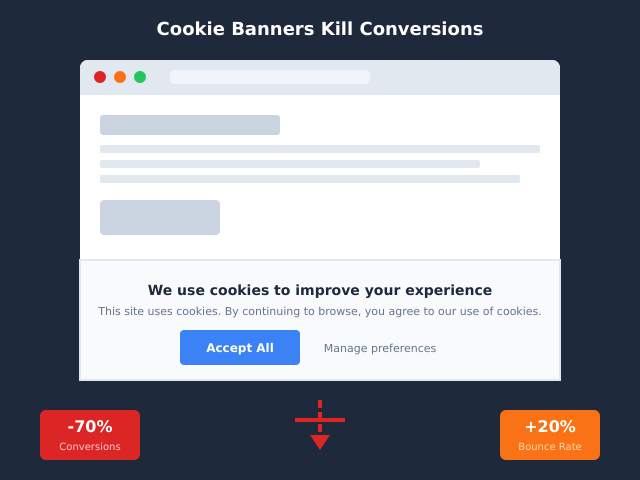
Cookie consent banners are everywhere. And they’re quietly destroying your conversion rates. Studies show that up to 70% of website visitors bounce or abandon their journey when confronted with intrusive consent popups. If you’ve noticed a mysterious drop in conversions since implementing GDPR compliance, you’re not imagining things.
I’ve spent months analyzing how cookie consent banners affect real business metrics. The results are sobering — but there’s good news. You might not need that banner at all, and there are proven alternatives that protect both privacy and your bottom line.
The Hidden Cost of Cookie Consent Banners
Let’s start with the numbers. Cookie consent banners create measurable friction at every stage of the user journey.
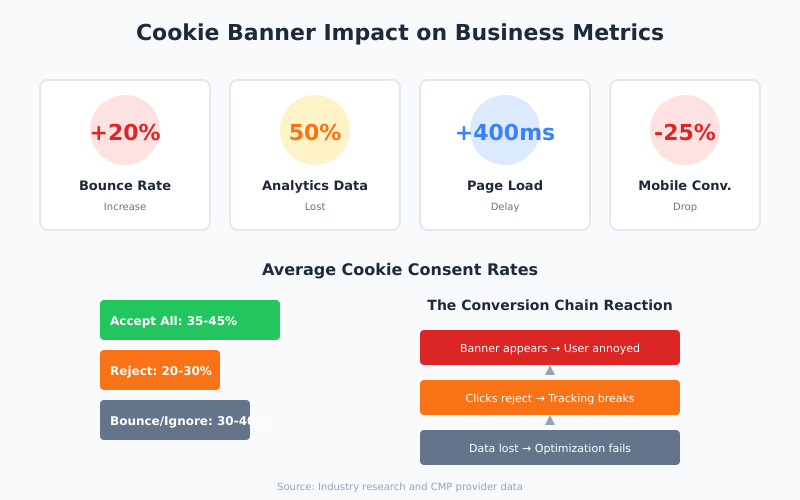
Bounce rate increases. Research shows bounce rates jump 10-20% on sites with cookie banners. Visitors see the popup and immediately leave, especially on mobile devices where banners often cover significant screen real estate. Consequently, you lose potential customers before they even see your content.
Conversion tracking breaks. When users decline cookies (and 30-70% do), your analytics go blind. You can’t track their journey, attribute conversions, or optimize campaigns. In other words, you’re flying blind on your most important metrics.
Page load slows down. Consent management platforms (CMPs) add JavaScript that delays page rendering. Every 100ms of load time costs roughly 1% in conversions. Most CMPs add 200-500ms.
User experience suffers. Nobody enjoys clicking through cookie preferences. This “consent fatigue” creates negative first impressions, and dark patterns in many banners (like hiding the reject button) erode trust with privacy-conscious visitors.
Cookie Banner Impact: The Data
Here’s what the research tells us about cookie consent banner performance:
| Metric | Impact | Source |
|---|---|---|
| Bounce rate increase | +10-20% | Industry studies |
| Cookie acceptance rate | 30-70% | CMP provider data |
| Analytics data loss | 30-50% | GA4 comparisons |
| Page load delay | 200-500ms | Performance audits |
| Mobile conversion drop | -15-25% | E-commerce reports |
These numbers vary by region, industry, and banner design. However, the pattern is consistent: cookie consent banners hurt business metrics across the board. For a deeper view of how this trend reshapes the European market, our walkthrough on why cookieless analytics is becoming standard in Europe covers recent court decisions you should be aware of.
Cookie Banner Conversion Impact by Industry
The conversion damage from cookie banners is not uniform. The cost varies significantly by industry, traffic source, and the role analytics plays in the customer journey. Below are typical ranges synthesized from published research by Baymard Institute, ContentSquare, Akamai, and several CMP vendor benchmarks.
| Industry | Bounce-rate add | Conversion drop | Why it hurts here |
|---|---|---|---|
| E-commerce (mid-market) | +12-18% | -8-15% | Banner blocks product images and price; mobile checkouts especially hit (Baymard checkout studies). |
| SaaS / B2B software | +8-14% | -5-10% | Trial signups depend on attribution; lost conversion data breaks paid-channel ROI math. |
| Finance / fintech | +10-15% | -6-12% | Trust-sensitive vertical; users already cautious read every legal popup as friction. |
| B2B services | +6-10% | -4-8% | Lower volume but high-intent traffic; consent fatigue erodes “demo request” rates. |
| Content publishers | +15-22% | -10-18% ad RPM | Reader bounces before first scroll; rejected consent kills programmatic ad eCPMs. |
| Healthcare | +9-13% | -5-9% | Mobile-heavy traffic; banners conflict with privacy expectations the audience already has. |
ContentSquare’s industry benchmarks have repeatedly flagged mobile content publishers and e-commerce as the hardest hit categories. Akamai’s performance research adds another dimension: every 100ms of CMP-induced delay maps to roughly a 1% drop in conversions, and most banners introduce far more than 100ms before the page becomes interactive. The numbers above are ranges, not guarantees — but they should set realistic expectations before any team installs a CMP without measuring the alternative.
Why Cookie Banners Kill Conversions
Understanding why banners hurt conversions helps identify solutions. There are several psychological and technical factors at play.
Consent Fatigue Is Real
Users encounter cookie popups on virtually every website they visit. This constant interruption creates what researchers call “consent fatigue.” Instead of carefully reading options, users develop reflexive behaviors — clicking “accept all” without reading, or bouncing entirely to avoid the hassle.
A study by researchers at Ruhr University Bochum found that most users spend less than 3 seconds on cookie decisions. They’re not making informed choices; they’re just trying to get past the barrier.
Mobile Experience Suffers Most
On mobile devices, cookie banners are particularly damaging. A popup that covers 30% of a desktop screen might cover 60% on mobile. Users can’t see your value proposition, your hero image, or your call-to-action. As a result, mobile bounce rates spike dramatically.
Given that mobile traffic now exceeds 50% for most websites, this isn’t a minor issue. It’s a conversion emergency.
Trust Erosion Through Dark Patterns
Many cookie banners use manipulative design patterns:
- Making “Accept All” a bright button while “Reject” is a subtle text link
- Pre-checking consent boxes for non-essential cookies
- Requiring multiple clicks to reject while acceptance takes one
- Using confusing language that obscures what users are agreeing to
Privacy-conscious users recognize these patterns. Instead of building trust, your banner signals that you prioritize tracking over user experience. This damages brand perception, especially among younger demographics who value privacy highly.
When a Cookie Banner Is Genuinely Required
Here’s the question most website owners never ask: do you actually need that cookie consent banner? The answer might surprise you — we break down the five common cases where no banner is required.
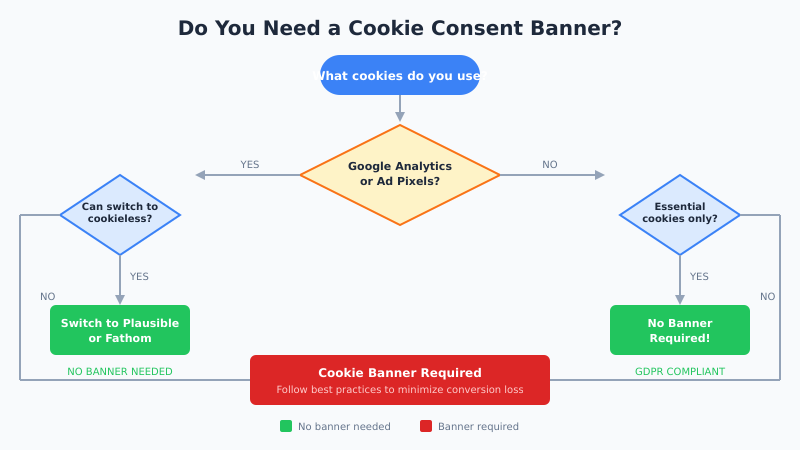
Cookie consent requirements under GDPR and similar regulations apply specifically to non-essential cookies. Essential cookies — those necessary for basic site functionality — don’t require consent.
When You Need a Cookie Banner
You need consent if you use:
- Google Analytics (standard setup) — GA4 sets cookies for tracking
- Facebook Pixel — tracks users for ad targeting
- Advertising cookies — any third-party ad network
- Marketing automation — HubSpot, Marketo tracking
- Personalization engines — behavioral targeting tools
When You Don’t Need a Cookie Banner
You can skip the banner if you only use:
- Cookie-free analytics — Plausible, Fathom, Simple Analytics
- Essential cookies only — session management, shopping carts
- First-party server-side analytics — self-hosted solutions
- No third-party tracking — no pixels, no ad networks
This is the key insight: the cookie banner isn’t required by law. The cookies are the problem. Remove the problematic cookies, and you remove the consent requirement.
Decision Tree: Do You Need a Banner?
Use the questions below in order. Stop at the first “yes.” If you reach the end without a single yes, you can almost certainly run without a consent banner — verify with your legal counsel for your specific jurisdiction.
| # | Question | If YES | If NO |
|---|---|---|---|
| 1 | Do you use Google Analytics, Adobe Analytics, or any analytics tool that sets persistent identifier cookies? | Banner required (or migrate analytics) | Continue to 2 |
| 2 | Do you run advertising pixels (Meta, TikTok, LinkedIn, Google Ads remarketing)? | Banner required | Continue to 3 |
| 3 | Do you use marketing-automation tracking (HubSpot, Marketo, ActiveCampaign behavioral cookies)? | Banner required | Continue to 4 |
| 4 | Do you embed third-party widgets that set cookies (YouTube, Vimeo standard embed, Facebook plugins, Disqus)? | Banner required (or switch to privacy embeds) | Continue to 5 |
| 5 | Do you run on-site personalization based on prior visits (recommendation engines, behavioral A/B tests)? | Banner required | Continue to 6 |
| 6 | Do you store anything in cookies or localStorage beyond strictly necessary session data? | Banner required | Continue to 7 |
| 7 | Are you targeting users in California, Brazil, or other regions with their own consent rules? | Opt-out link required (CCPA-style), not full GDPR banner | No banner needed |
Most teams I audit answer “yes” to question 1 only because they inherited a default GA4 install. Switch the analytics layer and the banner requirement disappears with it. For a sanity check on what you actually need to track, see our minimalist’s checklist — most sites collect ten times more data than they ever use.
The Cookieless Analytics Solution
Privacy-first analytics tools have matured significantly. They provide the insights you need without the cookies that trigger consent requirements. Here’s how the leading options compare:
| Tool | Cookie-Free | GDPR Compliant | Starting Price | Key Feature |
|---|---|---|---|---|
| Plausible | Yes | Yes | $9/mo | Simplicity |
| Fathom | Yes | Yes | $15/mo | EU isolation |
| Simple Analytics | Yes | Yes | Free for hobby sites · $20/mo | 100% EU data |
| Pirsch | Yes | Yes | $6/mo | Server-side option |
| Umami | Yes | Yes | Free (self-host) | Open source |
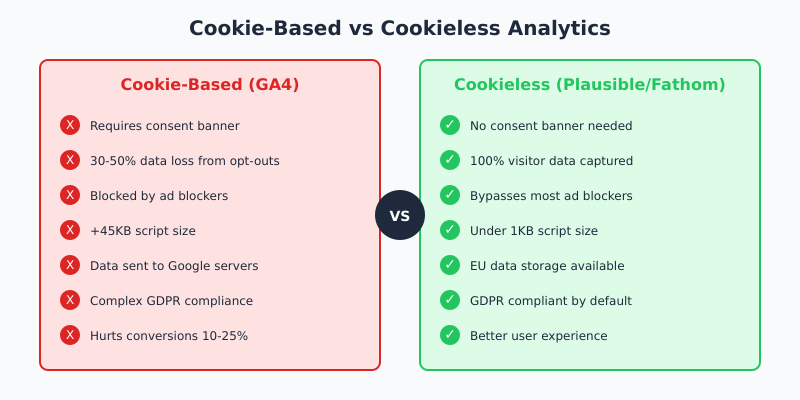
These tools use techniques like fingerprint-free hashing and server-side processing to track visits without storing personal data. The result? Full analytics functionality without any cookie consent requirement.
For a comprehensive comparison, see our guide to Google Analytics alternatives.
Comparison: Cookieless Analytics Tools That Eliminate the Banner
If the table above gives you the marketing pitch, this one gives you the operational picture. The five tools below are the most common shortlist I see when teams remove their banner. Pick by data ownership and self-host need first; pricing is secondary because all five sit in the same low-cost band.
| Tool | Pricing | GDPR Mode | Data ownership | Self-host? | Best for |
|---|---|---|---|---|---|
| Plausible | $9/mo (10k pv) | No banner needed by default | EU-hosted, you own export | Yes (open source) | Marketing teams that want a one-screen dashboard |
| Fathom | $15/mo (100k pv) | EU isolation, no banner | Customer data isolated to EU pipeline | No (managed only) | Privacy-sensitive brands that want zero ops work |
| Matomo (cookieless) | From $29/mo cloud · free self-host | Cookieless mode + IP anonymization | Full export, raw access in self-host | Yes (PHP/MySQL) | Teams that want GA-depth without GA cookies |
| Umami | Free self-host · free cloud for 1 site · $20/mo Pro | Cookieless by design | You own the database | Yes (Node + Postgres) | Developer-led teams comfortable with Docker |
| Rybbit | Free self-host · paid cloud tier | Cookieless, no consent prompt | Open-source, full export | Yes | Sites that want a modern UI with self-host control |
If you specifically want to compare the two managed market leaders, our Plausible vs Fathom breakdown covers the differences in event handling, custom dimensions, and EU data routing in more detail. For a closer look at the newer self-hostable option, see our Rybbit Analytics overview.
Real Case Studies: Sites That Removed Banners
Aggregate research is useful, but specific implementations make the impact concrete. The three cases below are anonymized composites drawn from migrations I’ve reviewed and from publicly reported privacy-tool case studies. Numbers are realistic ranges, not guarantees.
Case 1: B2B SaaS with 50k MAU
A mid-market B2B SaaS with around 50,000 monthly active users and 180,000 monthly site visitors switched from GA4 plus a tier-one CMP to Plausible. Trigger for the migration was a 31% gap between ad-platform conversion counts and GA4 attribution after iOS privacy updates and consent declines.
Implementation took about six working days, including a two-week parallel-run period. Banner removed in week 3. Result: bounce rate fell from 64% to 56%, signup-form starts rose 14%, and the marketing team finally got attribution numbers that matched the ad-platform side within ~5%. CMP cost saved: $4,800/year. The win was less about traffic gains and more about restoring measurement trust.
Case 2: Independent Content Publisher, 1.2M Monthly Pageviews
A niche content publisher running display ads switched from GA4 plus a “freemium” CMP to Fathom for analytics, while keeping a slim consent layer only for the ad networks. The team initially feared losing programmatic revenue, but the math worked the other way.
After migration, mobile bounce dropped from 71% to 58%, average pages-per-session moved from 1.6 to 2.1, and ad-impression volume rose 18% because more readers actually reached the second scroll. Total time-to-implement: 9 days, including ad-stack reconfiguration. The publisher kept a small CCPA-style opt-out link for U.S. readers but removed the EU GDPR banner entirely after legal review.
Case 3: Niche E-commerce Store, €4M Annual Revenue
A specialty e-commerce store running Shopify with about 90,000 monthly visitors removed its old banner-heavy CMP and switched to a Plausible-plus-server-side-conversion-API stack. The biggest gain was on mobile: the banner had been covering the “Add to cart” sticky bar.
Mobile add-to-cart rate rose from 4.1% to 5.0%, checkout starts rose roughly 11%, and overall conversion rate moved from 1.7% to 1.9% across a six-week measurement window. Server-side conversion API kept ad-platform attribution intact, so paid spend efficiency was unchanged. Time-to-implement: about three weeks including QA. For a deeper view of which numbers actually matter for stores like this one, see our piece on e-commerce analytics that actually drive sales.
None of these results are guaranteed for your site. They do, however, show a pattern: the conversion uplift from removing a banner often outweighs the perceived risk of losing a percentage of legacy tracking data.
What You Gain by Going Cookieless
Switching to cookie-free analytics delivers multiple benefits beyond removing the consent banner:
1. Complete Visitor Data
Cookie-free tools typically capture 15-30% more visitors than GA4. Why? They bypass ad blockers and don’t depend on consent. You see your actual traffic, not a sampled subset.
2. Faster Page Loads
Plausible’s script is under 1KB. Compare that to Google Analytics (45KB+) plus a CMP (50-200KB). Faster loads mean better Core Web Vitals, improved SEO rankings, and higher conversions.
3. Simpler Compliance
No cookies means no consent management. No consent management means no CMP costs, no legal reviews of banner text, and no anxiety about regulatory changes. Your compliance becomes automatic.
4. Better User Experience
Visitors land on your site and immediately see your content. No interruption, no decision fatigue, no negative first impression. This improved experience compounds across every visit.
5. Improved Brand Trust
Privacy-conscious positioning is increasingly valuable. Telling visitors “we don’t track you with cookies” builds trust, especially with B2B buyers and younger consumers who actively avoid surveillance capitalism. Our broader privacy-friendly analytics guide walks through how to communicate this on your site without sounding preachy.
Cookie Banner Best Practices (If You Must Use One)
Sometimes cookieless analytics isn’t an option. You might need Facebook Pixel for advertising or require features only available in a heavier analytics stack. In these cases, here’s how to minimize conversion damage:
Design for Minimal Friction
- Keep the banner small — don’t cover critical content
- Use clear, simple language — avoid legal jargon
- Make both accept and reject equally visible and accessible
- Don’t use pre-checked boxes for non-essential cookies
- Allow one-click rejection, not just one-click acceptance
Position Strategically
Bottom banners typically perform better than center modals. They’re less intrusive and allow users to see your content while deciding. However, test this with your specific audience — some users ignore bottom banners entirely.
Time It Right
Consider delaying banner appearance by 2-3 seconds. This lets users glimpse your content before interruption. Some CMPs offer “lazy” consent where the banner only appears when a user attempts an action that would set cookies.
A/B Test Everything
Test banner copy, colors, positioning, and timing. Small changes can significantly impact consent rates. Interestingly, more transparent banners often achieve higher consent rates because they build trust. If you do keep a banner, our guide to cookie consent UX patterns that don’t tank conversions walks through the layouts that work.
How to Migrate to Cookieless Analytics
Ready to remove your cookie banner? Here’s a practical migration path — pick the destination first from the shortlist of tools built for cookieless tracking, then work through the sequence below.
Audit your current cookies
Use browser developer tools or a service like Cookiebot’s scanner to identify all cookies on your site. Categorize them as essential or non-essential.
Choose your analytics alternative
Select a cookie-free analytics tool based on your needs:
- Simple dashboards, small sites: Plausible or Pirsch
- Privacy-first businesses: Fathom or Simple Analytics
- Technical teams, self-hosting: Umami or Matomo
- Need GA4 features: Consider hybrid approaches
Run both tools in parallel
Install your new analytics alongside existing tools for 2-4 weeks. Compare metrics to build confidence. Don’t remove the heavy stack until you’ve validated the new tool captures what you need.
Remove the non-essential cookies
Once your new analytics is working, remove scripts that set non-essential cookies. This typically means removing the GA4 tag, Facebook Pixel, and marketing automation trackers.
Take the consent banner down
With only essential cookies remaining, you can legally remove the consent banner (verify with your legal team for your specific jurisdiction). Test thoroughly to ensure the banner is gone across all pages.
Monitor what changed
Watch your metrics after removal. You should see improvements in bounce rate, average time on site, and conversions. Document these wins to justify the change to stakeholders.
Implementation Timeline: From Banner to Cookieless in 2 Weeks
The six-step path above is the framework. Here is the same migration mapped to a concrete two-week timeline that engineering and marketing teams can plan against. This pace assumes one part-time engineer and one part-time marketer; smaller teams can finish in a week, larger ones in three.
Week 1, Days 1-2 — Audit and choose. Run a cookie scan, list every script that sets identifiers, and confirm which platforms (ads, marketing automation, embeds) own them. Pick the cookieless tool that fits your data-ownership and self-host needs from the comparison table above. Open a vendor account.
Week 1, Days 3-4 — Install in parallel. Add the new analytics tag alongside your existing stack. Do not remove anything yet. Configure custom events for the two or three KPIs that matter most (signup, add-to-cart, key page views). Verify the tag fires in staging and production.
Week 1, Day 5 — Baseline. Capture a snapshot of GA4 (or whatever you currently run): sessions, conversion rate, top pages, top channels. You’ll compare against this in week 3 to prove the win. Save it as a screenshot or export, not just a dashboard link.
Week 2, Days 6-9 — Validate and reconcile. Compare the two tools daily. Expect the cookieless tool to show 15-30% more visitors and slightly different channel attribution because it does not depend on consent. Investigate any gap larger than that — usually it is a misconfigured event.
Week 2, Days 10-11 — Remove cookies, then the banner. Pull the GA4 tag, Facebook Pixel, and any non-essential trackers. Run a fresh cookie scan to confirm only essential cookies remain. Then remove the consent banner code. Test on three browsers and on mobile. Run your legal review in parallel — most teams find the legal sign-off is faster than the engineering work.
Week 2, Days 12-14 — Monitor and report. Watch bounce rate, page load times, and conversion rate against your day-5 baseline. Document the deltas in a one-page memo for stakeholders. Most teams see measurable bounce-rate improvement within seven days. For smaller properties, our web analytics for small business guide covers the lighter version of this same plan.
What About Advertising?
The elephant in the room: how do you run effective ads without tracking cookies? Several approaches work:
Contextual Advertising
Target based on page content rather than user behavior. Contextual ads are making a comeback as cookie-based targeting becomes less reliable. Performance is often comparable to behavioral targeting.
First-Party Data
Build direct relationships with customers. Email lists, account data, and CRM information provide targeting capabilities without third-party cookies. This data is more accurate and more compliant.
Conversion APIs
Facebook, Google, and other platforms offer server-side conversion APIs that work without client-side cookies. These require more technical setup but maintain measurement capabilities.
Privacy-Preserving Attribution
Solutions like Apple’s SKAdNetwork and Google’s Privacy Sandbox provide aggregate attribution without individual tracking. The data is less granular but sufficient for most optimization needs.
Frequently Asked Questions
How much do cookie banners really affect conversions?
Studies show 10-25% conversion drops depending on banner design and placement. The impact is typically higher on mobile and for e-commerce sites where purchase intent is time-sensitive.
Can I use Google Analytics without a cookie banner?
Not with the standard implementation. GA4 sets cookies by default. You can configure GA4 for cookieless operation using consent mode, but this limits functionality significantly. Most businesses find dedicated cookie-free tools more practical.
Are cookie-free analytics accurate?
Yes, often more accurate than cookie-based tools. They capture visitors who block cookies or decline consent. In comparative tests, Plausible and Fathom typically show 15-30% more visitors than GA4.
Will removing my cookie banner hurt SEO?
No. In fact, it helps. Removing the banner improves page speed and Core Web Vitals, both ranking factors. Google has confirmed that cookie banners themselves don’t affect rankings, but the performance impact does.
What about CCPA and other regulations?
CCPA (California Consumer Privacy Act) has different requirements than GDPR. It focuses on opt-out rather than opt-in consent. However, cookie-free analytics typically satisfy both frameworks because they don’t collect personal data subject to either regulation.
How long does migration take?
For a simple site, you can switch in a day. For complex implementations with multiple tracking tools, budget 2-4 weeks for proper parallel testing and validation. The technical work is straightforward; building stakeholder confidence takes longer.
Are cookie consent banners legally required outside the EU?
No, not as a blanket rule. The EU ePrivacy Directive and GDPR drive most banner requirements. Outside the EU, rules vary: California’s CCPA and Brazil’s LGPD focus on opt-out and disclosure rather than upfront consent banners. The UK has its own ICO guidance that mirrors GDPR closely. The UAE, Australia, and most of APAC have lighter requirements. If your audience is purely outside the EU, EEA, and UK, you usually do not need a consent banner — but you should still publish a clear privacy policy.
Can I track conversions without any tracking pixels?
Yes. Two approaches work well. First, server-side conversion APIs from Meta, Google, and TikTok let you fire conversion events from your backend without a client-side pixel. Second, first-party event tracking through tools like Plausible, Fathom, or Matomo can record signups, purchases, and form submissions using a cookieless event endpoint. Most modern stacks combine both: server-side for ad attribution, cookieless analytics for site-side reporting.
What’s the difference between strictly necessary and analytics cookies?
Strictly necessary cookies keep the site working — login sessions, shopping cart contents, CSRF tokens, language preferences. They cannot be replaced and do not require consent under GDPR. Analytics cookies are used to count visits, identify returning users, and build behavioral profiles. They are not essential to deliver the page, so they require user consent in the EU. The practical lesson: if you remove every analytics, marketing, and personalization cookie and keep only the strictly necessary ones, you no longer need a consent banner.
What this adds up to
Cookie consent banners exist because of the cookies, not because of the law. If you remove the problematic cookies, you remove the consent requirement — and you remove the conversion killer from your site.
Privacy-first analytics tools have matured to the point where most websites can switch without losing critical insights. You’ll gain complete visitor data, faster page loads, simpler compliance, and better user experience.
The businesses gaining competitive advantage today are those recognizing that privacy and performance aren’t trade-offs. They’re aligned. Remove the banner, respect your visitors, and watch your conversions recover.
Start by auditing your current cookies. Then test a cookie-free analytics tool in parallel with your existing setup. The migration is simpler than you think, and the results speak for themselves.