Privacy regulations are tightening worldwide. Fines are growing. And visitors increasingly expect websites to respect their data. However, most website owners still rely on analytics tools that were designed in an era when tracking everything was the default.
That approach no longer works. Therefore, privacy-friendly analytics has moved from a niche concern to a mainstream requirement. This guide covers everything you need to know — what privacy-friendly analytics means, why it matters, and how to implement it without losing the data you actually need.
What Makes Analytics “Privacy-Friendly”?
Privacy-friendly analytics tools share several core principles that set them apart from traditional tracking platforms. In essence, they collect only the data necessary for understanding website performance while respecting visitor anonymity.
Here’s what separates privacy-first tools from conventional analytics:
| Feature | Traditional Analytics | Privacy-Friendly Analytics |
|---|---|---|
| Cookies | Multiple tracking cookies | No cookies or first-party only |
| Personal data | IP addresses, device fingerprints | Anonymized or not collected |
| Cross-site tracking | Often enabled | Never |
| Data sharing | Shared with ad networks | Data stays with site owner |
| Consent banners | Required in EU/EEA | Usually not needed |
| Data storage | Indefinite, often in US | Limited retention, EU options available |
Moreover, privacy-friendly tools typically offer simpler dashboards. Instead of hundreds of reports, you get the metrics that actually matter: visitors, page views, referral sources, and conversions.
Why Privacy-Friendly Analytics Matters in 2026
The shift toward privacy-first tracking isn’t just a trend. It’s driven by concrete legal, technical, and business factors that affect every website owner.
Legal Pressure Is Increasing
The GDPR has been enforced since 2018, but enforcement has accelerated dramatically. In 2022 and 2023, multiple European data protection authorities ruled that Google Analytics violates GDPR by transferring personal data to the United States. As a result, businesses across Austria, France, Italy, and Denmark were forced to find alternatives.
Meanwhile, new privacy laws continue to emerge globally. The CCPA in California, Brazil’s LGPD, and South Korea’s PIPA all impose restrictions on how websites can collect and process visitor data. For a deeper look at GDPR requirements specifically, read our GDPR analytics guide.
Cookie Banners Hurt Performance
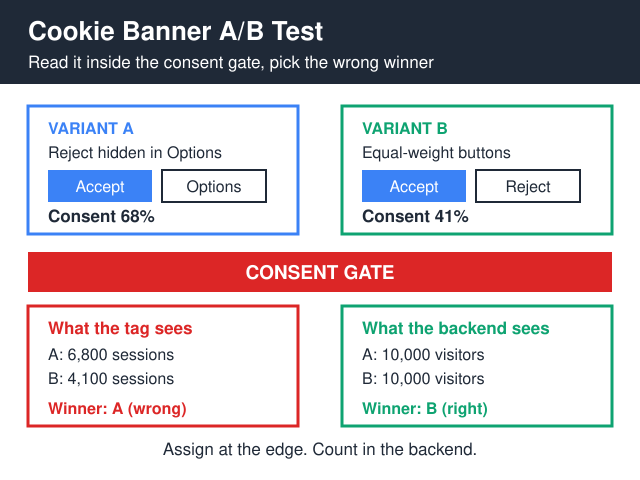
Cookie consent banners are more than just annoying — they actively damage your business metrics. Studies consistently show that consent banners reduce opt-in rates to 30-70%, meaning you lose data on a significant portion of your visitors. Additionally, consent popups increase bounce rates and slow down page load times.
Privacy-friendly analytics tools that operate without cookies eliminate this problem entirely. No cookies means no consent banner is needed. Consequently, you get complete data on 100% of your visitors. We explored this issue in detail in our article on cookie consent banners hurting conversions.
Visitors Expect Privacy
Consumer awareness of data privacy has grown substantially. According to Cisco’s Consumer Privacy Survey, 86% of consumers care about data privacy and want more control over how their information is used. Furthermore, 47% have switched companies due to data privacy concerns.
In other words, respecting visitor privacy isn’t just about compliance — it’s a competitive advantage.
Key Principles of Privacy-First Analytics
Understanding the core principles helps you evaluate any analytics tool. Here are the five pillars of truly privacy-friendly tracking:
- Data minimization — Collect only what you need. Page views, referral sources, and device types are useful. Browsing history across sites is not.
- Anonymization by default — IP addresses should be anonymized or discarded immediately. No individual visitor profiles should be created.
- No cross-site tracking — Analytics should be limited to your website. There’s no legitimate reason for your analytics provider to track visitors across other sites.
- Transparent data handling — You should know exactly what data is collected, where it’s stored, and who has access. Open-source tools offer the highest level of transparency.
- User control — Visitors should have clear options to opt out, and analytics should work without requiring consent where legally possible.
For a practical overview of what data you truly need, check our minimalist analytics checklist.
How Cookieless Tracking Works
One of the most important aspects of privacy-friendly analytics is the ability to track visitors without cookies. But how does that actually work?
Traditional analytics assigns each visitor a unique cookie — a small text file stored in the browser. This cookie persists across sessions, allowing the tool to recognize returning visitors and build browsing profiles. However, this approach requires consent under GDPR and similar laws.
Cookieless analytics uses different techniques to measure traffic:
- Session hashing — Combines the visitor’s IP address, user agent, and a daily rotating salt to create a temporary hash. This identifies unique visitors within a day without storing anything in the browser.
- Aggregate counting — Instead of tracking individual visitors, some tools simply count page views and events without any identification mechanism.
- Server-side processing — Data is processed on the server rather than in the browser, reducing exposure to client-side tracking scripts.
The trade-off is clear: cookieless tools can’t track individual user journeys across multiple sessions as precisely as cookie-based tools. However, for most websites, this level of detail is unnecessary. In fact, most small websites don’t need GA4-level complexity at all.
For larger sites that genuinely need to stitch journeys together — say, an email opened on mobile that ends in a desktop checkout — the answer isn’t third-party cookies but a deliberate first-party approach. Our breakdown of cross-device identity resolution walks through how login IDs, hashed contact keys, and consent-aware identity graphs connect those dots without surveillance.
We’ve covered the European legal landscape in more detail in our piece on why cookieless analytics is becoming standard in Europe.
Privacy-Friendly Analytics Tools: Your Options
The market for privacy-first analytics has matured significantly. Here’s a comparison of the leading options:
| Tool | Hosting | Cookies | Open Source | Starting Price | Best For |
|---|---|---|---|---|---|
| Plausible Analytics | Cloud / Self-hosted | None | Yes | $9/mo | Simplicity and compliance |
| Fathom Analytics | Cloud | None | No | $15/mo | Businesses needing EU isolation |
| Rybbit Analytics | Self-hosted | None | Yes | Free | Technical users who self-host |
| Umami | Cloud / Self-hosted | None | Yes | Free | Developers and small teams |
| Simple Analytics | Cloud | None | No | $9/mo | No-setup privacy compliance |
| Matomo | Cloud / Self-hosted | Optional | Yes | Free (self-hosted) | GA4 feature parity with privacy |
For an in-depth head-to-head comparison of two popular options, see our Plausible vs Fathom analysis. Similarly, our Rybbit Analytics review covers a strong open-source alternative.
Implementing Privacy-Friendly Analytics: Step by Step
Switching to privacy-friendly analytics is simpler than most people expect. Here’s the process:
- Audit your current setup — Document what your current analytics tracks. List every cookie, third-party script, and data collection point. You’ll likely find you’re collecting far more than you use.
- Define your actual data needs — Most businesses need answers to just four questions: How many visitors? Where did they come from? What pages do they view? Did they convert?
- Choose your tool — Match your needs to the comparison table above. If you want zero maintenance, go with a cloud-hosted option. If data sovereignty matters, self-host.
- Install the tracking script — Most privacy-friendly tools require a single JavaScript snippet. Installation takes under 5 minutes.
- Configure goals and events — Set up the specific conversions you want to track: form submissions, button clicks, file downloads.
- Remove old tracking code — Delete Google Analytics and any other legacy tracking scripts. Also remove your cookie consent banner if your new tool doesn’t require one.
- Verify data accuracy — Compare data from your new tool against your old analytics for 2-4 weeks to ensure consistency.
Common Concerns About Privacy-First Analytics
Website owners frequently raise the same objections when considering a switch. Let me address the most common ones:
“I’ll lose too much data”
Ironically, privacy-friendly analytics often provides more complete data than GA4. Since you don’t need a cookie consent banner, you capture 100% of visits instead of only those who click “Accept.” Consequently, your traffic numbers are actually more accurate.
“I need advanced features like funnels and cohorts”
If you genuinely need these features, tools like Matomo and PostHog offer them while still respecting privacy. That said, most businesses overestimate their need for advanced analytics. Before switching, ask yourself: when was the last time you actually used funnel reports to make a business decision?
“My marketing team needs Google Analytics for ads”
This is the one legitimate concern. If you run Google Ads, Google Analytics integration does provide value. However, you can run privacy-friendly analytics alongside a limited GA4 setup — using GA4 only for paid campaign tracking with proper consent, while your privacy tool handles general site analytics.
Privacy Analytics and SEO: What Changes?
Switching to privacy-friendly analytics does not affect your SEO. Search engines don’t use your analytics data for ranking purposes. Google has explicitly stated that using Google Analytics is not a ranking factor.
In fact, privacy-friendly analytics can indirectly improve your SEO performance. Without heavy tracking scripts and consent banners, your pages load faster. Page speed is a confirmed ranking factor. Additionally, by providing a better user experience without intrusive popups, you may see lower bounce rates and higher engagement — both positive signals.
The Future of Privacy-Friendly Analytics
Several trends point to privacy-first analytics becoming the default, not the alternative:
- Browser restrictions — Safari and Firefox already block third-party cookies by default. Chrome has significantly restricted cookie tracking as well.
- Regulatory expansion — New privacy laws are being enacted worldwide, each adding compliance requirements for website tracking.
- Server-side analytics growth — More businesses are moving analytics processing server-side, away from client browsers entirely.
- AI-driven insights — Privacy-friendly tools are adding AI features that derive insights from aggregate data, reducing the need for individual tracking.
Ultimately, privacy-friendly analytics represents a fundamental shift in how we think about website data. Instead of tracking everything and hoping useful insights emerge, you start with the questions that matter and collect only the data needed to answer them. For practical guidance on tracking without being invasive, see our guide on how to track traffic without creeping on your users.
Bottom Line
Privacy-friendly analytics isn’t about collecting less data — it’s about collecting better data. Tools that respect visitor privacy also tend to be simpler, faster, and more accurate than their data-hungry counterparts.
The business case is clear: better compliance, more complete data (no consent banner losses), faster page loads, and happier visitors. Whether you choose Plausible, Fathom, Matomo, or another privacy-first tool, the switch is straightforward and the benefits are immediate.
Start with an audit of what you currently track. Identify what you actually use. Then choose a tool that gives you exactly that — nothing more, nothing less.
Frequently Asked Questions
Will I lose too much data switching to privacy-friendly analytics?
Usually you gain data. Without a cookie consent banner, you capture 100% of visits instead of only the visitors who clicked Accept. Traffic numbers tend to come out higher and more accurate, not lower.
Do I still need a cookie consent banner with privacy-friendly analytics?
In most cases, no. Tools like Plausible, Fathom and Umami operate without cookies and without storing personal data, so the legal trigger for a consent banner doesn’t apply. Always check your specific local rules, but for typical EU and UK sites, the banner can come down once GA4 and similar trackers are removed.
Is privacy-friendly analytics GDPR compliant?
Yes, when configured correctly. Tools that anonymize IPs, avoid cross-site tracking, store data in the EU, and don’t share it with ad networks meet GDPR requirements out of the box. The key is checking the vendor’s data processing agreement and hosting location before signing up.
Will switching analytics tools hurt my SEO rankings?
No. Google has stated explicitly that using Google Analytics is not a ranking factor. Removing heavy tracking scripts often helps page speed, which is a confirmed ranking signal, so the switch can indirectly help SEO rather than hurt it.
What about advanced features like funnels, cohorts and segments?
If you genuinely need them, Matomo and PostHog offer those features while still respecting privacy. Most businesses overestimate the need though. Before switching, ask when you last used a funnel report to actually change something — for many sites the honest answer is rarely.
Can I run privacy-friendly analytics alongside Google Analytics?
Yes. A common setup is keeping a minimal GA4 install only for paid campaign attribution behind proper consent, while the privacy-friendly tool handles general site traffic without a banner. This gives marketing the campaign data it needs without forcing surveillance on every visitor.
How long does it take to switch from Google Analytics to a privacy-friendly tool?
The technical work takes about 30 minutes — install the new script, set up one or two conversion goals, and remove the old tracking code. Plan two to four weeks of running both tools side by side to verify the numbers line up before you delete the GA4 setup entirely.