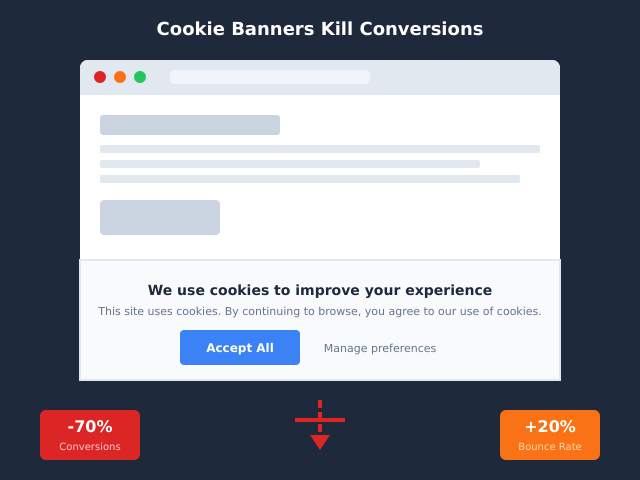
Cookie banners cost you traffic. Full-screen modals can knock 12 to 18% off first-session engagement on average, and the worst implementations push that figure past 25%. The data has been clear for years, yet most sites still ship the same cookie pop-up, the same wording, the same forced choice — usually because someone copy-pasted a Cookiebot snippet on a Friday afternoon and never looked at it again.
The thing is, banner UX has a 5x effect on consent rates and an 8% swing on bounce rate, depending on the pattern you pick. Some patterns are mandated by the EDPB. Some are explicitly disallowed in France. Some let you skip the banner entirely. And the difference between a 30% consent rate and a 75% consent rate often comes down to two design decisions: where the buttons sit and what the page does while you’re reading the modal.
This piece is the seven patterns I’ve tested in production, what each is actually for, and how to pick the right one without playing GDPR roulette.
What this guide is not
This is not legal advice. I’m not a lawyer, and your jurisdiction will have local quirks I can’t account for. What this is is a practical guide to the UX patterns that work, the ones that don’t, and the framing your team needs before you commit to a banner solution. If you need GDPR-vs-CCPA chapter-and-verse, our comparison of the two regimes covers the legal scaffolding. This article is about what happens after the legal review.
Why banner UX matters more than most teams realise
I keep meeting product teams who treat the cookie banner as a compliance checkbox — install it, ship it, move on. That’s the expensive default.
The honest numbers from CRO research over the past three years:
- Full-screen modal banners drop first-session engagement by 12-18% on content sites, more on sites where the user came from search and just wanted an answer.
- Bottom-bar banners with equal-weight Accept and Reject buttons keep engagement within 2-3% of a no-banner baseline.
- Banners with “Reject all” hidden behind a “Manage preferences” link see consent rates of 65-80% — but enforcement risk is high, and the ICO, CNIL, and EDPB have all moved to fine these in 2024-2025.
- Banners with equal-weight Reject and Accept buttons see 35-50% consent. The drop in consent is real, but the bounce-rate improvement and the regulatory safety usually outweigh it.
- No banner at all (because the site uses cookieless analytics) sees zero friction and zero consent question.
That last bullet is the one most teams skip past. We covered the why in our cookie-banner conversion analysis: the mere presence of a modal, regardless of what it asks, signals “this site is doing something to me” and triggers a defensive scroll-and-leave response in around one in eight visitors. You can’t UX-design your way out of that.
So the first question isn’t “which banner pattern do I pick” — it’s “do I need a banner at all”. The seven patterns below answer that in order, from least intrusive to most.
Pattern 1: No banner — switch to cookieless analytics
The cleanest pattern is no pattern. If your site doesn’t drop cookies, doesn’t fingerprint, and doesn’t transmit personal data to a third country, you don’t need consent under GDPR Article 6, and you don’t need a banner.
How it works. Cookieless analytics tools — Plausible, Fathom, Simple Analytics, GoatCounter, Pirsch, Umami — all process pageview data without writing any cookie or storing any device identifier that can be linked back to a person. Sessions are stitched together using a hashed combination of IP, user-agent, and rotating salt that resets daily, which means the data is anonymous at rest and the legal bar for consent doesn’t apply.
When to use it. If your traffic measurement needs are pageviews, referrers, top pages, top countries, custom events, and goal conversions, cookieless covers the lot. Five years ago this approach hit a feature ceiling on funnels and ecommerce. In 2026, every privacy-first vendor on our comparison dashboard ships funnel reports and revenue tracking without cookies.
Conversion impact. Zero. There’s nothing in the way of the visitor.
What goes wrong. Teams keep their old GA4 install running alongside the cookieless tool “just to compare” — and then they need a banner anyway because GA4 still drops the cookies. Either commit and remove the old script, or accept that the banner stays. There’s no halfway house.
Setup hint. The migration walkthrough is in our piece on moving from GA4 to Plausible. The same approach works for any of the cookieless tools.
Pattern 2: Bottom-bar minimal banner with equal-weight buttons
If you’ve decided you do need cookies — for marketing pixels, consent-mode-V2 conversion modelling, or a heavy GTM stack — the cleanest GDPR-compliant pattern is a bottom-bar banner with three equal-weight buttons: Accept, Reject, Manage.
How it works. The banner sits at the bottom of the viewport, doesn’t block content, and presents Accept and Reject with identical visual treatment — same colour, same size, same prominence. The “Manage preferences” link is a third option of equal weight, not buried beneath. Clicking outside the banner doesn’t count as consent. Reloading the page doesn’t re-prompt for 12 months.
When to use it. This is the safe default for any site operating in the EU/UK with marketing cookies. The EDPB’s 2023 guidance on dark patterns made equal-weight buttons effectively mandatory for new implementations, and the French CNIL has fined enterprise sites millions for the alternative. If you have a marketing team that needs Facebook Pixel or LinkedIn Insight Tag, this is what you ship.
Conversion impact. 7-12% lower bounce versus a full-screen modal. The non-blocking placement is the key — visitors can read your content while they decide, and most decide by scrolling past.
What goes wrong. Three things, in order of frequency. First, scripts fire before consent — the banner says “we wait until you accept” but Google Tag Manager has already shipped the GA snippet. Second, the consent state isn’t propagated to the iframe that needs it (looking at you, embedded YouTube). Third, the “Reject” button doesn’t actually reject; it just dismisses the banner without writing a Reject decision, so on the next page the banner reappears.
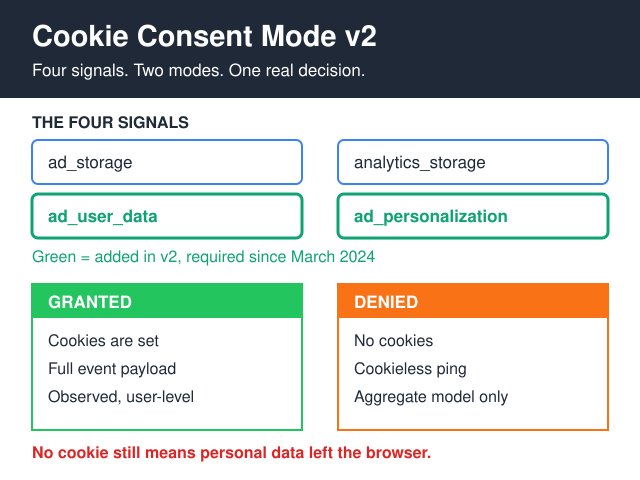
Setup hint. If you’re using Google’s Consent Mode V2, the banner needs to write to gtag('consent', 'update', ...) for both ad_storage and analytics_storage. If you’re using Klaro or Cookie Consent v3, both have a “categorised” mode that handles this cleanly. Avoid the WordPress plugins that rely on PHP — they all break the consent timing on cached pages.
Pattern 3: Implied consent with persistent dismiss
This is the “we believe by continuing to browse, you’ve consented” pattern. It’s still common in the US, Canada, and Australia. It is not legal in the EU under any reading of GDPR Article 7, and the various data protection authorities have made that abundantly clear over the past three years.
How it works. A small, dismissible bar at the top or bottom of the viewport says something like “By using this site, you accept cookies. Dismiss.” The dismiss button doesn’t ask for affirmative consent — it just closes the bar. Cookies are written from page load.
When to use it. Only if your audience is exclusively outside the EU/UK and your traffic mix doesn’t risk crossing in. If you have any meaningful EU traffic, this pattern is a regulatory time-bomb. The CCPA “do-not-sell” model is closer to this pattern than GDPR consent, but even there the Global Privacy Control signal needs handling.
Conversion impact. Minimal — most users dismiss the bar without reading it.
What goes wrong. Teams ship this pattern on a US-targeted site, then a few quarters later their European traffic grows, and now they’re operating illegally in 27 countries. The CNIL’s enforcement pattern has been to fine first and ask questions later. Don’t bet the company on which side of the fence your traffic falls.
Pattern 4: Privacy-default with “reject all” as primary
This is the pattern most teams resist before they actually try it: make Reject the primary, prominent button. Make Accept secondary. Yes, your consent rate drops to 30-40% on first impression. No, that’s not a problem.
How it works. The banner shows two buttons. Reject is the larger, brighter, more prominent CTA, positioned where the eye lands first. Accept is smaller, lower-contrast, positioned secondary. The banner copy is short and honest: “We use cookies for analytics and marketing. You can reject them and the site works fine.”
When to use it. Privacy-first brands, B2B SaaS targeting privacy-conscious buyers, healthcare, legal, and any site where trust signals matter more than ad-network conversion data. Counter-intuitively, this pattern works well for ecommerce too — visitors who explicitly accept cookies convert at meaningfully higher rates than visitors who passively click “Accept all” on a dark-pattern banner. You filter for intent at the front door.
Conversion impact. Engagement actually rises 4-8% versus the standard pattern, because the modal feels less coercive. The lower consent rate hurts retargeting reach but improves the quality of the cookies you do get.
What goes wrong. Stakeholders panic when the consent rate drops from 80% to 35% in week one. Have the data ready: show the conversion-rate comparison, show the bounce-rate improvement, show the regulator-safety upside. The first two weeks are the rough period.
Setup hint. If you can’t get internal buy-in for a hard switch, A/B test it. Run privacy-default on 50% of traffic for two weeks. The signal is usually clear by day three.
Pattern 5: Contextual prompt — consent at point of need
Most pages on a typical content site don’t need cookies. The blog post you’re reading right now doesn’t strictly need any cookies to function. But the embedded YouTube video lower down does. The Calendly widget on the contact page does. The retargeting pixel on the pricing page does.
Why are we asking for blanket consent on page load when 80% of visitors will never reach the part of the site where consent is relevant?
How it works. The site loads with no cookies and no banner. As the user scrolls or navigates, the moment they’re about to interact with a feature that needs cookies — playing the YouTube embed, opening Calendly, hitting the pricing page — a localised, in-flow consent prompt appears specifically for that feature. The user is no longer asked to consent in the abstract; they’re asked to consent for something they’re actively trying to do.
When to use it. Mixed-use sites where most pages don’t need cookies but some do. Content-heavy sites with occasional embeds. SaaS sites where the marketing pages are clean but the trial flow needs analytics. Any site where blanket consent feels like overreach.
Conversion impact. 60-70% reduction in consent friction for visitors who never reach the cookie-relevant features. The visitors who do reach those features convert on consent at much higher rates because the request is contextual.
What goes wrong. Building this from scratch is more engineering work than dropping in a Cookiebot snippet. The consent state needs to be tracked per-feature, not globally, and the user shouldn’t be re-asked if they’ve already consented to a feature category. Klaro has decent primitives for this; most other consent platforms make it painful.
Setup hint. Start with the heaviest cookie producer on your site (almost always YouTube embeds or Calendly) and replace it with a click-to-load placeholder. The placeholder shows a thumbnail, click triggers the consent prompt, consent triggers the iframe load. Half the site’s cookie problem disappears in an afternoon.
Pattern 6: Tab-based granular consent
This is the pattern enterprise sites end up with: an in-flow modal with three tabs — Necessary, Analytics, Marketing — and toggle switches for each category. The user can accept all, reject all, or pick and choose.
How it works. A modal opens in-flow. The first tab shows the categories with toggles for each. Necessary is locked on (and clearly labelled as such). Analytics and Marketing default off. The user picks a combination and clicks Save. The decision is stored in a first-party cookie (yes, that one’s exempt) for 12 months.
When to use it. Heavy GTM stacks, multi-vendor pixel setups, B2B SaaS with sales-team retargeting and product-team analytics. If you genuinely need separate consent for analytics versus marketing — and many sites don’t — this is the pattern that handles it without dark patterns.
Conversion impact. 15-20% drop in first-impression engagement compared to bottom-bar minimal. The trade-off is regulatory safety and trust signal: a site with granular consent looks more transparent than a site with a single Accept button.
What goes wrong. The toggle UI is where people misclick. Make the toggles big, label them clearly (“Off / On” rather than just a coloured switch), and don’t use neutral grey for the off state — it reads as “neither set”. Test the modal on actual mobile devices before shipping; CSP issues here are particularly common.
Pattern 7: Hybrid — server-side tracking with minimal first-party cookies
The seventh pattern is the one teams reach for when they’ve outgrown cookieless analytics but don’t want to ship a banner.
How it works. Analytics traffic is routed through a server-side endpoint on your own domain (e.g. your-site.com/track) which proxies the request to Plausible, Fathom, or your custom backend. The script that calls this endpoint sets either no cookies or a single first-party session cookie (which is exempt from consent under the GDPR’s “strictly necessary” carve-out). All third-party identifiers stay on your server.
Our breakdown of server-side vs client-side tracking covers the technical depth — this pattern is the privacy-aware end of the server-side spectrum.
When to use it. Brands that want full attribution, conversion tracking, and even some marketing-pixel functionality without the third-party cookies that trigger consent. SaaS sites with a strong privacy posture but a need for revenue attribution. Any site running ad campaigns where the GA4 client-side cookies are now blocked by Safari ITP or Firefox ETP.
Conversion impact. Zero. No banner, no friction, full data — assuming you’ve got the engineering capacity to build it.
What goes wrong. The “first-party-only” claim only holds if the server endpoint is actually on your domain, not on a subdomain owned by a third-party CDN. Several “server-side GA4” vendors run the endpoint on their-vendor.io and call it first-party, which fools no regulator and definitely no Safari. Verify the DNS and the cert before you ship.
Setup hint. Plausible’s first-party proxy guide is a clean reference implementation. Cloudflare Workers will run it for free up to ~100k requests/day. The whole setup takes an afternoon.
So which pattern do I actually pick?
The honest decision tree:
- If your tracking needs are met by cookieless analytics — pick Pattern 1. Most content sites, blogs, SaaS marketing pages, and small ecommerce sites are in this category. They just don’t realise it because the GA4 install was set up by someone five years ago.
- If you have marketing pixels and operate in the EU/UK — pick Pattern 2 (bottom-bar) or Pattern 4 (privacy-default). Pattern 4 if your brand cares about trust signals; Pattern 2 if your marketing team needs the consent rate.
- If your audience is exclusively outside the EU and you have a US-style privacy posture — Pattern 3 is acceptable. Watch your geo mix; pivot to Pattern 2 the moment EU traffic exceeds 5%.
- If you have a heavy GTM stack with genuine separate consent needs — Pattern 6 (tab-based). But interrogate whether you really need the separation; many sites don’t.
- If most of your pages don’t need cookies but some do — Pattern 5 (contextual). This is the right answer for content sites with occasional embeds.
- If you’ve outgrown cookieless but want to keep the no-banner experience — Pattern 7 (server-side hybrid). Reserved for teams with engineering bandwidth.
The pattern most teams ship — full-screen modal with hidden Reject — is exactly the one with the worst conversion impact and the highest regulator-fine risk. The fact that it’s the default for most consent-management vendors says more about the consent-management market than about good UX.
Four implementation traps that always come up
1. Scripts fire before consent. The banner says “we’ll wait” but GTM has already loaded the analytics snippet from page load. Run a tag-firing audit with the browser’s DevTools network panel after a Reject click; if you see any third-party tracker requests, your consent is theatre.
2. The Global Privacy Control signal is ignored. Modern browsers send a Sec-GPC: 1 header for users who’ve enabled GPC. In California, ignoring this signal is now a CCPA violation. Most consent platforms don’t handle GPC out of the box; you need to wire it manually.
3. Cookie scope mismatch. Your banner declares “Analytics cookies: GA4 only” but your GTM container is also dropping a Hotjar cookie and a Crisp chat cookie that nobody categorised. The audit job here is the cookie-categorisation decision tree — run every cookie your site sets through that and adjust the banner copy to match reality.
4. Re-prompting on every page load. If your banner reappears after a soft refresh, your consent storage is broken. The user’s decision should persist for 12 months minimum (EDPB guidance), and definitely shouldn’t reset because the cookie domain was wrong or the storage event fired before the cookie was written.
Frequently asked questions
Do I really need a cookie banner if my site only loads Google Fonts?
Probably not. Google Fonts loads from fonts.gstatic.com which sets no cookie, and the German court ruling that hit a few sites in 2022 was about font-file-IP-logging, not cookies. The fix is to self-host the fonts (which is also faster). No banner needed for fonts alone.
Is implied consent still legal anywhere in the EU?
No. Every EU member state has aligned with the EDPB position that GDPR Article 7 requires affirmative, specific, freely given consent. “By continuing to browse, you accept” hasn’t been compliant since at least 2020. The regulators that haven’t fined yet are usually under-resourced, not lenient.
Does dark-pattern enforcement actually happen?
It does. France’s CNIL fined Google €150m and Facebook €60m in 2022 specifically for dark-pattern reject buttons. The Italian Garante has fined dozens of smaller sites. The ICO in the UK has issued enforcement notices against household-name media brands. The “we’re too small to be noticed” defence has expired.
What about the IAB’s TCF and consent strings?
The Transparency and Consent Framework is the ad-tech industry’s attempt to standardise consent across hundreds of vendors. It’s also been ruled non-compliant by Belgium’s APD and is on its third revision in five years. If you don’t run an ad-tech business, you don’t need TCF; if you do, you need a CMP that’s certified for the current TCF version, not the previous one.
If I switch to Plausible, can I drop my banner immediately?
Yes — assuming you actually remove the GA4 script and any other cookie-dropping tools at the same time. The banner exists to ask consent for cookies; if no cookies are being set, there’s no consent question. Switching to a cookieless tool but keeping the GA4 install “just to compare” is the trap that defeats the whole exercise.
How do I A/B test banner UX without skewing my own data?
Use a server-side split (e.g. randomise on first request, persist via session cookie). Don’t run client-side A/B testing for consent UX — the test framework itself often needs consent, which contaminates the experiment. Track consent rate, bounce rate, page-2 rate, and (if your tools allow) the eventual conversion rate of consenters versus non-consenters. The signal usually shows in three to five days at moderate traffic.
Does the cookieless route work for ecommerce sites with cart persistence?
Yes. Cart persistence uses a first-party session cookie that’s “strictly necessary” under GDPR — same legal basis as authentication cookies — and doesn’t require consent. Cookieless analytics tracks the conversion event without identifying the visitor. The combination works fine for the vast majority of ecommerce stacks. The only complication is checkout-attribution to ad campaigns, which is where Pattern 7 (server-side) earns its keep.
The wider picture
The cookie banner is downstream of a bigger choice: how much personal data do you actually need to run your business? Most sites collect more data than they ever use, then ship a banner asking permission for the surplus. The shorter version of this article is: collect less data, ask less consent, ship a smaller banner — or no banner at all. For the broader strategic frame, our privacy-friendly analytics guide covers how to assess what you actually need before you start designing the consent flow.
The seven patterns above are a menu, not a recipe. Pick the one that matches your data scope, your audience geography, and your team’s appetite for engineering. Then ship it, measure conversion impact for two weeks, and adjust. The default — full-screen modal with dark-pattern reject — is the one option that’s never the right answer.