Looking for tool recommendations?
If you came here looking for GDPR-compliant analytics alternatives rather than a primer on the regulation itself, see our curated list of 12 GDPR-verified analytics tools — checked against Schrems II, sub-processor lists, and DPA availability. This article explains the regulation; that page recommends the tools.
If you collect analytics on visitors from the EU/EEA or UK, GDPR (and the ePrivacy rules) apply. That means: get valid consent before setting non-essential cookies, minimize the data you collect, sign proper processor agreements, honor user rights, and be careful with cross-border transfers. Do these well and you’ll lower compliance risk without losing the insights you need.
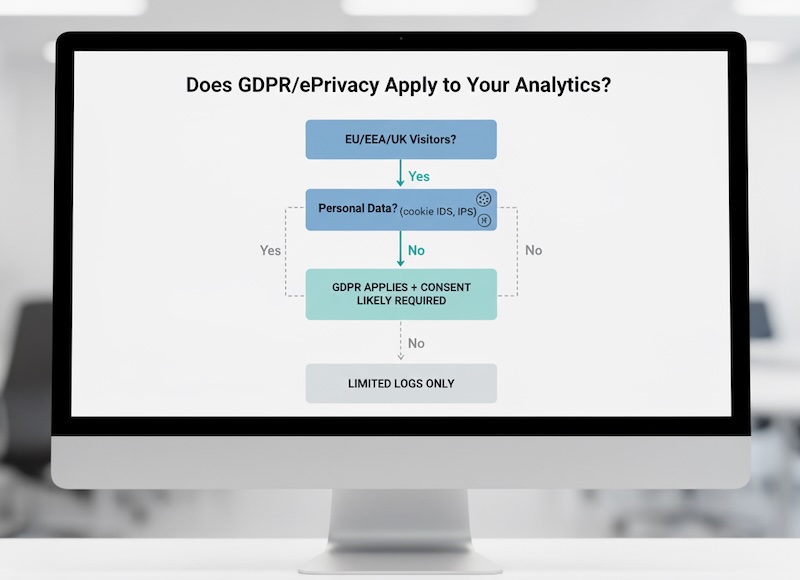
1) Does GDPR apply to your analytics?
Yes, if you:
- Have EU/EEA/UK visitors (even if you’re not based there), or
- Process personal data—which includes online identifiers like cookie IDs, advertising IDs, and often IP addresses.
Key point: Even “anonymous” analytics can slip into personal data territory if users can be singled out, combined across sessions, or re-identified. See the GDPR text and the Commission’s GDPR overview.
2) Controller vs. processor (who does what)
- You (site owner) are typically the controller: you decide why and how analytics happen.
- Your analytics vendor is usually a processor: they process data on your behalf.
Your responsibilities as controller:
- Choose a lawful basis.
- Provide clear notices.
- Keep a record of processing.
- Sign a Data Processing Agreement (DPA) with vendors and review their sub-processors.
For roles/definitions, consult EDPB guidance
3) Lawful bases for analytics: consent vs. legitimate interests
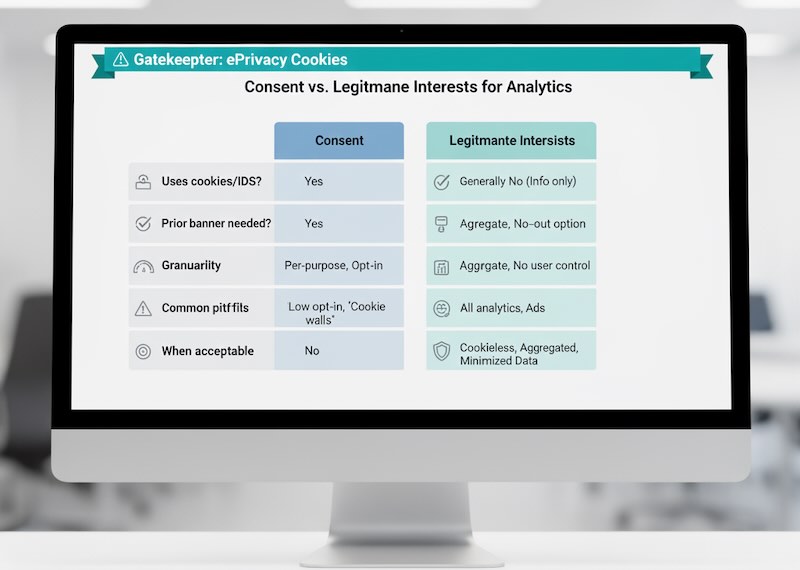
Under GDPR you need a lawful basis. For web analytics, the real gatekeeper is ePrivacy (cookie rules):
- If analytics set or read cookies/local storage (most tools do), you typically need prior consent unless cookies are strictly necessary (basic analytics rarely qualifies).
- Legitimate interests may work only for truly cookieless, aggregated, and strictly minimized measurement (e.g., short-lived server logs with IP truncation and no identifiers). Many regulators still expect consent banners for any tracking beyond essential site operations.
Practical takeaway:
Assume consent for standard analytics and A/B testing that uses cookies or cross-site identifiers. Consider a cookieless, aggregated setup if you want to reduce reliance on banners.
4) Consent that actually counts
A valid consent flow should be:
- Freely given, specific, informed, unambiguous (no pre-ticked boxes or vague wording).
- Granular (separate toggles for analytics, ads, etc.).
- Prior (don’t drop non-essential cookies until the user says “Allow”).
- Easy to withdraw (a visible “Privacy settings” link).
- Documented (store consent choices, versions, and timestamps).
UX pointers:
- Provide “Accept all” and “Reject all” with equal prominence.
- Explain why you collect analytics (“to improve content and fix issues”), not just legalese.
- Respect “reject” across the entire session and future visits (until the user changes their mind).
Case law confirms it: pre-checked boxes don’t fly—see Planet49 (C-673/17).
5) Data minimization: collect less, reduce risk
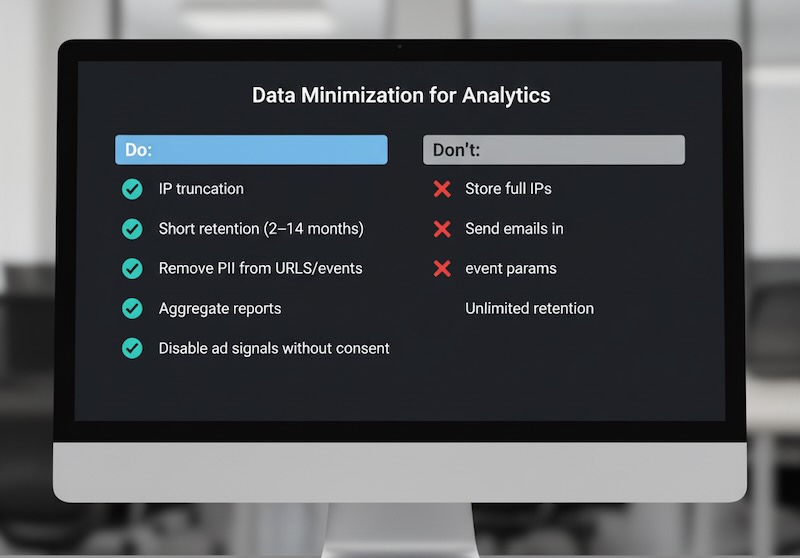
- Truncate or anonymize IPs (not just “mask later”; avoid storing full IP in logs where possible).
- Limit event parameters—no emails, full URLs with query strings containing PII, or free-text fields that could capture personal data.
- Short retention windows (e.g., 2–14 months for identifiers).
- Turn off ad-personalization signals if you don’t have consent for marketing.
- Aggregate reporting when individual-level data isn’t necessary.
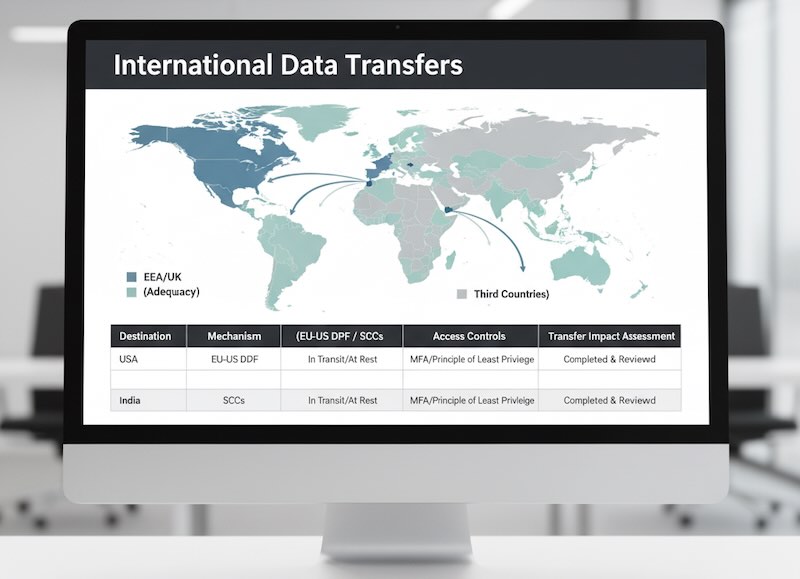
6) International data transfers
If analytics data leaves the EEA/UK:
- Prefer vendors that participate in recognized transfer frameworks (e.g., the EU-US Data Privacy Framework for US transfers).
- If not available, use Standard Contractual Clauses (SCCs) + a transfer impact assessment and supplementary safeguards (encryption in transit/at rest, access controls).
- Be transparent in your privacy notice about where data goes and who gets it.
7) Vendor governance and contracts
Before you implement or keep a tool:
- Sign a DPA that defines scope, security, sub-processors, deletion timelines, and breach duties.
- Review the vendor’s sub-processor list and get change notifications.
- Check security certifications (e.g., ISO 27001) and data residency options (EU data centers).
- Confirm deletion and export features for data subject rights.
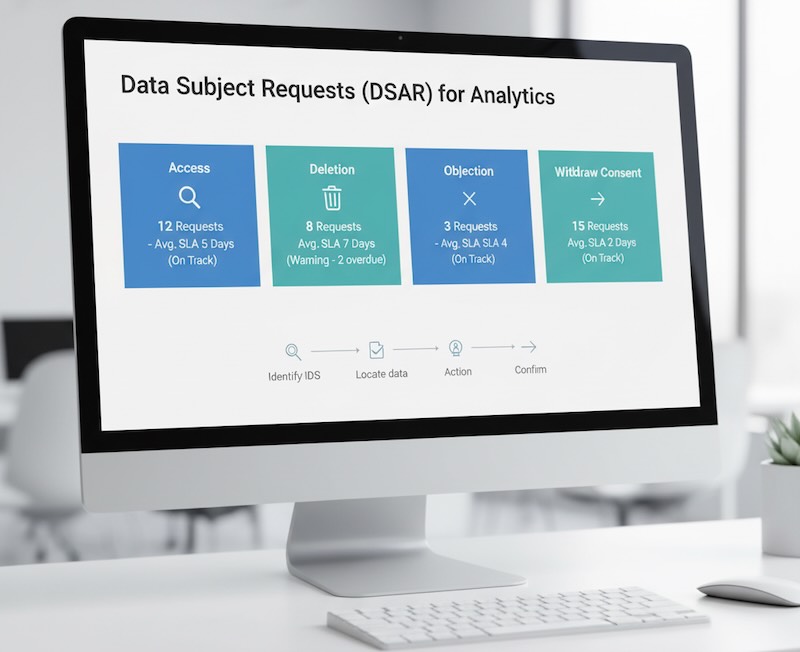
8) User rights you must support
Under GDPR, individuals can:
- Access their data (what you collect, why, with whom).
- Delete or rectify it.
- Object to processing (especially when relying on legitimate interests).
- Withdraw consent at any time.
What this means operationally:
- Provide a simple preference center (re-open the banner, change choices).
- Offer an opt-out path for analytics identifiers (and make it stick).
- Be prepared to locate and erase an individual’s analytics identifiers where feasible.
9) When you may need a DPIA (risk assessment)
Consider a Data Protection Impact Assessment if you:
- Do large-scale tracking, cross-device stitching, or heatmaps/session replay across many users.
- Combine analytics with other datasets to profile behavior.
- Process sensitive categories (rare in analytics; avoid).
DPIAs help you document risks, mitigations, and alternatives.
10) Special cases: children, session replay, A/B testing
- Children’s data: if your audience includes minors, tighten defaults, avoid persistent IDs, and get parental consent where required.
- Session replay/heatmaps: treat as high-risk—mask inputs, exclude forms, truncate IPs, and always require explicit consent.
- A/B testing: most tools rely on cookies/IDs—treat as analytics under the same consent rules.
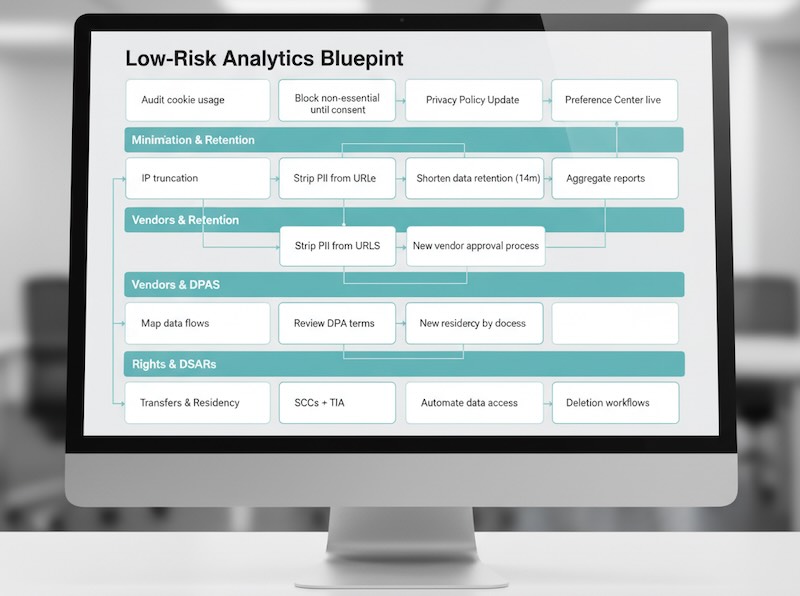
Your practical, low-risk analytics blueprint
- Map the data you collect (events, IDs, IP handling, retention).
- Choose tools that support EU hosting, minimization, and easy deletion.
- Set consent first: no non-essential cookies until “Allow.”
- Minimize identifiers and strip PII from URLs and events.
- Shorten retention and auto-delete aged identifiers.
- Sign DPAs, review sub-processors, document transfers.
- Publish a clear privacy notice: who, what, why, where, how long.
- Build a preference center for changing choices anytime.
- Prepare for DSARs (access/erasure) with a simple internal playbook.
- Review quarterly: vendor changes, consent rates, and data scope.
Common pitfalls that trigger complaints (and fines)
- Dropping analytics cookies before consent or after a user clicked “Reject.”
- Dark patterns: hiding “Reject all,” vague language, or forced consent.
- Storing full IP addresses or sending emails/user IDs as event parameters.
- Unclear notices: no list of vendors, no retention periods, no transfer info.
- Ignoring deletion requests because “it’s just analytics.”
- Using session replay without robust masking and explicit opt-in.
Safer analytics options (when you can’t rely on cookies)
- Cookieless, aggregated measurement with no persistent identifiers.
- Server-side, first-party collection acting as a privacy firewall (strip PII, shorten retention, EU-hosted).
- Sampling/metrics-only dashboards for trend monitoring when granular data isn’t needed.
Bottom line
You don’t have to choose between insights and compliance. Treat analytics like any other data product: start with consent, collect the minimum, document your vendors and transfers, and make changing one’s mind easy. Do that, and your reporting stays useful—and defensible—no matter how privacy rules evolve.