30-second answer
Rybbit is an open-source AGPL cookieless web analytics tool with session replay, real-time visitors, Web Vitals, and a $26/mo Pro tier (billed annually; $39 month-to-month). EU-hosted, ~6KB tracker, modern UI. The differentiator vs Plausible is that session replay is included in the Pro tier. The full Rybbit review covers pricing tiers, hosting, and what breaks when you migrate from GA4.
Why Privacy Matters in Web Analytics
Google Analytics has been the default choice for tracking website visitors for years. But it comes with baggage. GDPR banners. Cookie consent forms. Data sharing with advertising networks.
For many website owners, this trade-off no longer makes sense. If you’ve ever wondered how much those cookie banners actually cost you in conversions, the answer is usually more than people realize.
Rybbit Analytics offers a different approach. No cookies. No persistent identifiers. No consent banners cluttering your site. Just straightforward analytics that respects visitor privacy while giving you the insights you need.
What is Rybbit Analytics?
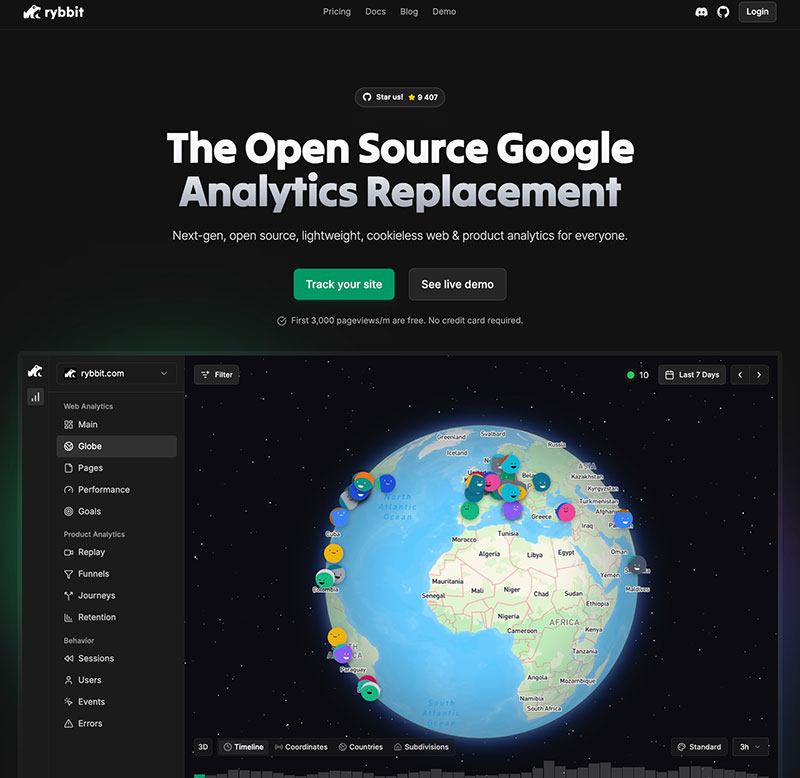
Rybbit is an open-source, cookieless web analytics platform. It tracks visitor behavior without using persistent identifiers, which means automatic GDPR and CCPA compliance. No legal gray areas. It competes with the other cookieless analytics platforms on features rather than on privacy, because all of them clear that bar.
The platform runs on Docker, making it easy to self-host if you want complete control over your data. But you can also use their hosted version if you prefer a hands-off approach.
Key characteristics:
- 100% cookie-free tracking
- Open-source codebase
- Self-hosting option available
- GDPR/CCPA compliant by design
- Lightweight tracking script
The Cookie-Free Advantage
Traditional analytics platforms identify returning visitors using cookies. This creates a tracking trail that privacy regulations frown upon. Rybbit takes a different approach.
Instead of tracking individuals, it tracks sessions. You still see how many people visit your site, which pages they view, and where they come from. You just don’t follow them across the internet. This is a pattern we cover in detail in our privacy-friendly analytics guide.
This matters for three reasons:
First, no cookie banners. Your visitors aren’t interrupted by consent forms the moment they land on your site.
Second, better data quality. No cookie blockers means more accurate tracking. You’re not missing 20-40% of your traffic because visitors declined cookies.
Third, peace of mind. You’re not storing personal data, so data breaches become less catastrophic.
Real-Time Visitor Monitoring
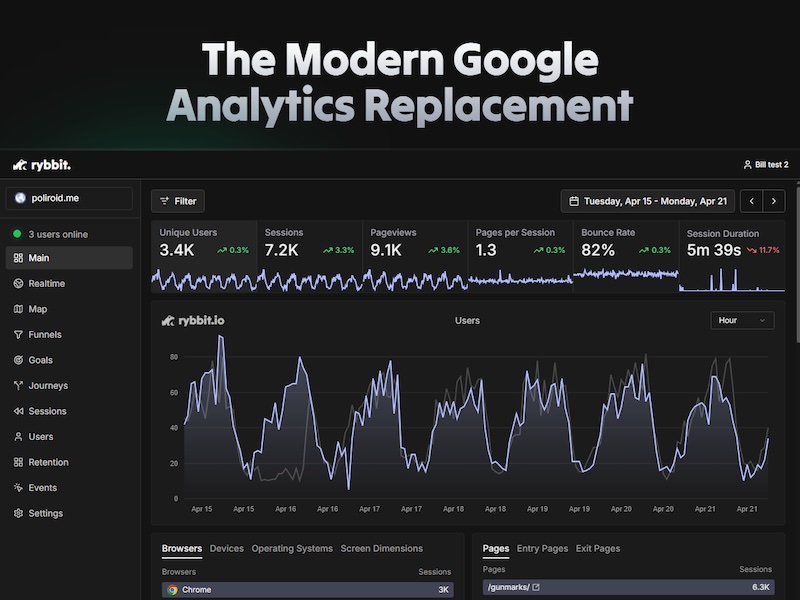
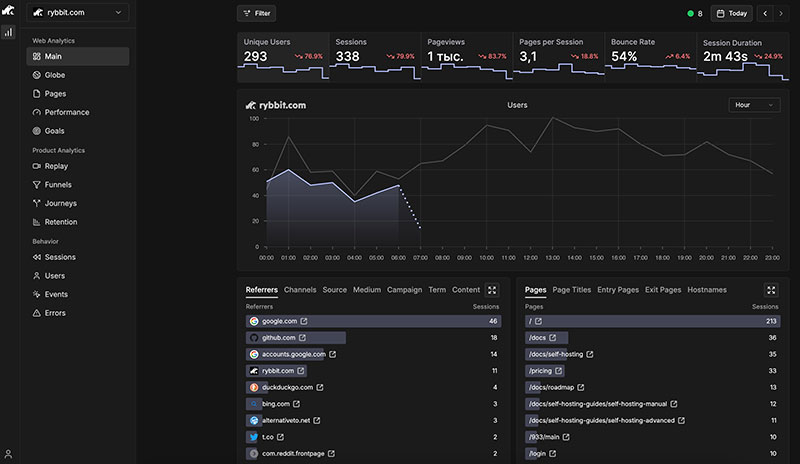
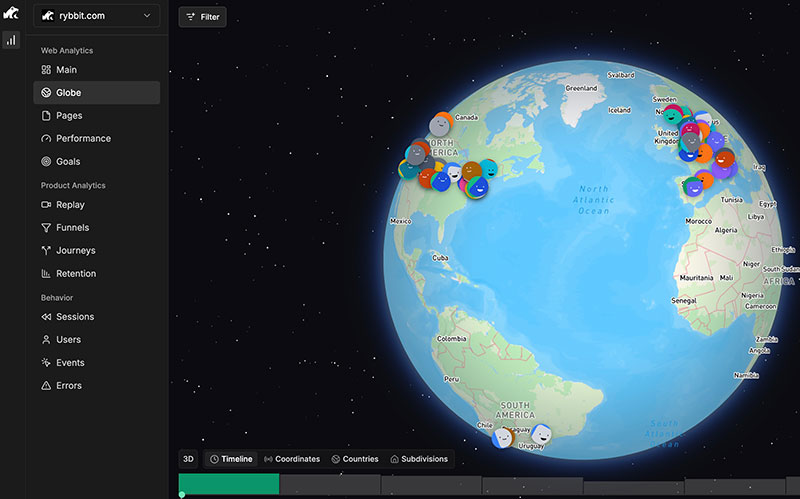
The real-time dashboard shows you exactly who’s on your site right now. Active sessions. Geographic locations on a world map. Current pages being viewed. Time spent on each page.
It’s surprisingly useful. Launch a new blog post and watch visitors arrive. Share a link on social media and see immediate traffic spikes. Notice unusual activity and investigate in real-time.
Core Metrics That Matter
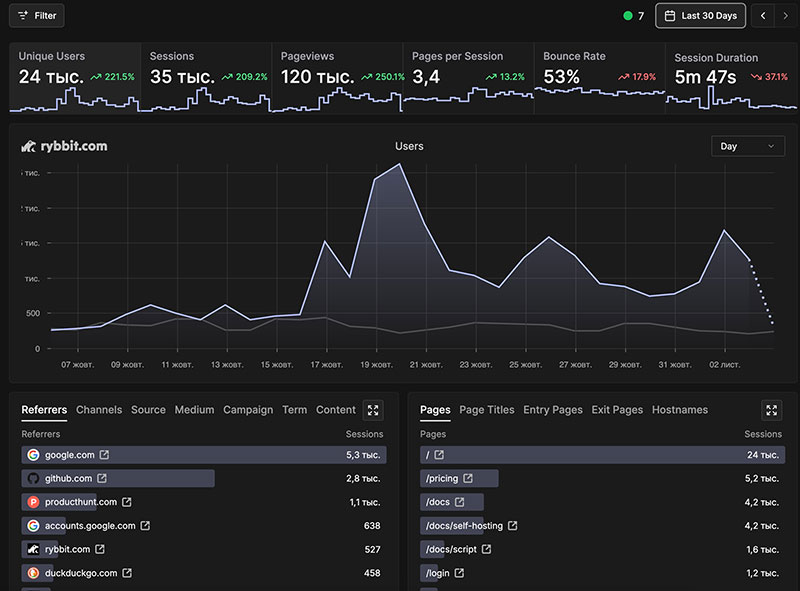
Rybbit tracks the fundamentals:
Unique visitors – How many different people visited your site
Sessions – Total number of visits
Pageviews – How many pages were loaded
Pages per session – Average pages viewed during each visit
Bounce rate – Percentage leaving after viewing only one page
Session duration – Average time spent on your site, the same time on site metric every tool computes a little differently
The dashboard presents these metrics with clear graphs showing trends over time. Daily, weekly, monthly views. Easy filtering by date range. If you’re unsure which numbers actually matter for your site, our minimalist analytics checklist trims the list down to the essentials.
Understanding Your Traffic Sources
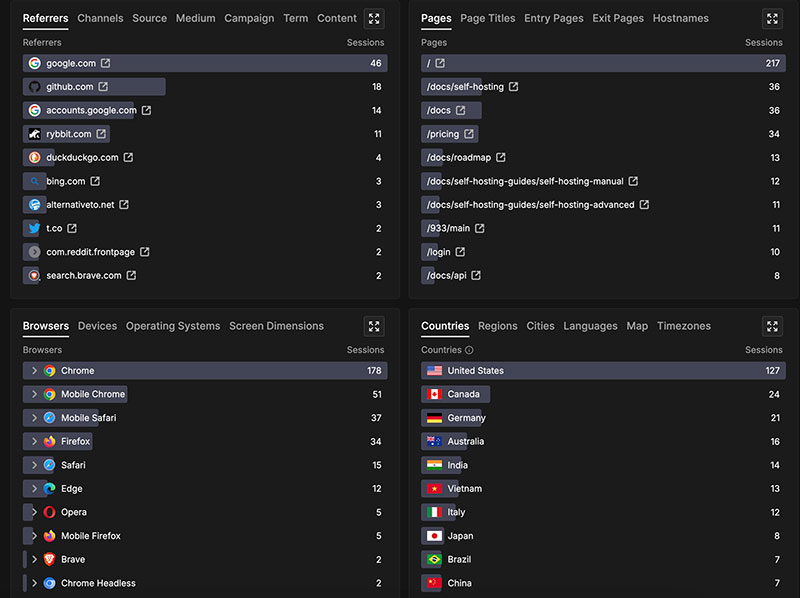
Where do your visitors come from? Rybbit breaks it down:
- Browsers – Chrome, Firefox, Safari usage patterns
- Operating systems – Windows, macOS, Linux, mobile OS distributions
- Devices – Desktop, mobile, tablet breakdown
- Geographic data – Countries and cities of origin
This information helps you optimize for your actual audience. If 60% of visitors use mobile devices, your mobile experience better be excellent.
Page Performance Analysis
Some pages work. Others don’t. Rybbit helps you figure out which is which.
Entry pages – Where visitors start their journey on your site
Exit pages – Where they leave (identify weak spots)
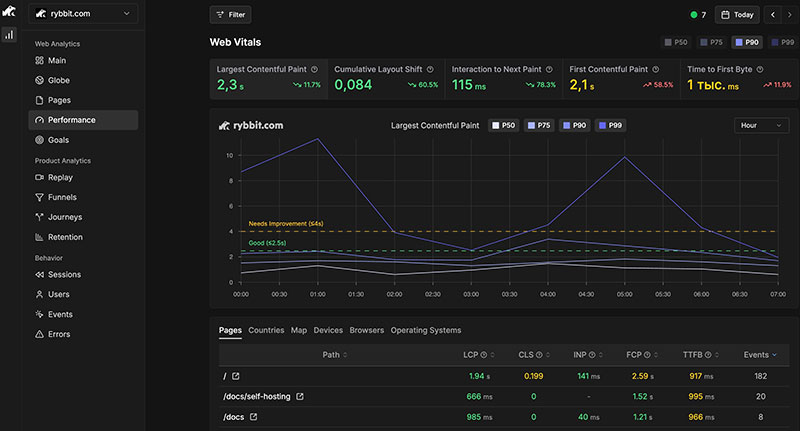
Page performance – Load times and Core Web Vitals (LCP, CLS, INP, FCP)
Page titles – Understand your site structure at a glance
The performance metrics are particularly valuable. Slow pages lose visitors. Core Web Vitals affect search rankings. This data lets you prioritize optimization efforts.
Advanced Behavioral Analysis
Here’s where Rybbit differentiates itself from simpler analytics tools:
Funnels – Track users through multi-step processes (product view → cart → checkout)
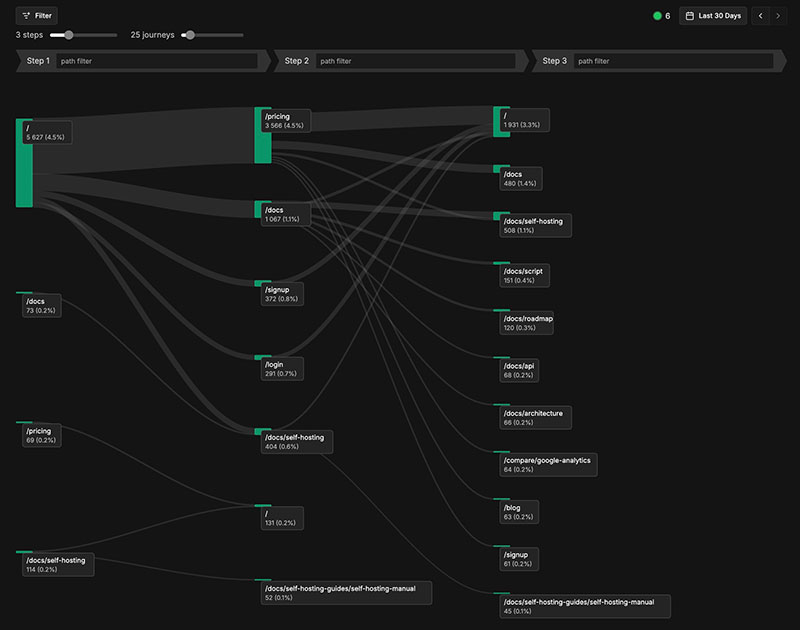
User journeys – See complete paths visitors take through your site
Session replay – Watch recordings of actual user sessions (⚠️ verify this feature exists)
Retention analysis – Measure how many visitors return over time
Custom event tracking – Monitor specific actions like button clicks or form submissions
Error tracking – Catch and log site errors automatically
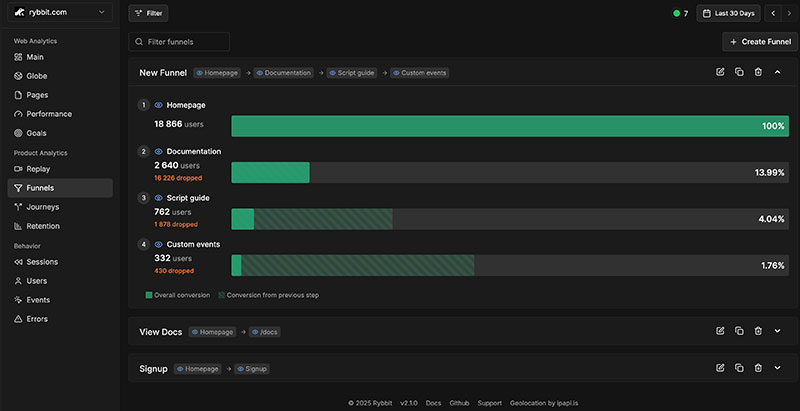
These features used to require expensive enterprise tools. Rybbit includes them in a privacy-respecting package.
Getting started: setup in minutes
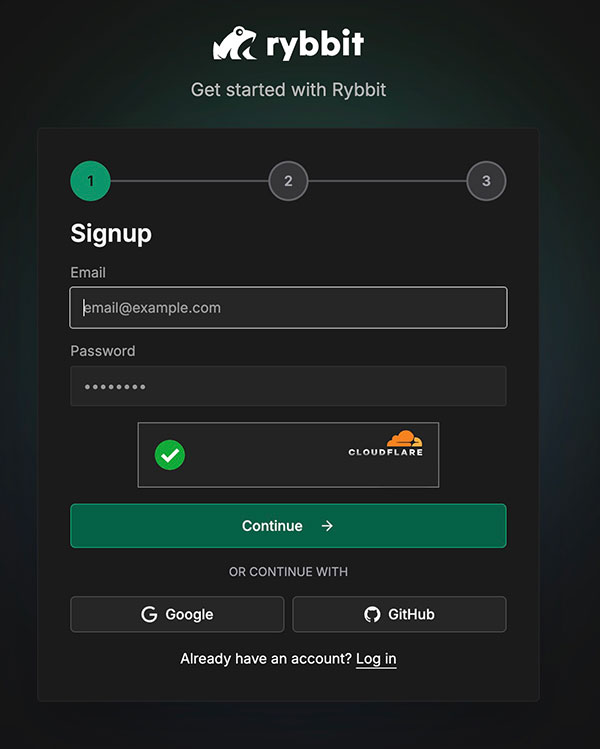
Create your account
Sign up on the Rybbit platform. Create an organization. Add your website domain.
Add your website
After creating your organization, add your site. The platform generates a unique tracking script.
Install the tracking code
Copy the provided script. Paste it into your site’s <head> section or just before the closing </body> tag.
One line of code:
<script async src="https://cdn.rybbit.io/tracker.js" data-site-id="YOUR_SITE_ID"></script>Verify tracking works
Visit your site. Check the real-time dashboard. Data typically appears within a few minutes.
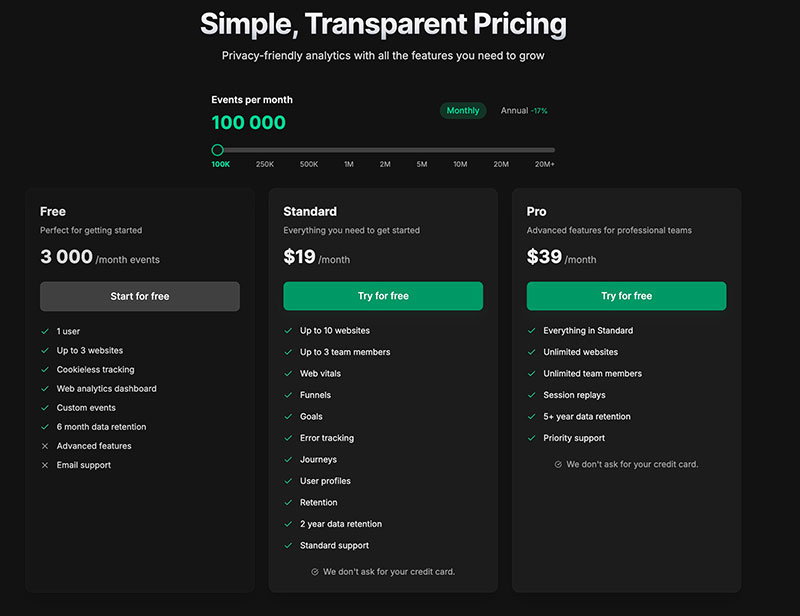
Rybbit pricing: Standard vs Pro (2026)
Rybbit is paid-only on the cloud. There is a 7-day trial, no permanent free tier, and pricing scales with monthly events. Self-hosting stays free under AGPL-3.
Standard
$13/month billed annually, or $19 month-to-month:
- Up to 5 websites and 3 team members
- Core analytics dashboard
- Advanced filtering options
- Custom event tracking
- Basic dashboard filtering
Pro
$26/month billed annually, or $39 month-to-month:
- Unlimited websites and team members
- Everything in Standard, plus session replay
- 5-year data retention and higher API limits
- Priority support
Why Businesses Choose Rybbit
Automatic Compliance
Cookie-free architecture means GDPR and CCPA compliance out of the box. No lawyers needed to review your data processing. For the legal context behind this, see our GDPR analytics guide and the recent EU court decisions that pushed cookieless tracking into the mainstream.
Open Source Transparency
The code is public. Anyone can verify that privacy claims are accurate. No hidden tracking or data sharing.
Cost Effective
Start free. Scale affordably. No surprise bills based on traffic spikes. For solo operators and lean teams, this matters more than feature parity — see our small business analytics guide for a practical framing.
Simple Deployment
Docker compatibility means straightforward setup on DigitalOcean, AWS, or your own hardware.
Active Community
Find support on Discord. Share insights with other users. Stay updated on new features.
Practical Use Cases
Optimize Conversion Funnels
Use funnel analysis to identify drop-off points. A three-step checkout showing 40% abandonment at payment? Time to simplify that form.
Improve Site Performance
Core Web Vitals reveal slow pages. Fix them and watch engagement improve. Google’s algorithm rewards fast sites with better rankings.
Understand Your Audience
Geographic and device data shape your content strategy. Mostly mobile visitors from Asia? Consider mobile-first design and loading speeds for that region.
Rybbit features and how they compare
Rybbit isn’t the only privacy-focused analytics tool. For a wider view of the landscape, see our roundup of 15 Google Analytics alternatives. A few common comparisons worth flagging:
- Plausible Analytics – Similar philosophy, different feature set. Worth reading our Plausible vs Fathom comparison for nuance.
- Simple Analytics – Minimalist approach
- Fathom Analytics – Focus on simplicity
- GoatCounter – Open-source, lightweight
Each has strengths. Rybbit’s combination of advanced features (funnels, session replay) with open-source self-hosting sets it apart.
Rybbit GitHub repo and documentation
- Official website: https://rybbit.com/docs
- GitHub repository: Source code and documentation https://github.com/rybbit-io/rybbit
- Community: Discord server for support https://discord.com/
Frequently asked questions
How much does Rybbit cost?
Rybbit has no free cloud plan — there is a 7-day trial. Standard is $13/month billed annually ($19 month-to-month) and Pro is $26 ($39 month-to-month), with session replay included in Pro. The codebase is open source, so self-hosting it on your own server is also free.
Is Rybbit GDPR compliant out of the box?
Yes. Rybbit doesn’t set cookies and doesn’t store personal identifiers, so it sits cleanly inside GDPR and CCPA. You don’t need a consent banner just to load it. For background, see how cookie banners hurt conversions — that’s the friction Rybbit removes.
How does Rybbit compare to Plausible?
Both are cookie-free and privacy-first. Rybbit ships more advanced features at the same price point — funnels, retention, error tracking, Core Web Vitals — while Plausible stays deliberately minimal. If you want a single-screen overview, Plausible is faster to read. If you want behavioural depth without GA4, Rybbit pulls ahead.
Can I self-host Rybbit?
Yes. The project ships as a Docker image, so any host that runs Docker — DigitalOcean, Hetzner, Railway, your own VPS — will work. You’ll need a Postgres-compatible database and roughly the same operational overhead as running a small WordPress install.
Does Rybbit work with single-page applications?
It does. The tracker handles SPA route changes once you wire up the navigation events. Most modern frameworks — React, Vue, SvelteKit, Next.js — only need a few lines of glue code in the router.
Will it block ad blockers from tracking visitors?
The tracking script lives on rybbit.io’s CDN by default, so aggressive blocklists can still drop it. Self-hosting on your own domain — or proxying the script through your origin — sidesteps most blockers and recovers the 20-40% of traffic GA4 typically misses.
Is Rybbit a good fit if I’m coming from GA4?
For most small and mid-sized sites, yes. You lose Google’s ad-product integrations and gain a dashboard you can read in 30 seconds. If you’re looking to track traffic without surveillance, Rybbit is one of the cleaner switches available.
Where Rybbit lands
Rybbit Analytics delivers powerful insights without sacrificing visitor privacy.
For website owners tired of cookie banners and GDPR compliance headaches, it’s worth testing. The 7-day trial lets you evaluate the platform without commitment. If it works for your needs, the Pro plan remains affordable compared to enterprise analytics tools.
The open-source nature adds credibility to privacy claims. When a company says “we don’t track users,” you can verify it yourself by reviewing the code.
Is Rybbit perfect? No tool is. But for privacy-conscious businesses that still need detailed analytics, it checks the right boxes.
Start with the 7-day trial. Explore the dashboards. See if the insights match your needs. You might find that cookieless analytics doesn’t mean sacrificing the data that drives business decisions.