30-second answer
Time on site is the average length of a visit: the total duration of all sessions divided by the number of sessions. A tool measures each session as the gap between the first and the last timestamp it received, so the final page of a visit — and every single-page visit — is usually recorded as zero. It is a different metric from time on page (one page, one view) and from bounce rate (the share of sessions with no engagement). GA4 has no metric called “time on site”: the number its reports lead with is average engagement time, which counts only the time your page was in focus — though average session duration is still on Google’s metric list for anyone who adds it to a report. For measuring it without cookies, see cookieless analytics tools like Plausible or Matomo.
“Time on site” sounds simple: people came, they stayed some amount of time, then left. In practice there are several time metrics hiding behind that phrase, each computed differently, and no two tools agree on the number. Read this as a plain-English map to what the time on site metric means, how it’s calculated, what GA4 replaced it with, and how to use it to make content better rather than longer.
How is time on site calculated?
Average time on site is the total duration of all sessions in a date range divided by the number of sessions. Each session’s duration is the difference between its first timestamp and its last one. Google documented exactly this for Universal Analytics, and the same arithmetic sits behind “visit duration” in Plausible, Umami and Matomo.
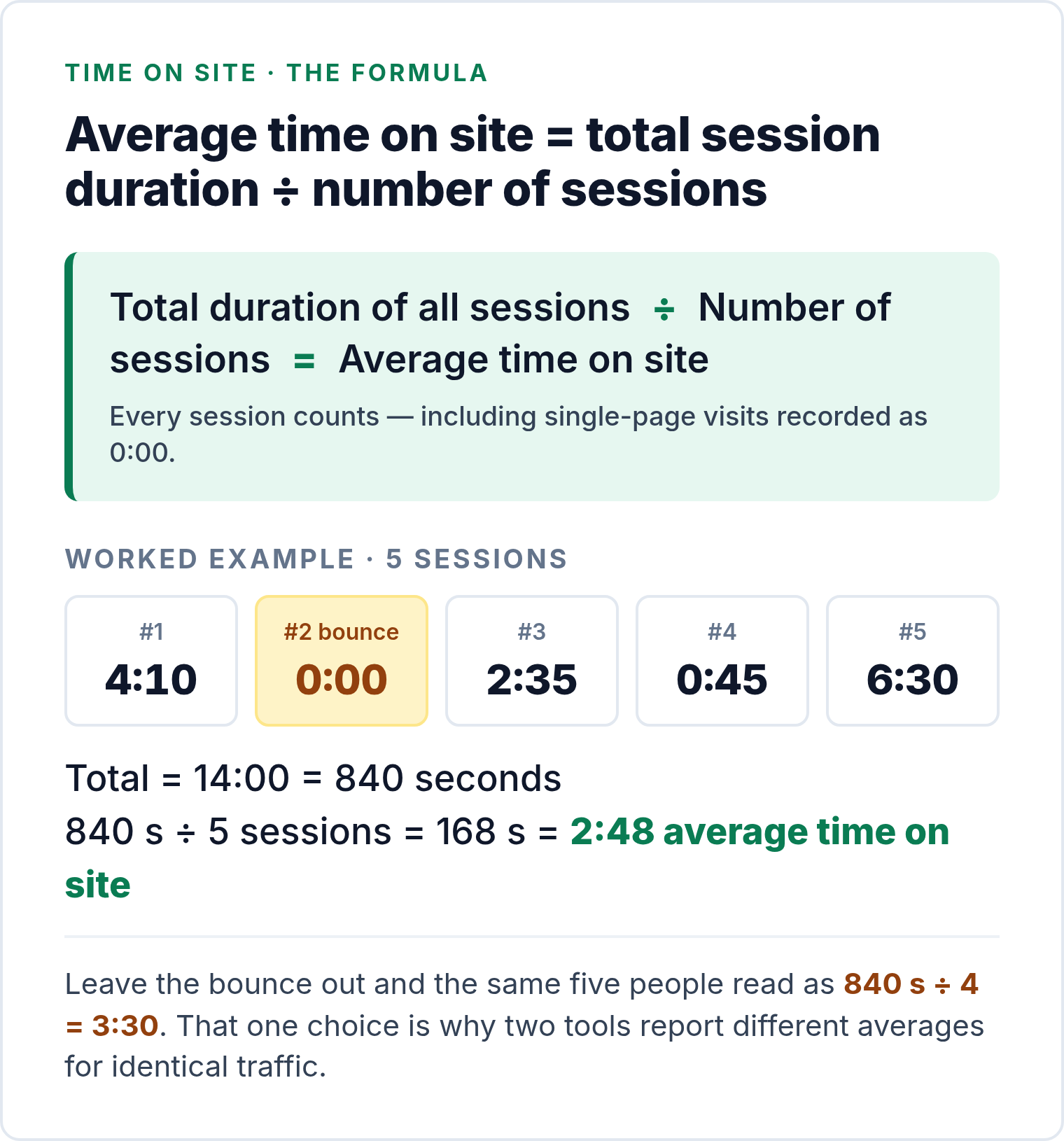
Five sessions last 4:10, 0:00, 2:35, 0:45 and 6:30 — 840 seconds in total. Divide by five and the average time on site is 168 seconds, or 2:48. The 0:00 entry is a single-page visit: one page, no second pageview, nothing to subtract. Keep it in the denominator and the average is 2:48; leave it out and the same five people read as 3:30. Whether bounces count as zero or are excluded is an editorial choice, and it’s why two dashboards on identical traffic can disagree by a minute.
The timestamp mechanics are worth spelling out because they explain most of the weirdness you’ll see. Time on page for any given pageview is the next timestamp minus this one. The last page of a session has no next timestamp, so unless the tracker sends something else it contributes nothing. Google’s Universal Analytics documentation spelled this out: with no engagement hits on the last page, session duration was “the time of the first hit on the last page minus the first hit on the first page”. A visitor who opened three pages at 10:00, 10:05 and 10:10 and then read the third one for a further five minutes was recorded as a ten-minute session.
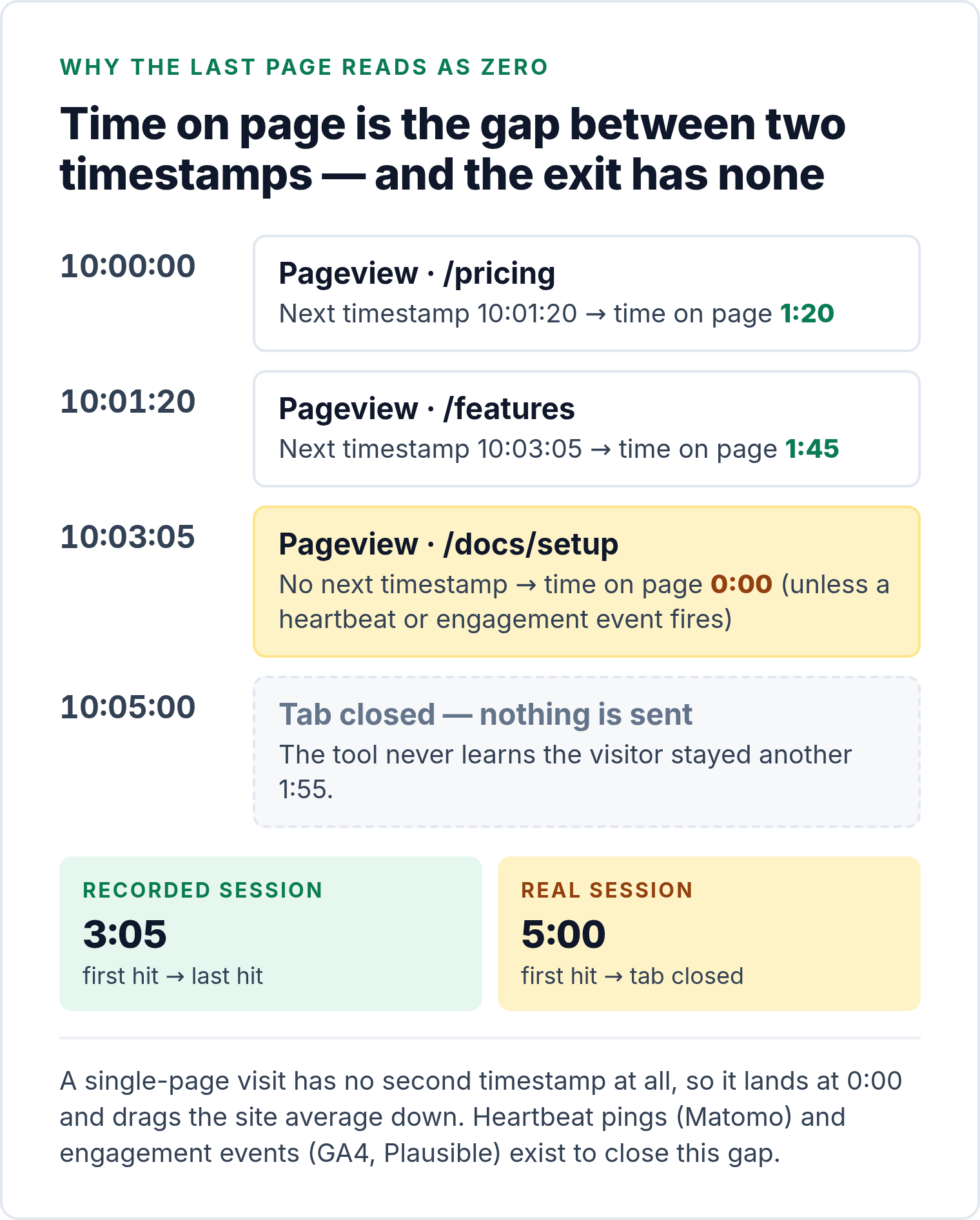
Tools close that gap in two ways. Matomo’s JavaScript tracker can send a heartbeat ping when the visitor leaves or hides the page (enableHeartBeatTimer); Matomo’s own guide notes that without it “a visit containing only one page view has a visit duration of 0 seconds” (developer.matomo.org). GA4 and Plausible send an engagement event when the tab loses focus or the visitor navigates away, so the clock only runs while the page is actually in front of someone. Both approaches produce a different number from the plain first-to-last-timestamp method — more accurate, and not comparable with the old one.
Time on site vs time on page vs bounce rate
These three get mixed up constantly, including in vendor dashboards that label them loosely. Time on site is a session-level average across all pages in a visit. Time on page is scoped to a single page. Bounce rate isn’t a duration at all — it’s the percentage of sessions that showed no engagement. Take a visitor who lands on the homepage, reads for 30 seconds, opens a product page, spends two minutes on it and leaves. Two and a half minutes of real reading — but the product page is the exit page, and a timestamp-gap tool never gets a closing timestamp for it. It records 0:30 for the homepage, 0:00 for the product page and a time on site of 0:30. The missing two minutes only show up if the tracker fires a heartbeat ping or an engagement event on the way out.
| Metric | Scope | How it’s computed | What distorts it | Use it for |
|---|---|---|---|---|
| Time on site also: average session duration, visit duration |
One session, all pages | Total session duration ÷ number of sessions; each session = last timestamp − first timestamp | Exit page contributes 0; bounces counted as 0 (Plausible, Umami) or excluded; idle tabs inflate it | Stickiness by traffic source or landing page, tracked over time in one tool |
| Time on page also: average time on page, average engagement time per page |
One page, one view | Next pageview timestamp − this pageview timestamp, averaged over views | Not measured on the exit page unless an engagement event or heartbeat fires; exit-heavy pages look short | Comparing content of the same type: which guides hold attention, which product pages lose it |
| Engaged time GA4: average engagement time; Plausible: time on page with engagement events |
Page in focus, any number of pages | Sum of intervals while the tab is in the foreground, sent as engagement events | Definitions differ by tool; not comparable with timestamp-gap metrics | A truer read of attention on long articles and tools |
| Bounce rate | Sessions | Sessions with no engagement ÷ all sessions. GA4: not engaged = under 10 s, no key event, one view. Plausible and Umami: one pageview/event | Thresholds and event setups change the number; a satisfied one-page reader is still a “bounce” | Spotting mismatch between what a landing page promised and what it delivered |
The practical rule: pair any time metric with a rate. Time on site tells you how long people stayed; bounce rate tells you how many left without doing anything; engagement rate in GA4 tells you how many crossed an arbitrary 10-second line. Read one without the others and you’ll draw the wrong conclusion — a page with a long average time on site and a 70% bounce rate is a page where a minority of visitors stayed for ages and the majority left at once.
What GA4 shows instead: average engagement time
No metric in GA4 is called “time on site”, and no standard report carries that heading. What the reports put in front of you is average engagement time, with average engagement time per session beside it, and both measure something narrower than the old metric: the time your page was in focus in the browser, not the gap between the first and the last hit. The old-style number hasn’t been deleted — average session duration is still a metric you can pull — but it is no longer what GA4 shows you by default. If you’re searching for GA4 time on site or time on page in GA4, average engagement time is what you’ll be looking at.
Google’s help centre defines user engagement as “the amount of time someone spends with your web page in focus or app screen in the foreground” (support.google.com). The tracker starts a clock when a session begins and sends the accumulated milliseconds — the engagement_time_msec parameter — attached to the next event whenever the visitor switches tabs, navigates to another page, closes the window, or the site crashes. When a visitor leaves a page, a user_engagement event carries whatever time is left over, which is how the exit page finally gets counted.
The aggregation differs from the old formula, too. GA4’s metric definitions give Average engagement time = total user engagement durations ÷ number of active users — a per-user figure, and the one the Pages and screens report shows by default (labelled per active user). Average engagement time per session divides by sessions instead, which is the closer relative of time on site. The same list still carries average session duration, defined as “the average duration (in seconds) of users’ sessions” — the direct heir of the old number. In the properties I’ve worked in it doesn’t appear in the standard reports; you add it to a custom report or an exploration to see it.
Three consequences follow. Idle tabs no longer inflate the number. Single-page visits finally count: a reader who stays 40 seconds on one page produces 40 seconds of engagement time where Universal Analytics recorded zero. And the figure is structurally lower than the old session duration for the same traffic, so a “GA4 time on site dropped after migration” panic is usually the definition, not the audience. Bounce rate was redefined alongside it around the idea of an engaged session: a session is engaged if it lasts longer than 10 seconds, has a key event, or has two or more page views, and bounce rate is the share of sessions that were not engaged (support.google.com).
How to measure time on site without Google Analytics
If you’ve moved off Google Analytics for privacy reasons, the privacy-first tools still report the metric — under slightly different names and with slightly different arithmetic. Here’s what each one is counting, straight from their documentation:
- Plausible — “Visit duration” is the sum of all session lengths divided by the number of sessions, and visitors who view only one page are counted at 0 seconds rather than excluded. Its newer time on page metric uses engagement events, so time in an inactive tab isn’t counted (Plausible docs). No cookies needed.
- Matomo — visit duration is derived from the time between tracked actions; a single-pageview visit is 0 seconds until you enable the heartbeat timer, after which leaving or hiding the page sends a final ping. Self-host under GPL or use Matomo Cloud.
- Fathom — Fathom reports “average time on site”, and its export documentation lists Avg Time on Site as a per-page column sitting next to bounce rate (Fathom docs).
- Umami — “Visit duration” is total time on the website divided by unique visits, where total time is only calculated for visitors who view more than one page, as the difference between first and last event timestamps (Umami docs). MIT-licensed, self-hostable.
All four run without a cookie banner and are covered in our GDPR analytics hub. Note the split: Plausible and Umami put bounces in the denominator, Matomo’s number depends on the heartbeat setting, and none of them will match GA4’s engagement time. Pick one tool and compare your own pages inside it — cross-tool comparisons are a waste of a meeting.
Why a time number misleads on its own
- Single-page sessions look short. If a visitor reads one long article and leaves satisfied, timestamp-gap tools record zero because there’s no second pageview to stop the clock — even though that reader got exactly what they came for.
- Idle inflation. People open your page, get coffee, answer a call. A timestamp-gap tool keeps counting until the next hit; only focus-based engagement time knows the tab went quiet.
- Different page jobs. A pricing page might succeed with two focused minutes; a how-to guide might need six. Comparing them directly is like timing a sprint against a hike.
- Traffic mix. Social visitors skim; email and search visitors linger. Double your social traffic and the site average drops without a single page getting worse. Segment by source before reacting.
What is a good time on site?
There isn’t a universal benchmark, and most time on site benchmarks you’ll find online are either unsourced or measured with a method that doesn’t match your tool. A figure that counts bounces as zero can’t be compared with one that excludes them, and neither can be compared with GA4’s engagement time. The only published range we’d quote is Plausible’s own note in its documentation that 1–3 minutes of visit duration “is common for most sites”, with documentation and content-heavy sites running higher — and even that is a description of Plausible’s customer base, not a target.
The useful version of the question is “what’s a good time on site for this page type, in my tool, compared with last quarter?” Patterns by page type are worth knowing; the minutes are yours to measure.
| Page type | What a healthy pattern looks like | Red flags |
|---|---|---|
| Blog posts / guides | Time scales with length; steady scroll depth; clicks through to related posts or a sign-up. | Seconds, not minutes, on a 1,500-word piece; rapid exits from search traffic. |
| Product pages | Short, purposeful visits with interaction: images, specs, add-to-cart, shipping details. | Long time with no micro-actions — analysis paralysis, not interest. |
| Landing pages | Quick scan, clear CTA click (demo, signup). | Long time plus low CTA click-through (confusion), or ultra-short skims (ad–page mismatch). |
| Docs / help | Time concentrated on problem pages; follow-through to the fix. | Repeat visits to the same page without resolution. |
| Pricing / plans | Comparison behaviour: toggles, tier switches, then trial or checkout. | Long dwell with few trial clicks — friction or unclear value. |
Build your own benchmark instead of borrowing one: same tool, same page type, a trailing three months, and compare each page against the median of its peer group. Anything more than about a third below its peers deserves a look; anything far above deserves a check that it isn’t idle-tab inflation.
How to improve time on site without inflating it
There are two ways to increase time on site and only one is worth doing. The inflation route — auto-playing video, one answer paginated across three pages, pop-ups that delay the exit — pushes the metric up while the experience gets worse, and the conversion rate next to it usually falls. The honest route makes the page more useful, which happens to keep people on it:
- Match the intent before anything else. Most short visits from search are a promise–content mismatch: the title sold one thing, the page delivers another. Fix the headline and the first paragraph before touching the body.
- Lead with the payoff. Put the answer, the number or the definition in the first screen and let the rest of the page earn the scroll.
- Chunk the information. Subheads every few paragraphs, short sentences, one table where there’s a comparison, one visual where there’s a mechanism.
- Give people a next page. Contextual internal links in the body do more for time on site than a “related posts” widget at the end, because they arrive while the reader is still curious.
- Fix the mobile layout and speed. A page that loads slowly or jumps around loses the visitor before any clock starts.
- Remove detours. Noisy sidebars and competing CTAs dilute attention; cutting them tends to raise both time and conversions.
The check that separates the two routes is simple: after a change, did the conversion rate or the next-step click rate move with the time? If time went up and actions didn’t, you inflated it. Our minimalist’s checklist of analytics data is built around that pairing — every duration metric sits next to the action it’s supposed to predict.
Use time metrics to ask better content questions
Time isn’t a trophy; it’s a clue — and it only reads correctly against the job the page was supposed to do for that visitor (research, buy, or get support). Four patterns cover most reviews:
- Short time + high conversions
People got what they needed quickly. Great for utility pages and high-intent visitors. Avoid padding content just to stretch time. - Long time + low conversions
Attention without action. Tighten the message, reposition CTAs, or reduce decision friction (too many options, jargon, hidden fees). - Short time + high bounce from search
Likely a promise–content mismatch. Fix the headline and meta, and front-load the answer with scannable structure. - Long time on articles + strong return visits
You’re building habit and trust. Offer next steps (newsletter, related deep reads, product tours).
More action ↑
Fast success
Short time, high conversion
Deep engagement
Long time, high conversion
Bounce / low interest
Short time, low conversion
Attention without action
Long time, low conversion
Shorter time ←→ longer time
A simple review routine you can reuse monthly
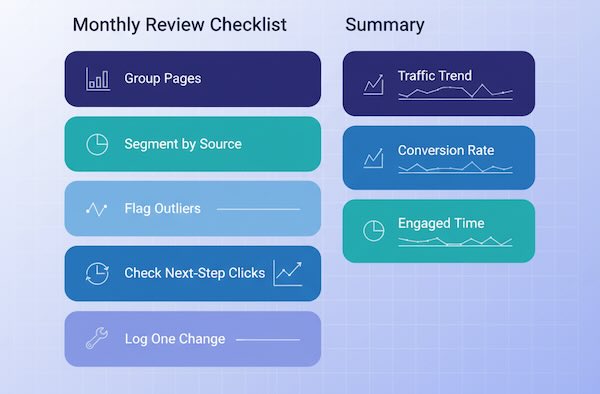
- Group similar pages (blog, product, landing).
- Compare time within the group — flag outliers, high and low.
- Segment by source to see which audiences linger and which skim.
- Check what happened after the page (click-throughs, micro-actions).
- Write one content change per outlier page and recheck next month.
You’ll learn faster by editing a few pages meaningfully than by chasing global averages.
Time on site: questions people keep asking
What is the average time on site formula?
Total duration of all sessions divided by the number of sessions. Each session’s duration is its last recorded timestamp minus its first, which is why the exit page and single-page visits usually contribute zero unless the tool sends heartbeat pings or engagement events.
Is time on site the same as average session duration?
Yes — “time on site”, “average session duration”, “visit duration” and “average time spent on site” are labels for the same session-level average. GA4 still carries average session duration in its metric list, but its reports lead with average engagement time, which counts only focused time and therefore runs lower. Time on page is the page-level cousin.
What replaced time on site in GA4?
In the reports GA4 shows by default, average engagement time — the average time your site was in focus in the browser, calculated as total user engagement durations divided by active users. Average engagement time per session is the closer relative of the old session metric. Average session duration itself still exists as a metric you can add to a custom report or an exploration. Both engagement metrics count only focused time, so they come out lower than Universal Analytics figures.
What is a good average time on site?
There’s no universal figure: the number depends on whether bounces count as zero, whether a heartbeat is enabled and what type of page you’re measuring. Plausible’s documentation describes 1–3 minutes as common for most sites, content-heavy sites higher. Your own page-type medians over the last quarter are the benchmark.
Does time on site affect SEO?
No published Google ranking system is called time on site, and your analytics account isn’t what search engines read; what they can observe is behaviour on their own results pages. The things that lengthen genuine time on site — matching intent, answering early, loading fast on mobile — are the same things that help pages rank, which is why the two move together. Improve the page, not the timer.
Where this leaves you
Time on site is only useful when paired with intent and next steps, and only meaningful inside one tool’s definition. Use the right clock for your question, judge pages against their peers, and read time as a story beat rather than the whole story. Next month, pick the one page in each group that sits furthest below its median, change one thing on it, and see whether the time and the action moved together.