If you run a website that gets traffic from both Europe and California, you’ve probably noticed your cookie banner doing two contradictory things at once. It blocks scripts until someone clicks accept (that’s the EU half) and shows a “Do Not Sell My Personal Information” link in the footer (that’s the California half). Most operators end up bolting these together and hoping the result holds up. It usually does, but only because nobody’s looking too closely.
The two regimes look similar from a marketing slide deck. They’re not. GDPR and CCPA come from different legal traditions, target different harms, and demand different banner mechanics. Get the difference wrong and you either annoy users with banners they don’t legally need, or you skip banners that are legally required. Here’s the operational breakdown — what actually changes in your banner code when you cross the Atlantic, and why a single well-designed banner can satisfy both.
The Two-Law Reality
The General Data Protection Regulation took effect across the European Union in May 2018. It’s a comprehensive privacy framework that treats personal data as something requiring active permission to process. Cookies that aren’t strictly necessary for the site to function fall under that umbrella. The law is enforced by national data protection authorities in each member state, and the fines run up to 4% of global annual revenue or €20 million, whichever is higher.
The California Consumer Privacy Act came into effect on January 1, 2020, and was substantially expanded by the California Privacy Rights Act in 2023. CCPA/CPRA is narrower in scope — it covers California residents and businesses meeting certain revenue or data thresholds — but it introduced something GDPR doesn’t have: an explicit right to opt out of the sale or sharing of personal information. Enforcement sits with the California Privacy Protection Agency and the state Attorney General.
The two laws share vocabulary (consent, personal information, data subject rights) but diverge on the most operationally important question: do you need permission before you set the cookie, or only after the user objects?
Opt-In vs Opt-Out: The Core Difference
This is the difference that rewrites your banner. Everything else is detail.
Under GDPR, the default is no. A non-essential cookie cannot be set until the user has actively consented. Pre-ticked boxes don’t count. Implied consent from “continued browsing” doesn’t count. The user has to do something — click, toggle, tap — that signals affirmative agreement. This was reinforced by the 2019 Planet49 ruling at the Court of Justice of the EU, which made the opt-in requirement bite even on cookies that operators had been treating as low-risk.
Under CCPA, the default is yes. You can set cookies, share personal information, and run advertising trackers without asking first. What the user has the right to do is opt out — to tell you to stop. The mechanism for that opt-out is what California regulates: the “Do Not Sell or Share My Personal Information” link, the response to the Global Privacy Control browser signal, and the verifiable request process for deletion.
Practically, this means a GDPR-compliant banner blocks scripts until consent. A CCPA-compliant banner doesn’t have to block anything — it just has to provide a working off-switch. Mash these together carelessly and you get a banner that blocks scripts in California (annoying users for no legal reason) or doesn’t block them in Europe (illegal).
| Dimension | GDPR (EU) | CCPA/CPRA (California) |
|---|---|---|
| Default state | Cookies blocked until consent | Cookies allowed; opt-out available |
| Consent model | Affirmative opt-in | Opt-out (with opt-in for under-16s in some cases) |
| Banner trigger | First visit, before any non-essential script | Persistent footer link; banner not strictly required |
| Granularity | Per category at minimum (analytics, ads, etc.) | Sale/share is the primary toggle |
| Withdrawal | Must be as easy as giving consent | “Do Not Sell” link visible at all times |
| Browser signals | No mandated standard | Must honor Global Privacy Control (GPC) |
| Proof burden | Operator must prove consent existed | Operator must process verified opt-outs in 15 days |
| Max fine | €20M or 4% global revenue | $7,500 per intentional violation |
What GDPR Demands
The operational reality of GDPR comes down to four mechanics that your banner has to deliver. First, the banner shows before any non-essential cookie is set. That includes Google Analytics, Facebook Pixel, A/B testing tools, heatmaps, and the long tail of marketing pixels. The legal carve-out for “strictly necessary” cookies is narrow: session IDs, load balancers, security tokens, cart contents. If a cookie improves your marketing or analytics, it’s not strictly necessary.
Second, the consent has to be granular. A single “Accept All” button is allowed, but the user must also be able to choose which categories they accept. Most operators settle on three or four buckets — necessary, functional, analytics, marketing — and let users toggle each independently. Lumping everything into one yes/no choice has been ruled non-compliant in multiple EU jurisdictions.
Third, withdrawing consent must be as easy as giving it. If “Accept All” is one click, then revoking consent should also be one click. Burying the withdrawal flow three menus deep is the most common compliance failure in the wild and the one that gets flagged in regulatory audits.
Fourth, you need to be able to prove consent existed. That means logging the consent event with a timestamp, the user identifier or session token, the banner version shown, and the choices made. If a regulator asks “did this user consent on March 14?”, you need a record. Storing those consent logs without creating a separate PII problem is its own design exercise — most teams hash the identifier and keep the log out of the analytics warehouse.
Worth noting: the conversion impact of doing this properly is real. Most cookie banners drop measurable traffic by 30-60% because of how they’re designed, not because of the law itself. Compliance and bad UX aren’t the same thing.
What CCPA/CPRA Demands
California’s mechanics look completely different because the law starts from a different assumption. Cookies are fine. Selling personal information is fine. The user just has to be able to stop you when they want to. The operational requirements break down into five visible elements.
The first is a “Do Not Sell or Share My Personal Information” link in the footer of every page. CPRA broadened “sale” to include “sharing for cross-context behavioral advertising,” which captures most ad-tech setups even when no money changes hands. If your site runs Google Ads, Meta Pixel, or any retargeting tag, you’re sharing for behavioral advertising under California’s definition.
The second is a “Limit the Use of My Sensitive Personal Information” link, required when you process sensitive PI (precise geolocation, race, health, sexual orientation, financial account credentials). Most marketing-focused sites don’t trigger this, but it has to be there if you do.
The third is honoring the Global Privacy Control signal. GPC is a browser-level header that says “this user opts out of sale.” California regulations require businesses to treat a GPC signal as a valid opt-out request without requiring the user to also click a link. Firefox, Brave, and DuckDuckGo send GPC by default; Chrome doesn’t, but extensions add it.
The fourth is a 12-month look-back window for data access requests. If a user asks “what do you have on me?”, you owe them the data you collected in the previous twelve months. This shapes how long you retain raw analytics logs.
The fifth is the verification process. Unlike GDPR, where any data subject request is valid on its face, CCPA lets you (and arguably requires you to) verify that the person making the request is who they claim to be. Most operators handle this with email confirmation plus a security question.
Banner Patterns by Jurisdiction
What does this look like as actual banner code? Different patterns have emerged for different visitor profiles:
| Visitor location | Banner shown | Scripts blocked? | Footer link | GPC respected | Storage of choice |
|---|---|---|---|---|---|
| EU/EEA/UK | Full consent banner with categories | Yes, until consent | “Cookie settings” | Optional | 1st-party cookie or localStorage |
| California | Optional notice; required footer link | No | “Do Not Sell or Share” | Required | 1st-party cookie |
| Other US states | Footer link, varying language | No | State-specific phrasing | Required in CO, CT | 1st-party cookie |
| Rest of US | None required by federal law | No | Optional privacy link | Optional | — |
| Canada (PIPEDA) | Notice with implied consent acceptable for low-risk | No, generally | Privacy link | Optional | — |
| Brazil (LGPD) | GDPR-style opt-in | Yes, until consent | “Configurações de cookies” | Optional | 1st-party cookie |
The Geo-Targeting Trap
For years, the standard advice was “show the GDPR banner only to EU visitors based on IP geolocation.” This worked technically and saved everyone outside Europe from the consent friction. It doesn’t really hold up anymore, for three reasons.
The first is that IP geolocation is unreliable at the edge. VPNs, mobile carriers, corporate proxies, and CDN routing all push users into the wrong bucket. A French user on a US VPN sees no banner; a Texan on a European VPN sees one in German. Regulators have started treating “we tried our best with IP” as an inadequate compliance basis.
The second is that GDPR applies to processing of EU residents’ data regardless of where they’re physically sitting when they visit. An EU resident on vacation in Florida is still an EU data subject. IP-based geo-targeting can’t see citizenship.
The third is the post-Schrems II reality. The Court of Justice’s 2020 ruling and the regulatory aftermath made cross-border data transfer paths much more fraught, which in turn raised the bar for any compliance approach that depends on knowing exactly where a user is. National DPAs in Austria, France, Italy, and Denmark have all ruled against analytics setups that route data through US servers, even with banner consent.
The pragmatic move most operators make today is a single banner pattern that works for everyone: opt-in for non-essential, footer link for opt-out, GPC respected, geo-detection used only to localize the banner copy, not to suppress it. It costs a small amount of conversion in the US but eliminates an entire category of legal exposure.
State Laws Beyond California
The US privacy landscape is no longer just California. As of 2026, more than a dozen states have passed comprehensive privacy laws, and the requirements are diverging rather than converging:
| State | Law | Effective | Opt-out signal | Notable feature |
|---|---|---|---|---|
| Virginia | VCDPA | Jan 2023 | Not required for cookies | Opt-out for targeted ads, sale, profiling |
| Colorado | CPA | Jul 2023 | Universal opt-out (GPC) required since Jul 2024 | DPIAs required for high-risk processing |
| Connecticut | CTDPA | Jul 2023 | Universal opt-out required since Jan 2025 | Aligned closely with Colorado |
| Utah | UCPA | Dec 2023 | Not required | Narrowest scope, business-friendly |
| Texas | TDPSA | Jul 2024 | Universal opt-out required | Lower thresholds — many SMBs covered |
The pattern is clear: each state’s law is its own snowflake, but the operational direction is convergence on a few primitives — a privacy notice, a working opt-out, GPC support, and a verifiable rights request flow. Building five different banners is impractical. Most operators build one banner that satisfies the strictest applicable regime (usually GDPR or Colorado/Connecticut) and ship it everywhere.
Operational Approach: Single Compliant Banner
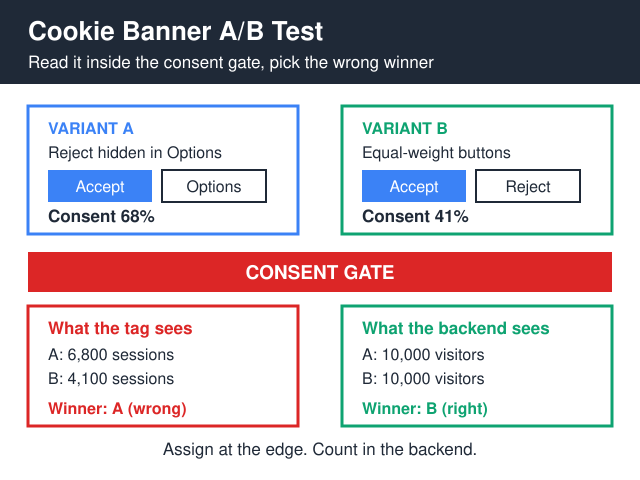
The design that holds up across regimes follows a few principles. Show a single banner on first visit, in the user’s locale-appropriate language, with three or four category toggles. Make “Reject All” and “Accept All” the same visual weight — same size, same color contrast, same position. Avoid pre-ticked boxes anywhere. Block all non-essential scripts before consent, regardless of jurisdiction; the conversion hit in the US is smaller than the legal risk of getting it wrong on an EU edge case.
In the footer of every page, include a permanent “Cookie settings” or “Privacy choices” link that re-opens the banner. Add the “Do Not Sell or Share My Personal Information” link as a separate item in the footer for US users — same destination as Cookie settings if your stack treats opt-out and consent withdrawal as the same operation.
On the server side, listen for the GPC header on every request and treat it as an opt-out signal that overrides defaults. Log every consent event with timestamp, version hash of the banner shown, and the categories chosen. Keep these logs for at least 24 months — long enough to cover GDPR’s “prove consent” requirement and CCPA’s 12-month look-back with margin.
The regulatory direction is clear: dark patterns get fined. A banner where “Accept All” is a green button and “Reject All” is a grey text link buried two clicks deep is non-compliant under GDPR’s “freely given consent” requirement and increasingly under California’s CPRA dark-pattern provisions too. The French CNIL has issued multiple multi-million euro fines specifically for this UX pattern.
Banner-Free Stack as the Easiest Compliance Path
The compliance gymnastics above only kick in because your stack uses cookies that need consent. There’s a simpler path: don’t use them. Several analytics tools today operate without setting any cookies on the visitor’s browser — they work from server-side request signals, anonymized IPs, and short-lived in-memory session identifiers. No cookie, no consent question, no banner. The cleanest reference implementation we’ve seen for a content site is documented here.
This is increasingly how European operators are escaping the regulatory squeeze. A cookieless analytics setup with EU-hosted data and no cross-border transfer can run without a consent banner under most national DPA guidance, because there’s no personal data being processed in the GDPR sense. The trade-off is that you lose user-level identification — no cohorts, no funnels with the same identity across sessions, no precise attribution. For most marketing analytics, this is a fair trade. For ad-tech that depends on individual identifiers, it isn’t. If you’re picking between the two best-known cookieless options for a multi-jurisdiction site, our Fathom compared with Plausible writeup is the right next stop.
If you’re rebuilding your analytics layer, this is the cleanest entry point. Going banner-free recovers the conversion you lose to consent friction while sidestepping the entire GDPR/CCPA banner-design problem.
Frequently Asked Questions
Do I need a cookie banner if my site doesn’t set any cookies?
Generally no, if you genuinely set no cookies and run no other tracking technologies (localStorage, fingerprinting, server-side identifiers tied to the user). You should still publish a privacy notice describing what you do and don’t collect, but a consent banner isn’t required because there’s nothing to consent to. Verify with a network-tab inspection in an incognito window — many sites think they’re cookieless and aren’t because of an embedded font, video, or social widget.
What is the GPC signal and do I have to honor it?
Global Privacy Control is an HTTP header (Sec-GPC: 1) that browsers send when the user has opted out of sale and sharing. California, Colorado, Connecticut, and Texas all require businesses to treat a GPC signal as a valid opt-out request. The technical implementation is checking for the header on every request and flipping your sale/share flag accordingly. Honoring it is good practice everywhere, even where it isn’t legally required, because regulators are watching.
What counts as a “sale” under CCPA if no money changes hands?
CCPA defines sale broadly: any transfer of personal information for “monetary or other valuable consideration.” CPRA added “sharing for cross-context behavioral advertising” as a separate category that’s also opt-outable. In practice, this means running Google Ads, Meta Pixel, LinkedIn Insight Tag, or any retargeting cookie probably counts as sale-or-share even though you’re not invoicing anyone. The regulatory enforcement actions in 2024-2025 have all gone in this direction.
Can I get fined for a banner that defaults to “Accept All”?
Yes, and operators have been. The CNIL fined Google €150 million and Meta €60 million in 2022 specifically because their banners made “Accept All” easier than “Reject All.” The pattern is now treated as a dark pattern under GDPR’s “freely given” consent requirement, and CPRA explicitly prohibits dark patterns in opt-out flows. Equal visual weight on accept and reject is the safe design.
What records do I need to keep to prove consent?
For GDPR purposes: timestamp of the consent event, version of the banner shown (a hash of the policy text works), the categories the user accepted or rejected, and an identifier that links the consent record to the user without itself being PII (a session token or hashed user ID). Most consent management platforms generate a “consent receipt” with this structure. Keep them at least as long as you keep the data you collected under that consent — typically 24-36 months.
What are the actual fines under CCPA?
CCPA fines are $2,500 per unintentional violation and $7,500 per intentional violation, levied per violation, not per investigation. The California Privacy Protection Agency calculates “per violation” by counting affected consumers. A misconfigured opt-out flow that fails for 100,000 California users isn’t one violation; it’s potentially 100,000. Sephora’s $1.2 million settlement in 2022 was the first major enforcement action, and the pace has picked up since.
Bottom Line
GDPR and CCPA both demand respect for user privacy, but they do it through opposite mechanics. GDPR blocks first, asks permission. CCPA permits first, requires a working off-switch. The single biggest mistake operators make is treating these as variations of the same banner — they’re not. The second biggest mistake is geo-targeting the GDPR banner to “EU only,” which doesn’t really work in 2026 and creates more legal exposure than it saves in conversion friction.
The robust pattern is one banner, designed to satisfy the strictest regime, with localized copy and a clean opt-out flow that respects browser signals. The robuster pattern is to skip cookies altogether and run an analytics stack that doesn’t need consent. The first costs you some conversions; the second costs you some attribution precision. Most portfolios end up doing some of both — banner-free for top-of-funnel awareness analytics, consented for the deeper attribution work where you actually need cross-session identity.
Whichever path you take, the days of bolting together a GDPR widget and a “Do Not Sell” link and calling it done are over. Regulators in both Europe and the US are auditing real banner UX now, and the fines are getting bigger.