A cookie banner A/B test breaks in a way ordinary split tests don’t: the thing you’re testing decides whether your measurement tool is allowed to run at all. Show variant A to half your traffic, variant B to the other half, then read the result in a consent-gated analytics tool — and that tool only ever sees the people who clicked Accept. As a result, the variant with the higher consent rate wins by construction. It would win even if it torched revenue.
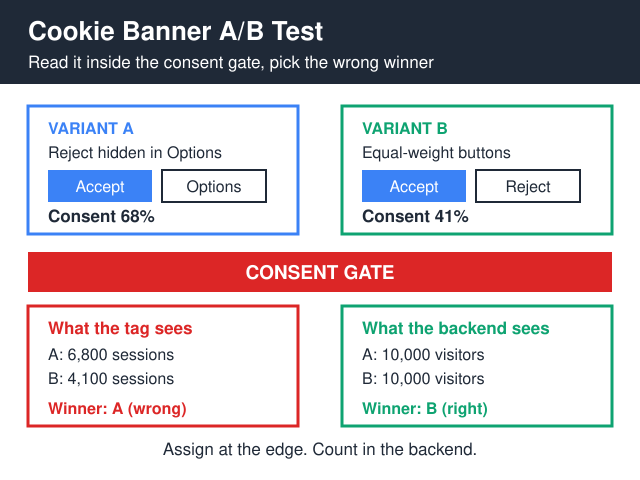
So the playbook comes down to three rules. First, assign the variant at the edge or on the server, before a single line of banner markup renders. Second, count outcomes in a layer that sits outside the consent gate — request logs, a cookieless script, or your own database. Third, define the primary metric as a business outcome per banner impression, never per consented session.
The rest of this playbook is how to do those three things without tripping over the test cookie, your CDN, or a regulator.
Why the consent gate rigs the result
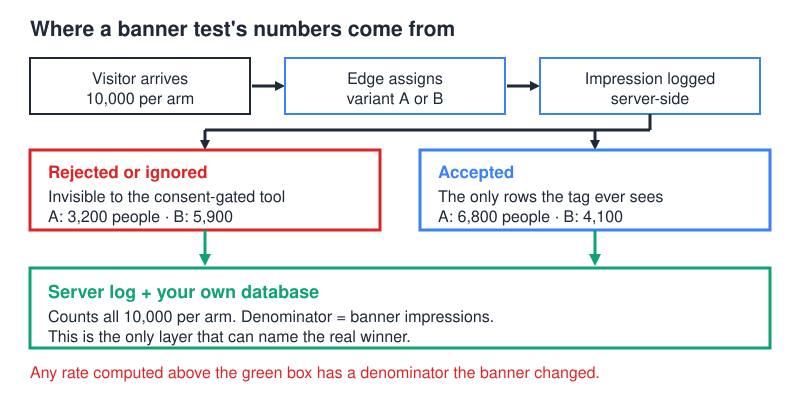
A consent-gated tool fires after analytics_storage is granted. Everyone who rejected, ignored, or scrolled past the banner is invisible to it — not as a missing row, but as a person who never existed in the dataset.
That’s survivorship bias, and it points one way. A pushy banner inflates the population your tool can see; a fair, equal-weight banner shrinks it. Moreover, both effects hit numerator and denominator together, so the ratios look plausible and nothing in the report flags a problem.
Worse, the two survivor populations differ in kind, not just in size. People who accept everything without reading self-selected on their attitude to the banner, and that attitude doesn’t stop at the banner — it colours how they behave on the rest of the site. Consequently you end up comparing two self-selected cohorts and calling it an experiment. No segment or extrapolation fixes that: you can’t reconstruct people the tool never recorded.
If changing the banner changes who is in your dataset, then every rate computed inside that dataset is measuring the banner twice — once in the numerator and once in the denominator.
What to measure, and where it has to be counted
Every metric in a banner test needs a denominator of all eligible visitors, not all tracked sessions. Therefore most of the measurement has to move down a layer.
| Metric | Where it has to be counted | Denominator | Why the tag can’t do it |
|---|---|---|---|
| Banner impressions | Edge worker / server render log | Eligible requests | Nothing fires before a decision is made |
| Accept / Reject / ignore split | CMP event posted server-side | Banner impressions | A dashboard fed by decisions never sees non-deciders |
| First-page exit | Cookieless analytics or log timestamps | All visitors in the bucket | Only accepters appear |
| Signups / orders | Your own database, stamped with the variant | All visitors in the bucket | Post-consent attribution, plus channel loss |
| Revenue per banner impression | Backend, joined on variant ID | Banner impressions | This is the decision metric and it never lives in the tag |
The “ignore” row deserves attention. Some visitors neither accept nor reject — they dismiss the thing mentally and read the page anyway. A consent dashboard that only records decisions cannot tell you how many of those people you have, because a non-decision emits no event. Log the impression separately from the decision, then compute ignores by subtraction. Whether that group turns out to be large or small on your site is a question only your own impression log can answer.
Counting layers you already own
Before building anything new, take stock of the counters that never touch the consent gate. Most sites have three or four already running.
- The request log. Nginx, Apache, or your CDN’s log stream records every hit whether or not anyone consents to anything. Add the assigned variant as a custom log field and you have an impression counter with no client-side code at all.
- Your product database. Signups, trials, and orders are recorded because the business needs them, not because a tag fired. Stamp the variant onto the row at creation time and the join is trivial afterwards.
- Search Console. Google measures impressions and clicks on its own surface, so those numbers don’t move when your banner does. For reference, the Search Console API usage limits allow 2,000 URL Inspection requests per day and 600 per minute per site, and a single Search Analytics query returns at most 25,000 rows, with a default of 1,000. However far back your property’s history runs, it is enough to know your normal weekday shape before you touch anything.
- A cookieless analytics script. Tools that set no identifier and store no device data run for every visitor, which makes them a legitimate second opinion on engagement rather than a replacement for your backend.
Search Console won’t tell you which arm a visitor was in — it has no idea your test exists. It is therefore a guardrail rather than a readout. On a time-sliced rollout, however, a clean fortnight-over-fortnight comparison of clicks and impressions is a useful check that your new banner hasn’t wrecked something structural, such as render-blocking the page or hiding content behind an overlay.
Where does the split happen — and does the test need consent itself?
Bucket at the edge. A Cloudflare Worker, Vercel middleware, Fastly VCL, or plain nginx map can hash something stable-ish and route the request before the HTML is assembled. The variant is decided before the page renders, and the impression log is yours.
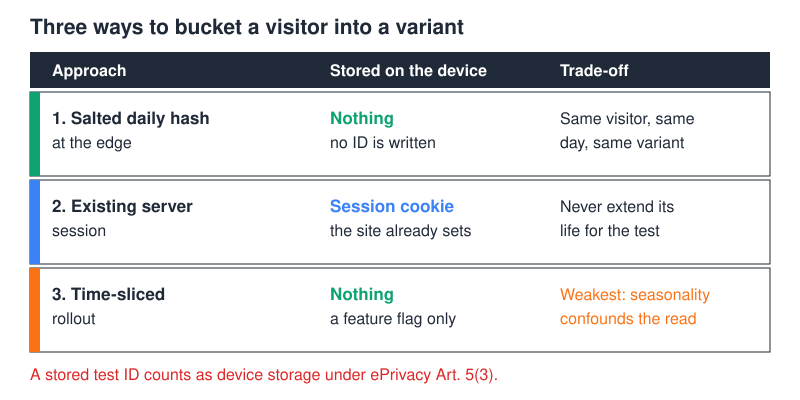
Now the awkward part: storing an A/B assignment on the device is itself storage. The EDPB’s Guidelines 2/2023 on the technical scope of Article 5(3) ePrivacy — Version 2.0, adopted on 7 October 2024 — make the reach of that rule wider than the word “cookie” suggests. It isn’t a rule about cookies. It covers storage of, or access to, information in a user’s terminal equipment by any technical means — local storage, script-initiated reads, and identifiers pulled back out of the browser all sit inside it.
Meanwhile the exemption is narrow: storage strictly necessary to provide a service explicitly requested by the subscriber or user. Read that literally and an experiment is a service you requested, not one the visitor did. In other words, you may need consent in order to test the consent banner. I’m an analytics practitioner, not your lawyer, so confirm the reading with counsel before you ship — but design as if the test identifier is in scope, because unwinding it later is expensive.
Three ways out, in order of how much I like them:
- No stored identifier at all. Derive the bucket at the edge from a rotating daily salt plus IP and user-agent, hashed and never written back. Same visitor, same day, same variant, nothing on the device — the mechanic cookieless analytics already uses for session stitching.
- Session-scoped server state. Keep the assignment in the server session your site already needs to function, without extending its lifetime for the test.
- Time-sliced rollout. Ship variant A for two full weeks, B for the next two, then compare like-for-like weekdays. It’s weaker, since seasonality and campaigns confound it, but it needs nothing beyond a feature flag.
Whatever you pick, both variants have to be legal in the market you’re testing. Running a dark-pattern banner against a compliant one is a good way to find a winner you can’t ship, and the ICO’s guidance on the use of storage and access technologies is a reasonable sanity check for UK traffic before you design either arm. Regime differences are covered in our comparison of GDPR and CCPA banner rules; the pattern-level detail sits in our guide to consent UX patterns that don’t tank conversions.
Why stamping the variant into GA4 doesn’t rescue the read
There’s an obvious-looking shortcut here: push the variant into an event-scoped custom dimension and break every GA4 report by it. Do that if you find it useful, but be clear about what it buys. It makes the tool’s own numbers sliceable by arm. It does not add a single non-consenting visitor to the dataset, because the events carrying that dimension only fire once analytics_storage is granted. You’ve labelled the survivors, not recovered the missing.
Budget the slot, too. Google’s GA4 configuration limits allow 50 event-scoped custom dimensions and 50 event-scoped custom metrics on a standard property. A throwaway experiment dimension is therefore not free — on a property that already registers a lot, the slot has to come out of something else.
The same logic applies to any consent-gated tool, not just Google’s. If the tag needs permission to fire, then permission is a filter on your sample, and a dimension inside the sample can’t describe what the filter removed.
Consent Mode v2 changes the signal, not the sample
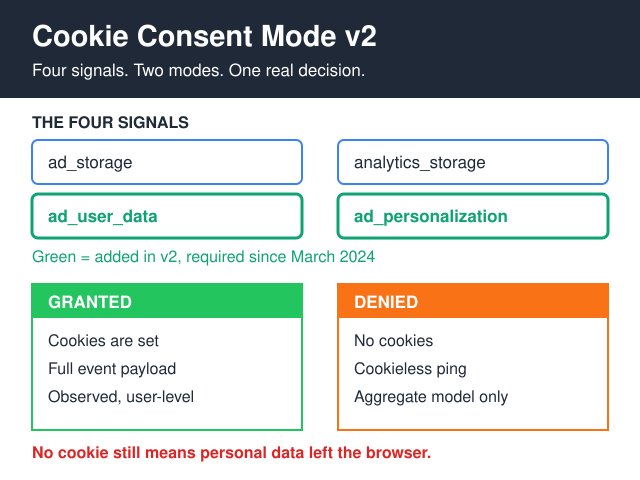
Consent Mode v2 has been required since March 2024 for sites sending EEA traffic into Google’s advertising and measurement products. It adds two signals alongside the existing storage flags: ad_user_data and ad_personalization, both documented in Google’s consent mode setup guide. Skip it and you lose personalisation and remarketing for those users, plus some measurement features — the tags still load, they simply carry a “no” and behave accordingly.
Two things are worth keeping straight, because they get blurred constantly. The EEA requirement rests on EU law. The extension to UK and Swiss users comes from Google’s own EU User Consent Policy — a contractual condition Google places on advertisers, which is a different basis from the Digital Markets Act, and the DMA does not extend to the UK. Merging those two into one sentence produces confident, wrong compliance advice.
For the experiment itself, none of this widens your sample. Consent Mode makes the absence of consent legible to Google and lets Google model around it, but modelling is built from the behaviour of consenting users — which is precisely the variable you’re manipulating between arms. Our explainer on where Consent Mode v2 actually works goes deeper on those limits.
How long do you run the cookie banner A/B test?
Two different questions, two very different answers, and this is where a banner test quietly falls apart. Consent rate is easy to power, because the baseline is huge. Take the standard two-proportion sample-size formula, n = 2 × (zα/2 + zβ)² × p̄(1−p̄) / δ², at 95% confidence and 80% power, so zα/2 = 1.96 and zβ = 0.84.
Substitute a 50% baseline and a 5-percentage-point effect: 2 × 2.80² × 0.25 / 0.05² lands at roughly 1,570 visitors per variant. Tighten the effect to 2 points and the same substitution gives about 9,800. Around a 2% signup baseline, chasing a 10% relative lift — that is, δ = 0.002 — gives on the order of 77,000 per variant. Check my arithmetic, then redo it with your own baseline: these are worked examples of a formula, not benchmarks from anyone’s site.
Conversion rate is a different animal. Reaching 77,000 per arm means about 154,000 bucketed visitors in total, so do that division against your own weekly traffic before you promise anyone a conversion read. Pretending the traffic is there is how teams end up shipping noise. So power the test on consent rate and engaged sessions, and treat revenue per banner impression as a guardrail you check for a large adverse move rather than a metric you expect to call. Finally, run whole weeks — a test that starts on Tuesday and ends on Friday is measuring the day of the week.
A worked read, where the winner flips
The numbers below are illustrative: arithmetic built to show the mechanism, not measurements from a client site. Variant A hides Reject behind a preferences link; B gives both buttons equal weight.
| Measurement | Variant A (Reject buried) | Variant B (equal weight) |
|---|---|---|
| Visitors bucketed at the edge | 10,000 | 10,000 |
| Consent rate | 68% | 41% |
| Sessions visible in the consent-gated tool | 6,800 | 4,100 |
| Signups the tool attributes | 160 | 82 |
| Conversion rate the tool reports | 2.35% | 2.00% |
| Signups in the database | 210 | 232 |
| Signups per bucketed visitor | 2.10% | 2.32% |
Read only the analytics tool and variant A wins twice over: almost double the conversions and a better rate. Read the database and variant B wins by about 10%. Nothing was misconfigured — the tool faithfully reported the population it was permitted to observe.
Notice why the rate flipped as well as the count. In arm B, the people who still click Accept are a smaller and more permissive slice of the audience, and on a privacy-conscious audience the ones who reject can be the more committed buyers. The composition of the visible cohort changed between arms, which is exactly the hazard. Meanwhile the database row is the only one that would survive a rerun at a different consent rate — a decent test, incidentally, for whether any metric belongs in your readout at all.
What voids a cookie banner A/B test
- The CDN serves one variant to everyone. If the variant isn’t in the cache key, a 50/50 split becomes 100/0 on cached pages. Check a cold and a warm hit from two networks before trusting a day of data.
- Bots inflate the impression count. Logs count crawlers, and crawlers never consent. Filter by user-agent and known ranges before computing any rate.
- Returning visitors never see a banner. Anyone with a stored decision skips the experience and dilutes both arms. Exclude them from the denominator, or report first-visit and returning cohorts separately.
- Consent state leaks across variants. Someone bucketed into B who already accepted under A carries the old decision. Version the consent record so a variant change invalidates it.
- Peeking. Every time you look at a running test and allow yourself to stop, you give the data another chance to cross the threshold by luck, so the real false-positive rate drifts above the nominal 5%. Fix the sample size up front and leave the decision metric alone until you hit it.
- The arms differ in more than the banner. A variant that also changes page weight, layout shift, or above-the-fold content is testing several things at once. Diff the rendered HTML of both arms before launch.
Frequently asked questions
Can I run a cookie banner A/B test in GA4 with Consent Mode?
Not as your measurement layer. Modelled conversions are estimates built from the behaviour of consenting users — precisely the variable you’re changing between arms, so the model is trained on the thing under test. For the experiment, count in the backend and use GA4 for context.
Does the A/B test cookie itself need consent?
Assume yes in the EU/EEA and UK, because testing serves the site operator rather than the visitor and so sits outside the strictly-necessary exemption in Article 5(3). The workable answer is to store nothing on the device: hash a bucket at the edge from a rotating salt, and the question never arises.
What if the winning variant has a lower consent rate?
That’s the expected outcome of a well-measured test, and it’s the whole reason to run one. Consent rate is an input, not a business result. If equal-weight buttons cut consent from 68% to 41% while raising signups per bucketed visitor, as in the illustration above, the cheaper analytics data was never worth the conversions it cost.
Can I test on one market only?
Yes, and often you must. Requirements differ by jurisdiction, so an EU-only test with an EU-only readout beats a global average that blends populations with different legal exposure. Bucket on the geo signal your CDN already resolves.
How do I stop the test if a variant is clearly harming revenue?
Define the stop rule before launch: a named guardrail metric, a threshold, and a person who can pull the flag without a meeting. Guardrails are allowed to be checked continuously — that’s what makes them guardrails — as long as the primary decision metric stays sealed until the planned sample lands.
Is there a version of this test with no banner arm at all?
There is, and it’s the one worth running first: no banner versus your current banner, on a stack that doesn’t set cookies. It removes the consent gate instead of optimising it, which also removes the measurement problem — every visitor is countable. We’ve written up the cases where this is legally available in when you don’t need a cookie banner.
Where to start
Before designing a single variant, build the counting layer. Stamp an edge-assigned variant ID onto your request log, join it to your signup or order table, and confirm you can reproduce yesterday’s totals from that join alone. If they don’t reconcile, no banner test will mean anything — and if they do, you’ve built the measurement backbone for every other experiment on the site.
A short pre-flight, in order:
- Reconcile the log-to-database join against a known day.
- Confirm the variant is part of the CDN cache key.
- Decide the primary metric, the guardrail, and the sample size, and write them down before launch.
- Check both arms are shippable in the market you’re testing.
- Start on a Monday and run whole weeks.
Ultimately, a cookie banner A/B test is a measurement problem wearing an optimisation costume. Get the counting layer right and the design questions become easy; get it wrong and every subsequent decision inherits the same bias. The uncomfortable results are usually the true ones.