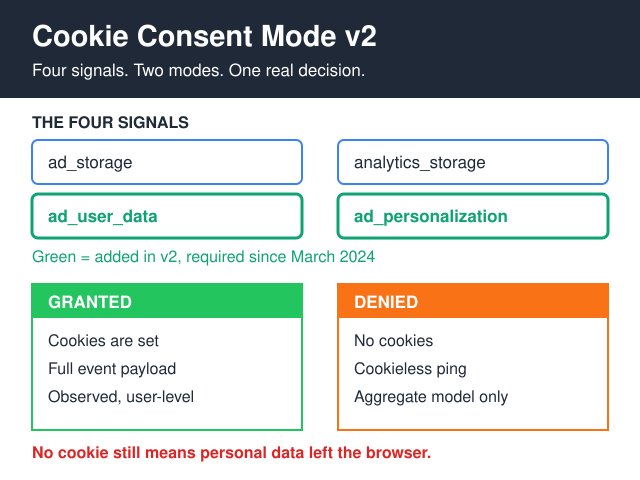
Cookie Consent Mode v2 is Google’s workaround for the fact that most European visitors say no. Instead of blocking its tags outright when consent is denied, Google fires them in a stripped state, sends cookieless pings, and rebuilds the missing conversions statistically. Since March 2024 it hasn’t been optional for advertisers reaching European users: you send two new signals — ad_user_data and ad_personalization — alongside the original ad_storage and analytics_storage, or you lose personalisation, remarketing and a slice of measurement for those users.
Here’s the part the CMP vendors skip. It only pays off in advanced mode, and advanced mode only pays off once your traffic clears Google’s modelling thresholds. Below them you get the same undercount you had before, plus a consent integration to maintain. Moreover, it does nothing for your legal position — a cookieless ping still ships an IP address to Google.
Worth the setup if you spend real money on Google Ads. Pure overhead if you don’t.
What actually changed in v2
Version 1 carried two signals that mattered for measurement. Version 2 added two more, then made the full set a condition of using Google’s advertising products. Two different rulebooks drive that, and most explainers mash them together.
For the EEA, the pressure came from the Digital Markets Act, which requires designated gatekeepers to obtain consent before combining personal data across their services. For the UK and Switzerland, the requirement comes from Google’s own EU user consent policy, which obliges you to obtain consent from “end users in the European Economic Area, the UK and Switzerland” both for cookies and for the collection of personal data used to personalise ads. The DMA doesn’t reach the UK. The commercial obligation does anyway, because Google wrote it into its advertiser terms. Different basis, same practical outcome — and worth keeping straight when someone asks you which law forces this.
Nothing about the transport layer changed. What changed is that Google now needs you to state, explicitly, whether it may use the data for advertising at all.
| Signal | Controls | New in v2 |
|---|---|---|
ad_storage |
Advertising cookies and device identifiers | No |
analytics_storage |
Analytics cookies, including the GA4 client ID | No |
ad_user_data |
Whether user data may be sent to Google for advertising | Yes |
ad_personalization |
Whether the data may fuel personalised ads and remarketing | Yes |
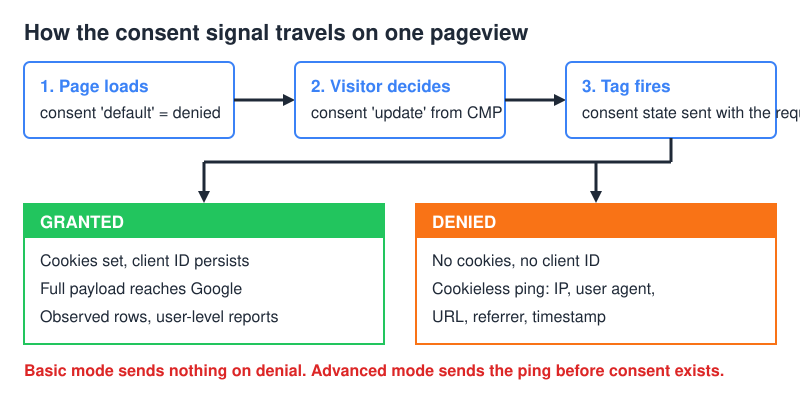
Mechanically it’s two calls. Your page sets a default state before any Google tag loads, and your consent banner sends an update the moment the visitor decides:
gtag('consent', 'default', { ad_storage: 'denied', analytics_storage: 'denied', ad_user_data: 'denied', ad_personalization: 'denied', wait_for_update: 500 });
Two parameters deserve attention, because most implementations ignore them. wait_for_update holds the tag for a few hundred milliseconds so an async CMP has time to answer. region scopes defaults geographically, so you can run denied-by-default for the EEA and granted elsewhere without shipping two tag configs. Both are documented in Google’s consent mode implementation guide.
Two more you’ll meet later. ads_data_redaction strips ad-click identifiers from pings while ad_storage is denied. url_passthrough carries gclid through your URLs as a query parameter, so click attribution survives a page hop without cookies.
Basic or advanced? That’s the whole decision
Everything else is plumbing. This is the fork that determines whether you get anything back at all.
| Basic mode | Advanced mode | |
|---|---|---|
| When Google tags load | Only after consent is granted | On page load, in a restricted state |
| What a denial sends | Nothing | Cookieless ping: IP, user agent, URL, referrer, timestamp |
| Conversion modelling | Not available | Available, if thresholds are met |
| GA4 behavioural modelling | No | Yes, if thresholds are met |
| Data you actually see | Consenting users only | Consenting users plus modelled estimates |
| Regulatory exposure | Lower — no pre-consent request to Google | Higher — a request leaves the browser before consent |
| Sensible for | Sites with no meaningful Google Ads spend | Advertisers with EEA volume above the modelling floor |
Most consent platforms ship basic mode and label it “Consent Mode v2 enabled” in the dashboard, which is technically true and practically useless. Therefore, if nobody deliberately chose advanced, assume you’re in basic and getting zero modelled data. The dashboard toggle confirms that a signal exists, not that anything useful happens with it.
Where do the modelled numbers come from?
Modelling is not recovery. Google doesn’t reconstruct the visitor who refused. Instead, it observes the behaviour of consenting users, learns the ratio between pings and conversions, then applies that ratio to the denied population. The output is an aggregate estimate, printed in your reports next to observed data and not distinguishable from it at a glance.
That estimate needs training data, which is where the thresholds bite. Google gates both conversion modelling and GA4 behavioural modelling behind minimum traffic volumes, and it doesn’t commit to a fixed floor you can design against. Consequently, the number matters less than the shape of your traffic. A site with solid European volume concentrated in two markets can clear the floor in both. The same traffic spread thinly across eleven markets clears it nowhere, and the reports look identical to a site with no modelling configured at all.
Three consequences catch people out:
- Modelled data is report-layer only. Your BigQuery export contains observed events. If your reporting runs off the warehouse, modelling is invisible to you, and your GA4 interface numbers will never reconcile with your own dashboards.
- You can’t segment it at user level. There is no modelled user to inspect, no path exploration to open, no cohort to retarget. You get totals, and totals only.
- It’s neither retroactive nor stable. Drop below threshold for a stretch and the modelled portion vanishes from those days, which shows up as a cliff that looks exactly like a tracking outage.
That third point causes more panic than anything else in this stack. Before you tear apart a container looking for a broken tag, check whether the affected days simply fell under the floor.
Log the consent state before you argue about the model
Modelled totals are opaque by design, so build a control number you own. Write the consent state into every event — granted, denied, or still unknown at the moment the event fired — and register it in GA4 as an event-scoped custom dimension. Suddenly you can chart your denial rate by day, by landing page, by country, and by device, using observed data rather than an estimate.
That single dimension answers questions the modelled reports can’t. Is the denial rate genuinely that high, or is the banner failing to load on mobile Safari? Did the rate jump on the day marketing shipped a new template? When a rendering bug is behind it, the shape gives it away: denials pile up in one browser or on one template and stay normal everywhere else.
Budget the slot deliberately, though. Google’s GA4 configuration limits allow 50 event-scoped custom dimensions and 50 event-scoped custom metrics on a standard property, so consent state costs you one slot out of fifty. Name it properly the first time.
One caveat worth stating plainly. This dimension records what the page believed at hit time, which is not the same as what the user intended, and in basic mode denied users send no hit at all — so there’s nothing to tag. If your consent dimension shows almost no denials, check which mode you’re actually running before you celebrate.
Five ways I’ve watched it break
- Default state fires after the tag. The CMP loads async, the Google tag wins the race, and your first pageview goes out fully granted. Check the network tab: the collect request carries a
gcsparameter that encodes the consent state at the moment of the hit — in debugging you’ll seeG100where both storage types are denied andG111where both are granted. Google doesn’t publish that encoding, so treat it as an observation you can reproduce, not a documented contract. - Basic mode shipped as advanced. Nobody flipped the switch in the CMP, so denied users send nothing, so there’s nothing to model from. The dashboard still says v2 is enabled.
- The stored decision isn’t replayed. The banner writes consent correctly on page one and forgets to push an update on page two, so returning visitors are treated as denied forever and your denial rate looks catastrophic.
- Non-Google tags ignore the whole thing. Consent Mode governs Google’s tags. Meta, LinkedIn, Hotjar and the rest need their own gating, and a container that blocks Google but not the others is a compliance gap with a green dashboard.
- Server-side GTM used as a laundry. Moving the endpoint to your own subdomain doesn’t change who receives the data or on what basis. The consent signal still has to travel with it — see our breakdown of server-side versus client-side tracking for what that architecture does and doesn’t buy you.
Does Cookie Consent Mode v2 make you compliant?
No, and it was never designed to. Consent Mode is an instruction to Google about how it may use data it has already received. In advanced mode, the cookieless ping leaves the browser before the visitor has agreed to anything, carrying IP address, user agent, page URL and referrer to Google’s infrastructure. Under GDPR that’s processing personal data, cookie or no cookie.
The regulatory reading on this is published, not folklore. In its Guidelines 2/2023 on the technical scope of Article 5(3) of the ePrivacy Directive (Version 2.0, adopted on 7 October 2024), the EDPB treats the consent requirement as attaching to “gaining access” and to “storage of information” on the user’s terminal equipment, then applies that analysis to techniques well beyond cookies — URL and pixel tracking, tracking based on IP only, unique identifiers. Read it once yourself; it’s shorter than most vendor whitepapers and considerably more useful.
Practical translation: Cookie Consent Mode v2 presumes a banner, it doesn’t replace one. If you were hoping it would let you drop the modal, read our decision tree on strictly necessary versus analytics cookies first — analytics never qualifies for the exemption, whichever vendor collects it.
What you can still measure when consent is denied
Losing a chunk of your visitors to a “reject all” click feels like flying blind. It isn’t, because several measurement surfaces never touched the visitor’s browser in the first place and therefore never needed consent at all.
Search Console is the obvious one. It reports on Google’s side of the interaction — impressions, clicks, positions, indexing status — with no tag on your pages and no identifier on your users. If you pull it programmatically, Google’s Search Console API limits define the working envelope: URL Inspection allows 2,000 queries per day and 600 per minute per site. The Search Analytics query reference caps a single request at 25,000 rows and defaults to 1,000, which is the detail that quietly truncates most first attempts. History is finite too — the window is the one Search Console states in its own help, not one you get to choose. That’s a substantial reporting layer sitting outside the consent question entirely.
Server logs are the second. Every request hits your infrastructure regardless of what the banner says, so bot traffic, response codes, redirect chains and crawl behaviour are all fully observable. Logs won’t give you funnels, but they will tell you whether a page is being requested and whether it’s answering.
Third, and most direct: a cookieless analytics tool sets no identifier, so there’s nothing to consent to and nothing to model. You lose cross-session identity and you lose Google Ads conversion import. In exchange, every number in the interface is a number someone actually generated.
When Google’s hack earns its keep
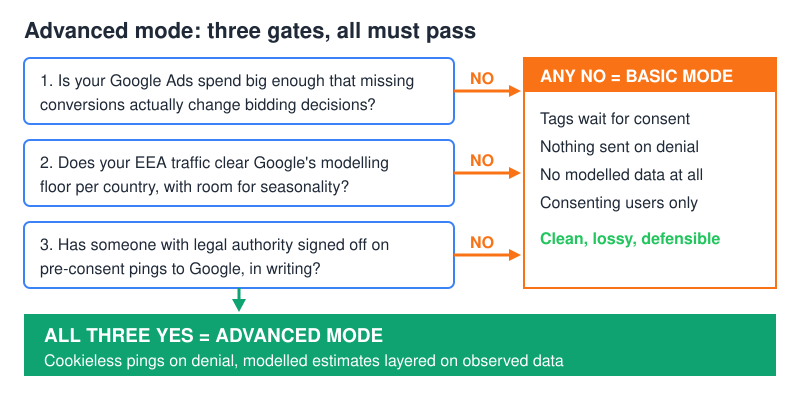
Advanced mode is worth building when all three of these hold:
- You spend enough on Google Ads that a missing chunk of conversions actually changes bidding decisions.
- Your EEA traffic comfortably clears the modelling floor, with headroom for seasonality.
- Someone with legal authority has signed off on pre-consent pings to Google, in writing.
Miss any one and the honest options narrow faster than the vendor pitch suggests. Basic mode keeps you clean and lossy: fewer numbers, no pre-consent request, nothing to explain to a regulator. Alternatively, you leave the Google measurement stack entirely, at which point Cookie Consent Mode v2 stops being your problem — there’s no consent to collect, no ping to justify, and no model to trust. That’s the trade I take on most small and mid-size sites.
The middle path is the expensive one: advanced mode running below the modelling floor, with all of the exposure and none of the recovered data. That configuration is more common than anyone admits, precisely because the dashboard gives no signal that it’s happening.
FAQ
Is Cookie Consent Mode v2 mandatory?
For advertisers serving European users through Google Ads, effectively yes — since March 2024, without the two new signals you lose remarketing lists and audience features. For a site that runs no Google advertising, it’s optional, and basic mode is a legitimate choice.
What’s the difference between basic and advanced Consent Mode?
Basic blocks Google tags until consent is granted, so a denial produces no data at all. Advanced loads the tags immediately in a restricted state and sends cookieless pings on denial, which is what makes conversion and behavioural modelling possible in the first place.
Will I still lose data with Consent Mode v2?
Yes. Modelled numbers are estimates layered on top of observed data, they only appear above Google’s volume thresholds, and they never reach your BigQuery export or user-level reports. Expect a permanent gap between the GA4 interface and anything you build yourself.
Can Consent Mode replace my cookie banner?
No. It reads a consent decision, it doesn’t obtain one. You still need a compliant banner — and if you’d rather not run one, our list of cases where a banner isn’t required covers the legitimate routes out.
Does Consent Mode v2 apply to non-Google tools?
Only if you wire it up. The consent state is available to other tags in Google Tag Manager, but Meta, LinkedIn, Hotjar and friends won’t honour it on their own. Each one needs explicit gating.
How do I check which mode my site is running?
Open the network tab, load the site fresh, and reject everything. If a request to Google still fires after the rejection, you’re in advanced mode. If nothing fires at all, you’re in basic — regardless of what the CMP dashboard claims.
What I’d do next
Open a fresh incognito window, load your site, and watch the network tab before you touch the banner. If a Google request fires with consent granted, your default state is losing the race and every other number in this article is moot. Fix the ordering first. Then decide between basic and advanced on the strength of your ad spend — not on what your CMP dashboard claims is enabled.
And if that audit turns into a week of tag archaeology, that’s a signal too. The move off GA4 takes the whole consent stack with it.