Most discussions about “first-party tracking” collapse two different things into one phrase. There’s first-party data, which describes whose servers a request hits. And there’s the cookieless posture, which describes what identifiers (if any) you store on the visitor’s device. You can do first-party with cookies, without cookies, with persistent IDs, without persistent IDs, on your own server, or at the edge. The mechanism matters more than the marketing label.
This piece walks through the actual moving parts. What gets sent where. What the browser allows. What you give up when you stop riding on Google’s or Meta’s tracking infrastructure. And — because audits keep surfacing the same five mistakes — what to avoid when you reorganise around it. For the broader picture of where first-party fits, see the privacy-friendly analytics guide.
First-Party vs Third-Party: The Distinction Most Sites Get Wrong
The line is drawn by the request’s destination, not by who wrote the JavaScript. If a script on your domain sends a beacon to example.com/api/event, that’s first-party regardless of whether the script came from your CMS, a vendor’s CDN, or a tag manager. If the same script sends a beacon to vendor-collector.io, that’s third-party — even if the vendor calls their product “first-party analytics” in the marketing copy.
| Aspect | First-party | Third-party |
|---|---|---|
| Request destination | Your domain (or a subdomain you control) | External vendor domain |
| Cookie scope | Set by your domain, readable only by you | Set by external domain, blocked by Safari/Firefox by default |
| Browser blocking | Usually allowed; ITP caps lifespan to 7 days for some cookies | Blocked by default in Safari (ITP), Firefox (ETP), Brave |
| Cross-site tracking | Impossible without coordination | The whole point |
| Consent under GDPR/ePrivacy | Still required if it identifies a person, but the legal basis is cleaner | Almost always requires explicit consent |
| Ad blocker susceptibility | Lower (no shared blocklists) | High (filter lists target known vendors) |
| Data ownership | You hold the raw events | Vendor holds the raw events; you hold a dashboard |
| Vendor lock-in | Low; you can change the receiver | High; replacing the vendor means losing history |
The trap most sites fall into: they install a “first-party mode” feature from a third-party vendor, assume they’ve solved the problem, and never look at the actual network requests. The DevTools waterfall doesn’t lie. Open it, filter for “Other” or “XHR”, and watch where the beacons go.
What Counts as First-Party Data
Three sources qualify as genuinely first-party:
Server logs. Every HTTP request to your server is logged by default. Nginx, Apache, Caddy, your CDN’s edge logs, your application framework’s access logs — they all record the URL, method, status, user agent, and IP. This is the oldest form of first-party data. It existed before JavaScript was invented. The drawback is that it’s noisy: bots, prefetchers, asset requests, monitoring pings. But it’s also tamper-proof in a way that client-side beacons aren’t.
Authenticated events. When a logged-in user clicks a button or submits a form, your application already knows who they are. Recording that interaction in your own database — without bouncing it through any analytics service — is first-party by definition. Most teams don’t think of this as “tracking” because it’s product telemetry, but for analytics purposes it’s the highest-confidence source you have.
Page-view beacons sent to your own domain. A small script on your site fires a request to yourdomain.com/_collect when a page loads. The receiver is something you control: a Cloudflare Worker, a tiny Express endpoint, a self-hosted Plausible instance, a server-side GTM container. That’s the third class — and it’s the one most teams mean when they say “first-party tracking.”
The Four Mechanisms of Cookieless First-Party Tracking
Strip away the vendor branding and there are four underlying patterns. Most products combine two or three.
1. Server logs as the source of truth
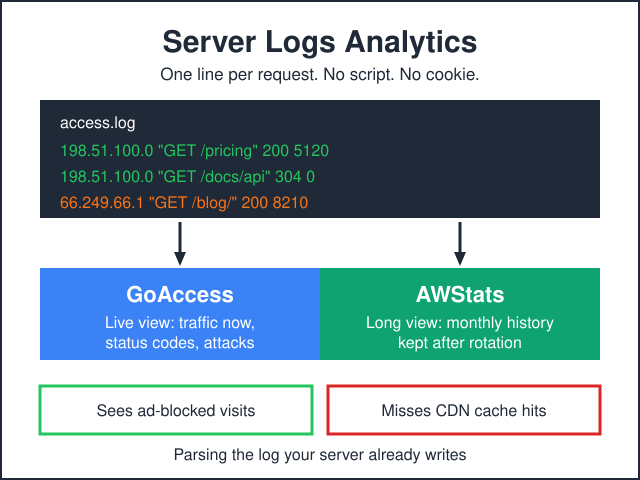
You parse access logs (or stream them through something like GoAccess, Matomo log analyzer, or a custom pipeline) and build sessions from IP + user agent + time-window heuristics. No JavaScript needed. No cookies. No consent banner required in most jurisdictions, because you’re not storing identifiers on the device. The sessionisation is approximate — two visitors on the same office IP look like one — but for traffic-trend purposes, it’s defensible.
2. Edge tracking
A worker at the CDN edge (Cloudflare Workers, Fastly Compute, Vercel Edge Functions, Edgee) intercepts every request and writes a structured event before forwarding to origin. The visitor’s browser never sees a tracker. The edge has full request context: URL, referrer, country, device class. It can hash the IP for sessionisation without storing the raw value. This is the cleanest implementation in privacy terms because the data never leaves your infrastructure perimeter.
3. Session-keyed first-party cookies
You set a cookie under your domain — _session_id=abc123 — that lives for the duration of a browsing session. It isn’t a stable identifier across sessions. It just lets you stitch page views within a single visit. Plausible, Fathom, and the cookieless modes of Matomo and Umami all do versions of this with hash-based daily-rotating IDs instead of explicit cookies. The principle is the same: identify the session without identifying the person. If you want to see the deployment story for the most popular self-hosted option, the dedicated Umami profile walks through it.
There’s a sub-flavour of this with persistent identifiers — a cookie that lives 30 or 90 days and lets you compute returning-visitor metrics. That’s still first-party, but it crosses into territory where consent rules apply more strictly. The PII in web analytics guide has the practical line on what triggers what.
4. HTTP-only beacon
The strictest pattern. A small endpoint on your domain receives POST /event requests with a JSON body. No cookies set, no IDs assigned, no client-side state. Each request is independent. You compute aggregate metrics from the stream — page views per URL, referrer breakdown, country distribution — and never reconstruct individual journeys. This is what GDPR-friendly analytics tools like the privacy modes of Plausible and Fathom default to.
Browser Restrictions That Forced This Shift
None of this would matter if browsers still let third-party cookies roam freely. They don’t.
| Browser / Year | Restriction | What it broke |
|---|---|---|
| Safari 11 (2017) | ITP 1.0 — third-party cookies blocked after 24h of inactivity | Cross-site retargeting on iOS / macOS |
| Safari 12 (2018) | ITP 2.0 — third-party cookies blocked entirely; some first-party cookies (set via document.cookie) capped at 7 days | Long attribution windows on Safari |
| Firefox 69 (2019) | ETP enabled by default — known trackers blocked using Disconnect list | Vendor scripts unable to set cookies for many users |
| Safari 14 (2020) | Storage Access API required for any cross-site cookie access | Embedded widgets that needed authentication state |
| Brave (since launch) | Aggressive third-party blocking, fingerprinting randomisation | Most analytics by default |
| Chrome (2024-2025) | Privacy Sandbox; third-party cookie deprecation paused but Topics / Attribution Reporting introduced as replacements | The replacement timeline keeps shifting; first-party became the safe bet |
| Firefox 103 (2022) | Total Cookie Protection — cookies partitioned per top-level site | Cross-site state even when “allowed” |
Chrome’s repeated delays to third-party cookie deprecation gave a lot of teams an excuse to wait. The teams that audited their actual Safari + Firefox traffic share usually realised half their visitors were already on cookieless browsers. The court rulings in Europe — covered in why cookieless is becoming standard in Europe — closed the legal escape hatch for the rest.
First-Party Cookies vs No Cookies at All
These are different postures with different consequences. A first-party cookie is still a stored identifier. Under GDPR / ePrivacy, storing or reading information on a user’s device requires consent unless the storage is “strictly necessary” for the service the user explicitly requested. Analytics cookies — even first-party ones — generally don’t pass that test. So a first-party-cookie analytics setup still needs a consent banner in the EU, even though it dodges the cross-site-tracking concerns.
A no-cookie setup that derives sessions from request hashes (rotating salt, hashed IP + user agent, daily expiry) avoids storing anything on the device. That’s the basis on which Plausible and Fathom argue they don’t need consent banners in most EU jurisdictions. Local regulators have largely accepted this for the strict-aggregate cases. Edge cases — a returning-visitor metric, a 30-day cohort report — pull you back into territory where consent applies. The consent banner conversion piece covers the practical impact when you do need one.
How Plausible and Fathom Implement First-Party
Both products ship a small (1-2 KB) JavaScript file you load from their CDN. By default it sends events to their domain — which is technically third-party, but the script doesn’t set any cookies and the events don’t carry persistent IDs. So it’s third-party in network terms, first-party in data terms.
The genuine first-party mode is the proxy setup. You serve the script from your own domain (a CNAME or a reverse-proxy route) and the events post back to your domain too. The vendor sees the data but every request the browser makes goes only to your hostname. Ad blockers can’t filter it because there’s nothing distinctive in the URL pattern. Safari’s ITP doesn’t kick in because nothing’s third-party.
The Plausible review covers their proxy options in detail, and the analytics alternatives roundup compares how each vendor handles the proxy story — most of them now offer something equivalent. For teams choosing between the two leading self-hosted privacy tools, our Matomo compared with Umami piece weighs the proxy-and-self-host story against ops burden.
Server-Side First-Party Tracking
The heavier setups move all tag execution off the browser. Instead of loading 8 vendor scripts that each send beacons, the page loads one tiny script that posts to your endpoint, and your endpoint relays to whichever vendors you’ve configured.
Plausible Proxy. Lightest option. A reverse-proxy rule that maps /js/script.js and /api/event to Plausible’s domain. Five lines of nginx config or a Cloudflare Worker. No infrastructure to maintain.
Google Tag Manager Server-Side. The mainstream choice. You run a GTM Server container in App Engine or Cloud Run; client tags fire to your collect.yourdomain.com endpoint; server tags forward enriched events to GA4, Meta CAPI, TikTok, etc. Cost: $30-150/month depending on volume. The complexity is real — you’re operating a small data pipeline — but the privacy and ad-blocker resilience are substantial.
Edgee. Newer entrant. Runs at the CDN edge. The pitch is “all tags execute server-side at the edge with no infrastructure.” Compelling for teams that don’t want to operate GTM SS.
Stape. Hosted GTM Server-Side. Same idea but they run the container for you. Lower operational burden, slightly less control.
Server-side first-party doesn’t change the data model — you still need consent for whatever you ultimately store. It changes what the browser sees, what ad blockers can intercept, and what survives Safari’s storage purges. For traffic measurement specifically, the traffic-without-creeping piece has setup-by-setup guidance.
What You Lose Going First-Party Only
The honest list. None of these are deal-breakers for most sites, but pretending they don’t exist sets up bad surprises later.
Cross-site retargeting. If you can’t set or read a cookie on someone else’s domain, you can’t follow them around the web with display ads. The Privacy Sandbox’s Topics API is the proposed Chrome replacement, but it’s coarser than what advertisers used before. For a B2C site that depends on retargeted Facebook ads, this is the biggest hit.
Look-alike audiences. Same root cause. Building a look-alike requires sharing user identifiers with the ad network. If you’re not setting third-party cookies and not sending hashed emails to Conversions API, the network has nothing to match on.
Long attribution windows. A 30-day click attribution requires a stable identifier that survives 30 days. Without it, you’re stuck with same-session attribution or coarse aggregate methods (modelled conversions, marketing mix modelling). For most paid-acquisition teams, this is the change that stings most.
Cross-device journeys. Connecting “user clicked an email on phone, bought on laptop” requires a deterministic ID — usually a logged-in user. Cookieless first-party can’t do probabilistic cross-device. The cross-device identity piece walks through what’s still possible.
Some click-fraud and bot signals. Third-party fraud detection vendors rely on cross-site fingerprinting. Without it, your bot filtering is whatever your own server logs and edge layer can detect.
What You Gain
Speed. A 1 KB first-party script versus 80 KB of vendor JavaScript is real. Page weight drops, third-party connection counts drop, INP and LCP usually improve. For a content site this often translates directly into ranking and conversion lift.
Privacy posture. “We don’t share visitor data with third parties” is a defensible statement when it’s true. Privacy policies become shorter and more honest. DPIAs become easier.
Fewer banners. A cookieless first-party setup may not need a consent banner at all in many EU jurisdictions, or may need only a minimal banner (no buttons to choose between). Banner removal alone often recovers 5-15% of pageview-based metrics that were lost to people clicking “reject all”.
Resilience. Ad blocker share is 30-45% on tech audiences. Filter lists target known third-party domains. First-party endpoints under your own hostname don’t appear on those lists.
Future-proofing. Whatever Chrome decides about Privacy Sandbox, whatever EU rulings come next, a setup that doesn’t depend on cross-site state is robust by default. The migration cost is paid once.
Implementation Patterns
Three concrete setups, in increasing order of effort and capability.
| Pattern | What it gives you | What it doesn’t | Setup time |
|---|---|---|---|
| Minimal: server logs + Plausible proxy | Page views, referrers, countries, top pages — cookieless, no banner needed | Conversions tracking, custom events, ad attribution | 1-2 hours |
| Intermediate: Plausible proxy + custom events + auth-event logging | Above + form submissions, signups, downloads — still cookieless | Marketing-channel attribution beyond first-touch referrer | 1 day |
| Full server-side: GTM SS + GA4 first-party + CAPI | Full event model, ad-platform conversions, ITP-resilient cookies | True cookieless posture (you’re back to consent banners) | 1-2 weeks |
| Hybrid: Plausible for analytics + GTM SS for paid conversion only | Best of both — clean analytics, conversions where they’re needed | Two systems to operate | 1 week |
The hybrid is what I usually recommend for sites that have meaningful paid spend. Run Plausible (or Fathom, or Matomo cookieless) as the source of truth for traffic. Run a thin GTM Server-Side container that only fires conversion events to ad platforms — and only after consent. Two systems, but each one does one job cleanly.
Mistakes I See in Audits
1. “First-party mode” without checking the network tab. Vendors slap “first-party” on settings that still send beacons to vendor domains. The DevTools waterfall is the only check that matters.
2. Forgetting the consent layer applies to first-party cookies too. First-party isn’t a magic word that eliminates GDPR. If you’re storing identifiers on the device, you need a basis. The privacy-friendly analytics guide walks through which patterns avoid this and which don’t.
3. Loading the proxy script through a tag manager that’s still third-party. If your page loads googletagmanager.com/gtm.js, that’s a third-party request before any of your “first-party” tags fire. Server-side GTM solves this; pure client-side GTM doesn’t.
4. CNAME cloaking caught by Safari and ad blockers. Pointing analytics.yourdomain.com at vendor-collector.io via CNAME used to be the standard cloak. Safari ITP detects this since 2020 and treats the cookies as third-party. Ad blockers added CNAME-uncloaking rules around the same time. Use a true reverse proxy, not a CNAME.
5. Hashing IPs and calling it anonymous. A hash is reversible by anyone with the same algorithm and the candidate IP space (which is small enough to brute-force). Salting helps but only if the salt rotates. The data is still personal data under GDPR even if you call it anonymous internally.
Frequently Asked Questions
Is first-party tracking legal everywhere?
Tracking is legal everywhere. The constraints are on storing identifiers and processing personal data. First-party tracking that doesn’t store identifiers and doesn’t process personal data is the easiest case to defend in any jurisdiction. First-party with cookies is legal but consent-dependent in the EU, UK, and increasingly California. Outside those, rules are looser.
Do I still need a consent banner?
If you store anything on the visitor’s device that isn’t strictly necessary for the service requested — yes, in the EU. If you don’t store anything (no cookies, no localStorage, no IndexedDB), most EU regulators have accepted that no banner is needed. Always check your specific national guidance; CNIL (France) and Garante (Italy) have been the strictest.
What about GA4’s first-party mode?
GA4 calls its server-side variant “first-party mode” but events still ultimately reach Google’s servers. The browser sees only your domain, which is the privacy-and-blocking benefit. The legal question — does data still go to Google — answers itself. Treat GA4 first-party mode as ITP-resilience, not as a privacy posture change.
How much does server-side tracking cost?
Self-hosted GTM Server-Side on Google Cloud Run: $30-80/month for typical traffic, more for high-volume sites. Hosted (Stape, Addingwell): $50-300/month depending on plan. Plausible proxy: free if you already use a CDN with workers. Edgee: usage-based, similar range to GTM SS hosted.
Can I switch from GA4 to first-party without losing history?
You can’t migrate raw event history out of GA4 to most alternatives, no. What you can do is run both in parallel for a quarter, learn the new tool’s metrics on real traffic, and then switch primary reporting. Keep GA4 in BigQuery export so the historical raw data remains queryable. The analytics alternatives roundup covers which tools have the best migration story.
Does first-party tracking work with my tag manager?
Yes, but the tag manager itself needs to be first-party for the chain to be clean. Client-side GTM loads from googletagmanager.com — third-party. Server-side GTM serves from your domain — first-party. Same tool, two postures. If you’re keeping client-side GTM, accept that it’s a third-party request and weigh whether the rest of your “first-party” effort is doing useful work.
What about fingerprinting as a cookieless alternative?
Fingerprinting (canvas, fonts, hardware features) creates stable identifiers without any cookie. Browsers actively fight it: Safari randomises canvas output, Firefox blocks known fingerprinting libraries, Brave randomises broadly. Regulators treat fingerprinting as worse than cookies because users can’t clear it. Don’t do it.
Bottom Line
First-party tracking isn’t a single technique. It’s a posture you assemble from server logs, edge workers, your own JavaScript on your own domain, and — when you need them — server-side relays to whichever ad and analytics platforms you can’t avoid. The four mechanisms (logs, edge, session-keyed cookies, beacon-only) cover almost every implementation in the wild.
What you give up is mostly cross-site retargeting and long attribution windows. What you gain is speed, privacy posture, fewer banners, and resilience to whatever the browsers and regulators do next. The migration is once. The benefits compound. Most of the audit-time mistakes are unforced — checking the network tab once a quarter catches them all.