A cookieless analytics stack isn’t one tool pretending to be Google Analytics. It’s seven layers, each answering a different question, and none of them writing an identifier to the visitor’s device. Page traffic comes from one lightweight script — Plausible, Umami, or GoatCounter. Server logs catch everything the script never sees. Search Console owns your query data, because nothing else has it. Events and funnels run through a cookieless-configured Matomo or PostHog. Speed data arrives from real visitors via Google’s web-vitals library. Heatmaps sit at layer six, optional, and they’re the first thing I’d cut. Your own database closes the loop on revenue, since no analytics tool knows what a customer is actually worth.
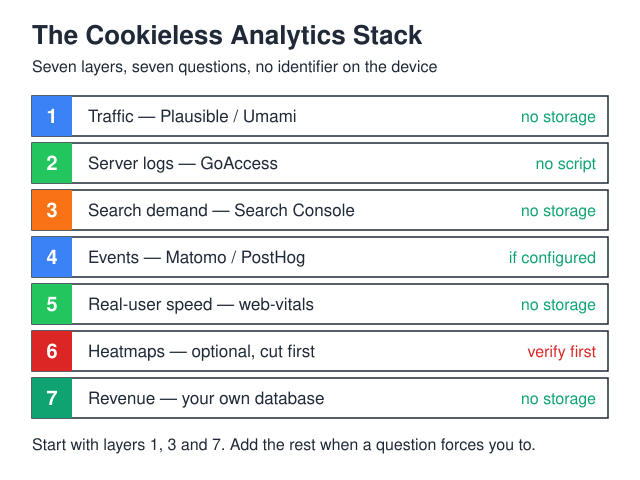
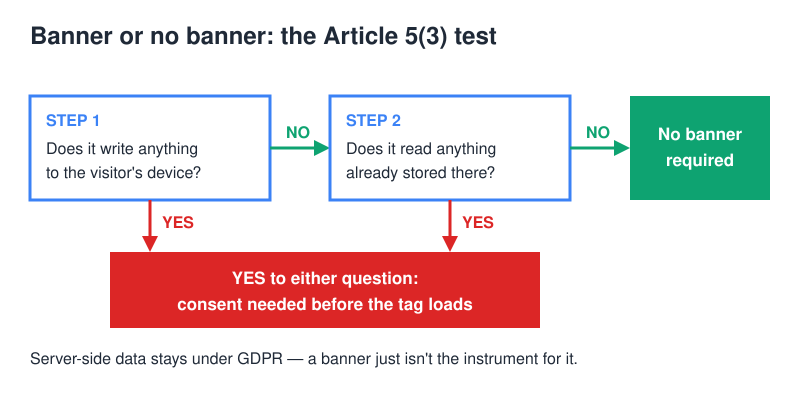
Set up this way, nothing stores or reads information on the terminal equipment — which is the exact trigger in Article 5(3) of the ePrivacy Directive. No storage, no access, no banner.
What “zero cookies” has to mean before it means anything
Plenty of tools call themselves cookie-free while quietly moving the same identifier into localStorage. That’s not a loophole. The EDPB’s Guidelines 2/2023 on the technical scope of Article 5(3), adopted on 7 October 2024, quote the provision itself — “the storing of information, or the gaining of access to information already stored, in the terminal equipment of a subscriber or user” — and state that it “does not exclusively apply to cookies, but also to ‘similar technologies’.” The use cases the guidelines work through include URL and pixel tracking, local processing, tracking based on IP only, and unique identifiers.
So the test for every layer below is mechanical. Does the tool write anything to the device? Does it read anything back? If both answers are no, you’re outside the consent requirement — and you still have a GDPR question to answer about the server-side data, which is a separate matter I’ve covered in the GDPR and website analytics guide.
Run that test yourself rather than taking a vendor’s word for it. Open the page in a private window, let it load, then look at the Application panel in your browser’s developer tools: cookies, local storage, session storage and IndexedDB, one after another. Anything the tool put there shows up immediately, and anything it reads back shows up in the Network tab as a request carrying a stable value. It takes a few minutes per tool, and it’s the only claim on a vendor’s homepage you can settle for yourself.
One more thing worth saying out loud: the traffic layer on this site is Plausible, and there’s no gtag anywhere in the page source. You’re welcome to check.
The seven layers at a glance
| Layer | Question it answers | Typical tool | Writes to device? |
|---|---|---|---|
| 1. Traffic | Which pages did people open, and where from? | Plausible · Umami · GoatCounter | No |
| 2. Server logs | What did the JavaScript miss? | GoAccess | No — nothing runs client-side |
| 3. Search demand | What did people type before they arrived? | Google Search Console | No — data is Google’s, not your page’s |
| 4. Events & funnels | Did they finish the thing they started? | Matomo (cookieless config) · PostHog | No, if configured correctly |
| 5. Real-user speed | Is the site slow for actual humans? | web-vitals → your own endpoint |
No |
| 6. Qualitative | Where did they get stuck? | Self-hosted heatmaps | Depends — check before you trust it |
| 7. The ledger | What was any of it worth? | Your database or a spreadsheet | No |
Traffic: one script, and it should be boring
This layer replaces most of what site owners actually open GA4 for: pageviews, referrers, top pages, countries, devices. Plausible, Umami and GoatCounter all do it without cookies by default, and all three ship a fraction of the payload Google’s tag does. Umami self-hosts on Docker with a compose file and a Postgres container — the walkthrough is in the Umami self-hosting guide. GoatCounter is the minimalist end of the scale, and I went through it in the GoatCounter review.
The trade-off is real, however. Without a stored identifier, “unique visitors” becomes an estimate derived from a rotating, salted hash of IP and user-agent, and it resets daily. Consequently, returning-visitor loyalty reports are gone. Before you mourn them, ask what decision that number has ever changed for you — it tends to end up on a slide rather than in a plan.
Server logs catch what the script never sees
Every JavaScript-based tool measures the subset of visitors whose browser ran your script. Ad blockers, privacy browsers, corporate proxies and text-mode crawlers are simply absent from that picture. GoAccess reads your nginx or Apache access log instead, so it sees every request that reached the server.
Moreover, it’s the only layer that shows you bot traffic honestly. If your “traffic doubled” last Tuesday, the log will tell you within a minute whether that was humans or a scraper working through your archive. Run it as a cron job that writes a static HTML report, and it costs you nothing but disk.
The catch is the opposite of the script layer’s: logs over-count rather than under-count. Every asset request, every health check and every crawler hit lands in the same file, so the raw line count means nothing until you filter. Set the bot exclusions once, keep the report next to the traffic dashboard, and treat the two as a range rather than as one number and a wrong number.
Search Console holds data no analytics tool can reconstruct
Queries, impressions and average position exist in exactly one place, and it isn’t your analytics script. Search Console measures on Google’s side, not in your visitor’s browser, so verifying a property adds no script and no storage to your pages. In consent terms this layer is free.
If you automate the export — and you should — the ceilings are published rather than guessed at. A single Search Analytics call returns at most 25,000 rows, and defaults to 1,000, so any real export pages through the data rather than pulling it in one go. Separately, the API usage limits cap URL Inspection at 2,000 queries per day and 600 per minute per site. Historical performance data is bounded as well, by the retention window stated in Search Console’s own help — check it there, because it is the figure that quietly shapes what year-on-year comparisons you can still make.
Therefore, if you take one thing from this article and skip the rest, export your query data monthly and keep the CSVs. Sooner or later Google will change what it shows you, and your own archive is the only version that stays.
Events and funnels without a visitor ID
Here’s where cookieless setups get genuinely harder. A funnel needs to know that the person on step three is the person who was on step one — and traditionally that’s what the cookie was for.
Two workable routes exist. Matomo can be configured to run without cookies, turning off client-side storage and falling back to short-lived server-side session matching. PostHog can run with in-memory persistence instead of cookies, which scopes identity to the current page session. Both are configuration choices, not defaults, so confirm them with the developer-tools check above after you switch them on.
Either way, accept the limit up front: your funnel is session-scoped. A visitor who researches on Monday and buys on Thursday shows up as two sessions, not one journey. Alternatively, do the funnel server-side, where the identifier is your own order ID rather than anything on the device — the mechanics are in server-side vs client-side tracking.
Speed data from real visitors, not lab runs
Lighthouse scores describe a simulated phone in a data centre. Field data describes your actual audience. Google’s web-vitals library is tiny and posts measurements to any endpoint you point it at — including a custom event in Plausible or Umami, so you don’t need a seventh dashboard. Run the developer-tools check on it like everything else here; storage is a property you verify, not one you assume.
Send LCP, INP and CLS, and grade them against the thresholds the library itself documents rather than a number you half-remember. The part that changes your conclusions isn’t the threshold anyway, it’s the statistic you read: look at the slow end of the distribution, not the average. Averages are flattering, and the visitors who leave are always in the tail.
The qualitative layer, and why I’d cut it first
Heatmaps and session replays answer “where did they get stuck,” which no counter can. That said, they’re also the layer most likely to break your zero-cookie claim without telling you — replay tools commonly set storage on load, and replay in particular can sweep up form contents and other personal data if masking isn’t configured properly.
If you want it, self-host it and read the storage documentation before you install. If you’re running a site with a few thousand visitors a month, honestly, skip it and watch five people use the page over a call instead. I compared the options in privacy-first heatmaps.
The ledger: your database closes the loop
No analytics tool knows what a customer is worth. It knows a conversion event fired; it doesn’t know that the order was refunded, that the trial churned in week two, or that one signup became a three-year account.
Therefore the last layer isn’t a tool you install — it’s the join between your analytics export and your own order or CRM table, plus one question on the signup form: “How did you hear about us?” Self-reported attribution is coarse, and people mistype it, but it survives everything. Ad blockers don’t strip it, Safari doesn’t expire it, and it captures the podcast mention that no tracker on earth would have attributed correctly.
The consent gate is what you’re actually escaping
It’s easy to frame this as a compliance chore. It isn’t. The banner is a gate in front of your measurement, and everyone who declines becomes a hole in the dataset you then have to reason around.
Google’s tags formalised that gate with Consent Mode v2, in force for traffic from users in the European Economic Area since March 2024. Two parameters carry the signal: ad_user_data, which sets consent for sending user data to Google for advertising purposes, and ad_personalization, which sets consent for personalised advertising. Without them you lose ads personalisation and remarketing for those users, along with some measurement features — which is precisely the outcome the banner was supposed to prevent.
The territory is worth stating carefully, because it usually gets muddled. The EEA is the perimeter in Google’s own documentation. Google separately extends the requirement to the UK and Switzerland through its EU User Consent Policy — that is a policy obligation Google imposes on advertisers, and it is not the DMA, which does not apply to the UK. Two different instruments with two different scopes; keep them in two different sentences.
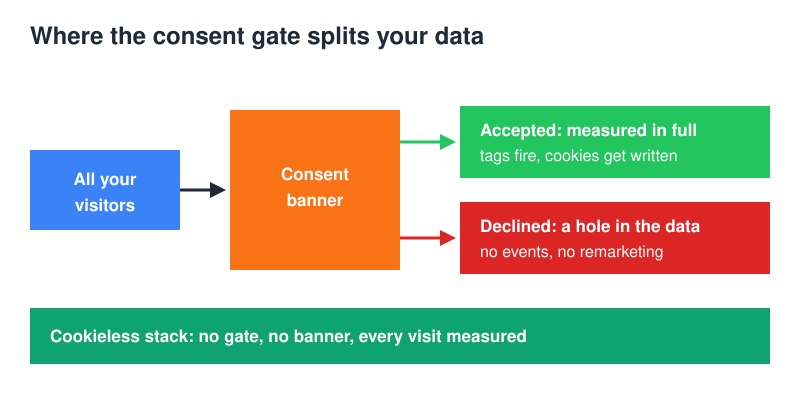
A cookieless analytics stack sidesteps the whole mechanism, not because it’s cleverer, but because it never triggers the rule that created the gate. Nothing is stored, so nothing needs consent, so there’s no accepted-versus-declined split to model your way out of. You measure everyone or you measure no one, and the answer is everyone.
The ceiling nobody mentions until you hit it
There’s a second reason to prefer separate layers over one platform, and it has nothing to do with privacy. Every all-in-one tool has a shared budget, and you find out where it sits at the worst possible moment.
GA4 is the example to hand. A standard property allows 50 event-scoped custom dimensions and 50 event-scoped custom metrics. That sounds generous until three years of half-finished tracking plans have eaten it, and every new question you want to ask has to displace an old one you can no longer remember agreeing to.
Split across seven layers, that pressure disappears, because no single system carries the whole schema. Server logs have no dimension budget. Search Console’s ceiling is a row limit on export, not on what you’re allowed to define. Your own database has whatever columns you write into it. Consequently the failure mode changes shape: instead of one platform quietly running out of room, you get seven small systems that each do one job and can be replaced independently when they stop doing it well.
What this stack won’t do
- Cross-device journeys. Phone-then-laptop is invisible without a login. If you have accounts, use your own user ID server-side; if you don’t, accept the gap.
- Multi-touch attribution models. Last-touch plus self-reported is what you get. Frankly, the models were mostly fiction anyway.
- Individual user profiles. By design. That’s the point.
- Ad-platform optimisation signals. If you’re spending heavily on paid social, those platforms want their own pixel, and that’s a consent conversation you can’t dodge.
FAQ
Does a cookieless analytics stack still need a consent banner?
If no layer stores or reads information on the device, Article 5(3) isn’t triggered, so the banner requirement falls away. You still process data server-side under GDPR, which needs a lawful basis and a privacy notice — just not an interstitial. The common cases are listed in when you don’t need a cookie banner.
Can I keep GA4 running alongside this?
Technically yes. Practically, GA4 puts you straight back into consent territory, which means the banner returns and your cookieless layers only measure the people who clicked “accept.” Running both gives you two incomplete datasets that disagree, and you’ll spend more time reconciling them than using either.
How many of the seven do I actually need?
Three, for most sites: traffic, Search Console and the ledger. Add server logs the first time a traffic number looks wrong. Add events when you have a funnel worth measuring. Layers five and six are for sites where speed or a specific broken page is already costing money.
Is the visitor count lower than GA4 showed?
It can go either way, and the mechanism explains why. Blocklists ship rules aimed at Google’s endpoints by name; a small first-party script often isn’t on those lists, so a cookieless tool can see visitors GA4 was silently dropping. The two numbers won’t reconcile in any case, because the counting method differs. Don’t try to match them; pick one and track the trend.
Self-hosted or SaaS for the traffic layer?
SaaS if you’d rather not own a database and a backup routine; self-hosted if data residency is contractual or you’re at a scale where per-pageview pricing stings. The decision framework is in self-hosted vs SaaS analytics.
Where I’d start on Monday
Install the traffic script and verify Search Console. Neither is a long job, and together they carry most of the weight. Then add the “how did you hear about us” field to whatever form matters most — it’s a one-line change that will outlive every tool on this list.
Build the rest of the analytics stack when a specific question forces you to, not before. Seven layers is the ceiling, not the starting point, and a stack you actually read beats a stack you merely installed.