Real-time analytics dashboards look impressive. Watching visitor counts tick up, seeing pageviews stream in live, monitoring your traffic second by second—it feels like you’re in control. Like you’re running a mission control center for your website.
But here’s what nobody tells you: most websites don’t need real-time analytics. And obsessing over live data might actually hurt your business more than it helps.
I’ve watched countless site owners refresh their real-time dashboards dozens of times per day, reacting to every spike and dip. It’s exhausting, unproductive, and often leads to poor decisions. So let’s talk about when real-time analytics actually matters—and when it’s just expensive noise.
What Real-Time Analytics Actually Means
First, let’s clarify terms. Real-time analytics shows you what’s happening on your website right now—typically within seconds of an event occurring. You can see:
- Current active visitors on your site
- Pages being viewed at this moment
- Traffic sources bringing visitors right now
- Geographic locations of current users
- Events and conversions as they happen
This differs from standard analytics, which typically processes data in batches—anywhere from a few minutes to 24-48 hours depending on the platform.
The appeal is obvious. Instant feedback feels powerful. However, power without purpose is just wasted energy.
When Real-Time Analytics Actually Matters
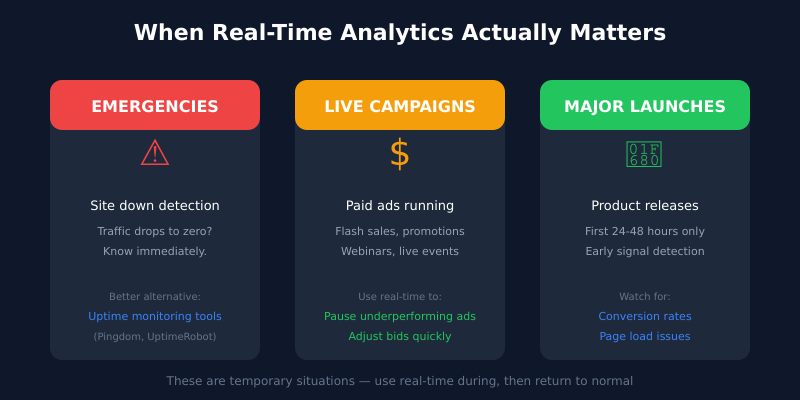
Let’s be fair. There are legitimate scenarios where real-time data provides genuine value.
1. Emergency Detection
If your site goes down or experiences a major technical issue, real-time analytics can alert you before customers start complaining. A sudden drop to zero visitors indicates a problem that needs immediate attention.
However, for this use case, you’re better served by uptime monitoring tools like Pingdom or UptimeRobot. They’re purpose-built for emergencies and will actually alert you, rather than requiring you to stare at a dashboard.
2. Live Marketing Campaigns
Running a flash sale? Launching a time-sensitive promotion? Hosting a live webinar? Real-time data helps you understand immediate response and adjust on the fly.
If you’re paying for ads by the hour and traffic isn’t converting, knowing immediately lets you pause the campaign before wasting more budget.
3. Major Product Launches
When you release something significant, watching initial reception in real-time can inform rapid decisions. Is the landing page converting? Are visitors finding the right information?
But notice: these are special events, not everyday operations.
4. High-Traffic Media Sites
News publishers and viral content sites might legitimately need real-time data. When a story takes off, understanding the traffic pattern immediately helps with server scaling and content decisions.
If you’re not running a major media operation, this doesn’t apply to you.
When Real-Time Analytics Is Overkill
Now for the honest part. For most websites—and I mean the vast majority—real-time analytics is unnecessary complexity.
Small to Medium Business Websites
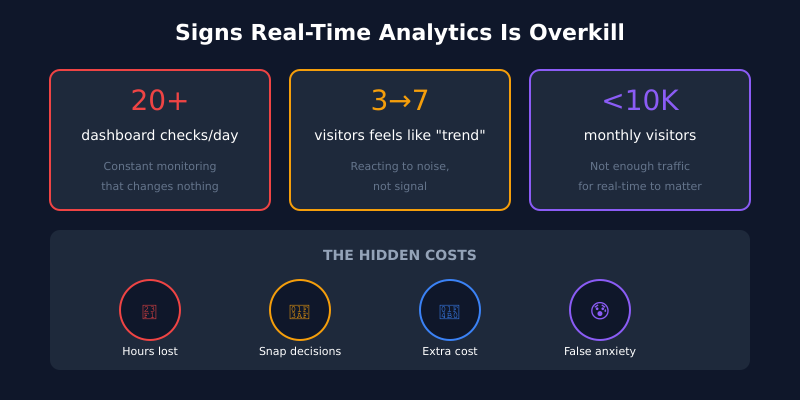
If your site gets under 10,000 visitors per month, real-time data is essentially meaningless. You might see 1-5 concurrent visitors at any moment. That’s not a trend—that’s statistical noise.
Whether you have 3 or 7 visitors right now tells you nothing actionable. What matters is your weekly and monthly patterns.
Content Sites and Blogs
Blog content performance plays out over weeks and months, not minutes. An article might get 10 visitors today and 1,000 next month after search engines index it properly. Real-time data for content sites is almost always misleading.
E-commerce with Stable Traffic
If your online store has consistent traffic patterns, real-time monitoring adds little value. Your key e-commerce metrics—conversion rate, average order value, cart abandonment—are better analyzed over days and weeks, not seconds.
B2B and Service Businesses
When your sales cycle is weeks or months, obsessing over real-time website visits is absurd. A visitor today might convert into a customer six months from now. Real-time data won’t capture that journey.
The Hidden Costs of Real-Time Obsession
Beyond the question of necessity, there are real downsides to real-time analytics that rarely get discussed.
Decision-Making Damage
Real-time data encourages reactive thinking. You see a traffic dip and panic. You notice a page getting attention and assume it’s trending. But short-term fluctuations are mostly random noise.
Good decisions require adequate sample sizes. A day’s worth of data beats an hour. A week beats a day. A month reveals actual patterns. Real-time encourages exactly the opposite—snap judgments based on incomplete information.
The Distraction Tax
Every minute spent watching live dashboards is a minute not spent on work that actually moves your business forward. I’ve seen business owners check real-time analytics 20+ times daily. That’s hours of lost productivity weekly.
Meanwhile, the data they’re watching wouldn’t change their actions even if it showed something unusual.
Complexity and Cost
Real-time processing requires more infrastructure. Tools that offer true real-time analytics often cost more—either in money or in the technical overhead of self-hosting more complex systems.
You’re paying for a feature you probably don’t need.
False Confidence
Having real-time data creates an illusion of control. You feel informed. You feel on top of things. But feeling informed and being informed are different things.
Real insight comes from thoughtful analysis of meaningful timeframes, not from watching numbers tick up and down.
What to Do Instead
If real-time analytics isn’t the answer, what is? Here’s a more effective approach.
Establish a Review Rhythm
Set specific times to check your analytics—and stick to them:
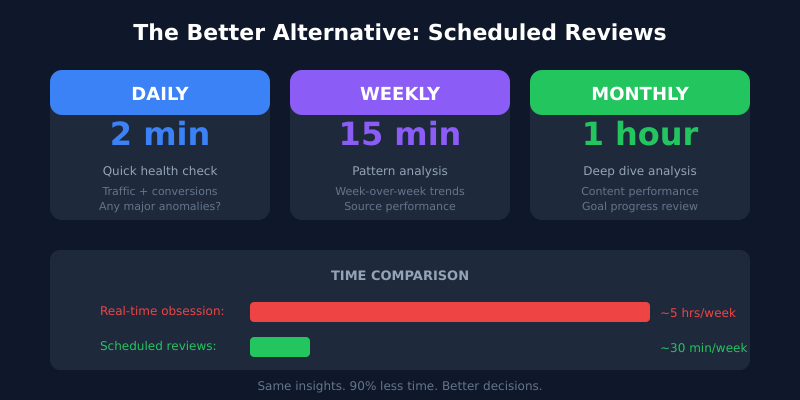
- Daily (2 minutes): Quick glance at yesterday’s traffic and conversions. Any major anomalies?
- Weekly (15 minutes): Review the full week. Compare to previous weeks. Identify actual patterns.
- Monthly (1 hour): Deep analysis. Traffic sources, content performance, conversion trends, goal progress.
This schedule gives you all the insight you need without the distraction of constant monitoring. For a deeper dive into this approach, see our guide on what analytics data you actually need.
Focus on Meaningful Timeframes
Different metrics require different time windows:
- Traffic trends: Compare week-over-week, month-over-month
- Conversion rates: Need at least 100+ conversions for statistical significance
- Content performance: Give new content 30+ days before judging
- SEO impact: Measure over 90-day windows minimum
Real-time data is useless for all of these.
Set Up Alerts Instead
If you’re worried about missing emergencies, configure alerts rather than watching dashboards. Most analytics tools let you set notifications for:
- Traffic drops below a threshold
- Conversion rate falls significantly
- Error pages spike
- Specific goals get triggered
Alerts let you respond to actual problems without the constant vigilance that real-time dashboards encourage.
Choose Simpler Tools
Many privacy-focused analytics tools like Plausible and Fathom offer near-real-time data without making it the focus. They update quickly but present data in ways that encourage thoughtful analysis over reactive checking.
The dashboard design matters. Tools that emphasize trends over tickers help you make better decisions.
The Exception: When You Should Use Real-Time
To be completely fair, here’s when you should absolutely use real-time analytics:
- During active paid campaigns where you’re spending significant money by the hour
- First 24-48 hours of a major launch when early signals matter
- When troubleshooting a specific issue and need immediate feedback
- During live events you’re hosting or participating in
Notice the pattern: these are all temporary situations with specific purposes. The key word is during. Use real-time when there’s an active reason, then return to normal rhythms.
Making the Switch
If you’re currently addicted to real-time dashboards, here’s how to break the habit:
- Remove bookmarks and shortcuts to your real-time analytics views
- Set a calendar reminder for your daily 2-minute check—and only check then
- Close the analytics tab after checking. Don’t leave it open.
- Track how often you check for a week. Awareness helps.
- Ask yourself each time: “Will this data change what I do today?” Usually, the answer is no.
The goal isn’t ignorance—it’s appropriate attention. Your analytics deserve regular, focused review. They don’t deserve constant, anxious monitoring.
The Bottom Line
Real-time analytics is a powerful capability that most websites simply don’t need. It feels productive but usually isn’t. It provides data without providing insight. It encourages reactive decisions when thoughtful analysis would serve you better.
Unless you’re running major campaigns, handling emergencies, or operating high-traffic media sites, you’re better off with a structured review schedule and tools that encourage reflection over reaction.
Stop watching the numbers tick. Start understanding what they mean over time. That’s where real insight lives.
Frequently Asked Questions
What’s the difference between real-time and near-real-time analytics?
Real-time updates within seconds of an event happening. Near-real-time typically lags by 30 seconds to a few minutes. For decision-making purposes the difference is meaningless — neither timeframe gives you enough data to act on with confidence.
Does my analytics tool need to be real-time to be useful?
No. The vast majority of websites get more value from a tool that emphasizes weekly and monthly trends than from one that streams live counts. Privacy-friendly tools like Plausible and Fathom update quickly but design their dashboards around patterns rather than tickers.
How often should I actually look at my website analytics?
A two-minute daily glance for anomalies, a 15-minute weekly review for trends, and a one-hour monthly deep dive. That schedule catches every meaningful change without the addiction of constant refreshing.
Can I detect a website outage without watching real-time analytics?
Yes, and you should. Uptime monitoring tools like UptimeRobot or Pingdom are purpose-built for that — they alert you the moment your site goes down, regardless of whether you happen to be looking at a dashboard. That’s a far more reliable safety net than human attention.
When does real-time data actually help an e-commerce store?
During flash sales, paid campaign launches, and the first 24 to 48 hours after a major product drop. Outside those windows, conversion rate, AOV and cart abandonment are better analyzed across days and weeks, not seconds.
Will I miss important traffic spikes if I’m not watching live?
Almost never. Configure threshold alerts in your analytics tool — they’ll email or notify you when traffic, conversions or error rates move outside a normal range. That way you respond to actual events instead of staring at a dashboard hoping something happens.
Is real-time analytics worth paying extra for?
For most sites, no. Tools that emphasize real-time often cost more in money or self-hosting overhead. Unless you’re running a high-traffic media site, an active hourly campaign, or genuinely time-sensitive operations, the upgrade rarely pays off.