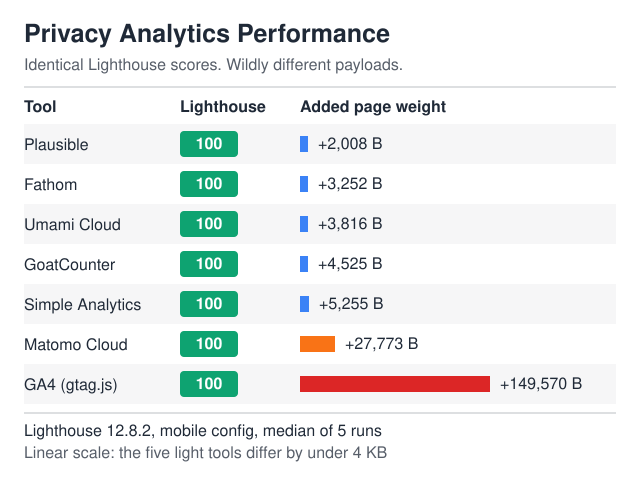
SaaS analytics privacy is decided by what you put inside an event, not by which vendor’s logo sits on your dashboard. A self-hosted tool fed raw email addresses in page paths leaks more than a hosted EU tool fed nothing but an account hash.
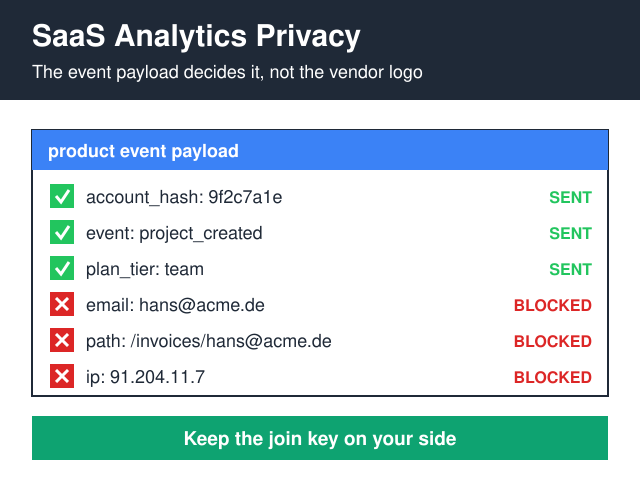
Four numbers cover most product decisions in a SaaS app: activation rate, weekly active accounts, feature adoption, and the usage drop that predicts churn. All four can be computed from a pseudonymous account ID, an event name and a timestamp. No names, no email addresses, no stored IPs, no cross-site identifiers.
The rule I work by: an event may carry an ID that your billing database can resolve, but the analytics store must never hold the field that resolves it. Keep the join key on your side. That pseudonymous ID is still personal data under GDPR Recital 26, so it still needs a legal basis, a retention limit and a line in your Article 30 record — it just stops being a copy of everything you know about the customer.
What makes SaaS product analytics different from website analytics?
On a marketing site, the visitor is anonymous until they convert. Inside a logged-in app, however, you already know who they are — every event is attached, at least implicitly, to a paying human with a name in your CRM. That changes three things at once.
- The identifier problem is inverted. Marketing analytics fights to identify people. Product analytics, conversely, has to work at not identifying them, because identification is the default.
- Your URLs carry data.
/projects/acme-gmbh/invoices/[email protected]is a page path in your app and a personal-data disclosure in your analytics vendor’s database. - The processor list grows. Every product-analytics SaaS you bolt on becomes an Article 28 processor of your customers’ data — named in your DPA, and defended during B2B procurement.
The marketing-side half is covered separately in the practical guide to PII in web analytics. This is the in-app half.
Which product metrics are worth the data they cost?
Most SaaS teams instrument everything and read four things. Here’s what each metric actually requires, and what it costs you in exposure.
| Metric | Question it answers | Minimum data required | Privacy cost |
|---|---|---|---|
| Activation rate | Do new accounts reach first value? | Account hash, event name, timestamp | Low |
| Weekly active accounts | Is usage a habit or a visit? | Account hash, timestamp | Low |
| Feature adoption | Which features earn their maintenance cost? | Account hash, event name, plan tier | Low — until plan tier narrows the crowd to a handful of accounts |
| Time to value | How long from signup to the first real outcome? | Two timestamps per account | Low |
| In-app funnel drop-off | Where do people stall? | Ordered event names per account | Moderate — event sequences re-identify people in small cohorts |
| Session replay | Why did they stall? | Full DOM capture, including form contents unless masked | High — treat as a separate purpose with its own legal basis |
Nothing above the replay row needs a single field that identifies a person to your analytics vendor. That’s the whole trick, and it’s why the tool choice matters less than most vendor comparisons pretend.
How do you measure activation without identifying anyone?
Use account-scoped IDs, not user-scoped ones
In B2B SaaS the unit of decision is the account, not the seat. Therefore emit account_id as a salted hash and drop user_id entirely unless a specific question needs it. You keep cohort analysis, retention curves and expansion signals; you lose the ability to answer “what did Hans click on Tuesday” — which is usually a question nobody should be asking anyway.
Two details people get wrong. First, hashing is not anonymisation: a hash you can reverse via your own lookup table is pseudonymous data, fully in scope of the GDPR. Second, if you rotate the salt to break long-term linkability, you also break your retention cohorts. Pick one and document why.
Send events from your server
Browser-side SDKs collect what the browser hands them — IP address, user agent, referrer, and whatever your URL happens to contain. A server-side emitter, in contrast, sends only the fields you wrote by hand. Moreover, it survives ad blockers, which in a developer-tools SaaS can distort adoption numbers badly enough to kill the wrong feature.
The trade-off is real: you lose client-side context like viewport and rage clicks, and you take on queue and retry logic. For metrics that feed roadmap calls, the cleaner dataset is worth it. For UX debugging, however, keep a narrow client-side channel behind an explicit consent gate.
Strip the payload before it leaves your app
Write one sanitiser function and route every event through it:
- Rewrite dynamic path segments to templates:
/projects/:slug/invoices/:id, never the literal values. - Drop all query strings except a fixed allowlist.
- Ban free-text properties. Error messages, search terms and support-ticket bodies belong in your logs, under your retention policy, not in a third-party analytics store.
- Truncate or omit IP entirely at the point of collection rather than relying on a vendor toggle you can’t audit.
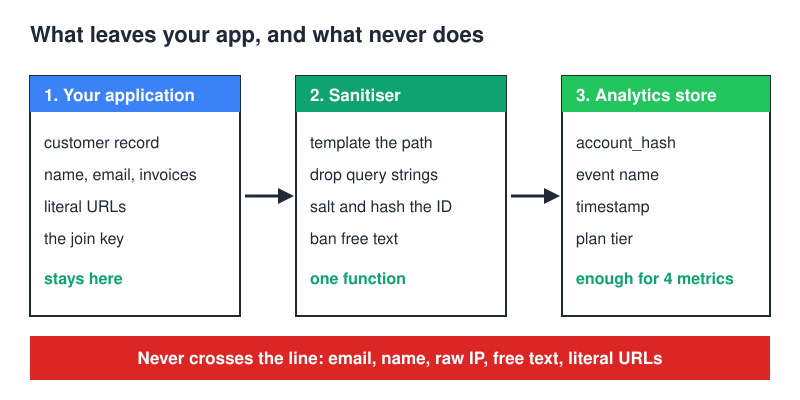
One function, one place to review, one place to fix when a new feature ships a new URL shape. Consequently the schema review below takes an hour instead of a sprint.
Does GA4 fit SaaS analytics privacy requirements?
Plenty of teams try, mostly because GA4 already sits in the marketing stack and looks free. Inside a logged-in product, though, it runs into two walls: a schema ceiling and a consent-plumbing problem.
Take the ceiling first. Product events live or die by their properties — plan tier, workspace size, feature flag, onboarding step. GA4 exposes those as custom dimensions, and a standard property is capped at 50 event-scoped custom dimensions and 50 event-scoped custom metrics, as set out in Google’s GA4 configuration limits. That’s a fixed budget, not an elastic one.
The ceiling sounds generous until you’re mid-experiment and the slots are already spent on properties nobody agreed to. A sloppy first pass at your event schema is expensive to unwind — exactly the wrong incentive while you’re still learning what to measure. The fix isn’t clever, it’s administrative: one owner for the dimension list, a written naming convention, and a review before anything new ships. Otherwise the list fills up on its own, mostly with dimensions nobody reads.
The second wall is consent, and it lands on the marketing side of the same property. Since March 2024 Google has required Consent Mode v2 for its advertising and measurement features, adding two signals to the original pair: ad_user_data and ad_personalization. Both parameters are documented in Google’s consent settings reference for tags.
Scope trips people up. The requirement is aimed at users in the EEA. Separately, Google extends the same expectation to the UK and Switzerland through its own EU User Consent Policy — that extension is a contract term between you and Google, not an obligation created by the DMA. Keep the two grounds apart when someone in the room starts arguing about scope, because they have different remedies and different consequences.
Miss the signals and nothing breaks loudly. Instead you quietly lose personalisation and remarketing for those users, plus part of the measurement functionality, and your reported numbers drift away from your CRM with no obvious cause. My own preference: leave GA4 on the marketing site if it’s already there, and keep in-app product events in a store you control. Two tools with clean boundaries beat one tool doing both jobs badly.
Do you need a consent banner inside a logged-in app?
SaaS analytics privacy splits into two legal questions here, and people keep collapsing them into one.
Article 5(3) of the ePrivacy Directive governs storing or reading information on the user’s device. Cookies, localStorage, device fingerprints — consent is required unless the access is strictly necessary for a service the user explicitly requested. Furthermore, the EDPB’s Guidelines 2/2023 on the technical scope of Article 5(3) (Version 2.0, adopted on 7 October 2024) are the part that surprises engineers: they read the rule as reaching well past cookies, to URL-embedded identifiers, pixels and comparable techniques.
The GDPR then governs what you do with the resulting personal data, and consent is only one of the six lawful bases in Article 6.
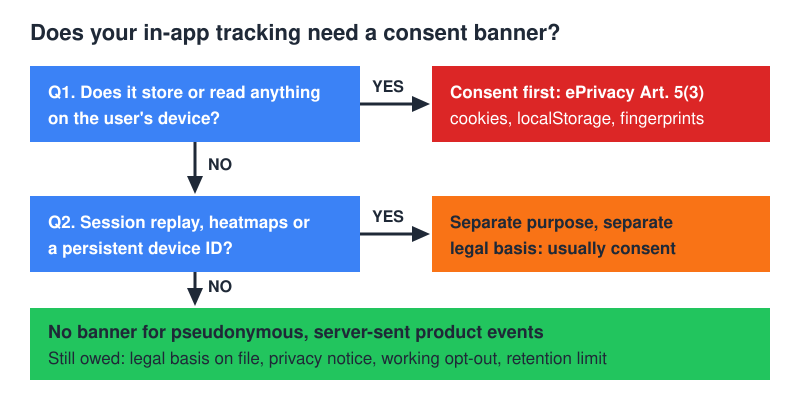
So a setup that stores nothing on the device and processes pseudonymous account IDs under legitimate interest can sit outside the banner requirement, while still owing the user a clear privacy notice, a balancing test on file, and a working opt-out. Add session replay or a device-stored identifier, however, and you’re back to consent. I’m a practitioner, not your lawyer — get the balancing test reviewed by someone who is.
Which tools fit privacy-compliant product analytics?
The relevant axis isn’t “privacy-friendly vs. not”. It’s how much identification the tool assumes by default, and how far you have to configure it downward.
| Tool | Where the data sits | Product-event depth | Identifies individuals by default? | Best fit |
|---|---|---|---|---|
| Plausible | Hosted, EU infrastructure | Custom events with properties | No persistent user identifier | Teams that need adoption counts, not cohort surgery |
| Umami | Your server, your database | Custom events with data fields | No | Small teams already running Postgres who want data ownership |
| Matomo | Self-hosted or vendor cloud | Events, goals, funnels, cohorts | Optional — off unless you enable the user ID feature | Organisations replacing a GA-shaped workflow one report at a time |
| PostHog | Self-host or EU-region cloud | Funnels, retention, feature flags, replay | Yes, by design | Teams needing Amplitude-class analysis who will spend the time configuring it down |
Notice what the table doesn’t rank: dashboards. Every one of these renders a retention curve competently. The differences that matter in a compliance review are where the rows live, which identifiers the default install writes, and how much work it takes to turn the identifying features off and keep them off through the next upgrade.
If you’re weighing the hosting question itself rather than the feature set, that decision has its own write-up: self-hosted vs SaaS analytics. The short version — self-hosting relocates the risk to your own backups and access logs. It doesn’t delete it.
The leaks that quietly break the compliance story
Every SaaS analytics privacy review I’ve run has failed in the same handful of places, and never at the tracker itself.
- The invite flow. Signup and invitation URLs carry email addresses in query strings, which land in page-path reports verbatim.
- Support tooling. A replay or heatmap script added by the support team, months after the analytics review, with no masking on form fields.
- Custom properties that grew. A property called
contextthat started as a page name and ended up carrying the customer’s project title. - Staging pointing at production. Test data and real accounts in one dataset, so deletion requests miss half of what they should reach.
- Exports. A CSV pulled for a board deck, sitting in a shared drive outside every retention rule you wrote.
A quarterly walk through your own event schema catches most of it. Sort properties by cardinality: anything with a near-unique value per account is either an ID you meant to send or a leak you didn’t. Then read the ten most frequent page paths as a stranger would, and ask what each one tells you about a named customer.
Document the walk, however briefly. A dated note listing what you checked and what you changed is the difference between “we take privacy seriously” and something a procurement questionnaire can actually accept.
How long should raw events live?
Long raw retention rarely pays for itself. The pattern that holds up: keep raw events for a short window — a rolling 90 days is my default, and it has yet to cost me an answer I needed — then roll them into aggregates carrying no account identifier at all. Monthly active accounts by plan tier, activation rate by signup cohort, adoption per feature. Those can live forever, because they’re no longer personal data.
It also makes erasure requests tractable. Dropping rows matching one hash from a 90-day table takes minutes; unpicking years of accumulated history across a vendor’s warehouse turns into a project. Under Article 33 of the GDPR a personal-data breach must be reported to the supervisory authority within 72 hours of becoming aware of it — and the smaller your raw store, the shorter that conversation gets.
The acquisition side, meanwhile, runs on clocks you don’t set. Search Console’s Search Analytics API hands back at most 25,000 rows per request, with a default of 1,000 — the valid range is set out in Google’s Search Analytics query reference. Historical performance data is bounded by the window stated in Search Console’s own help, not by your warehouse. If your internal reporting joins product usage to organic acquisition, therefore, pull and store that data on a schedule instead of assuming you can backfill it later.
FAQ
Is a hashed account ID still personal data?
Yes, if anyone can reverse it. Pseudonymisation reduces risk but keeps the data in scope of the GDPR (Recital 26). Anonymous means irreversibly unlinkable by anyone, including you — which a hash plus your own lookup table plainly isn’t.
Can I run product analytics without a cookie banner?
Often, yes — if you store nothing on the user’s device, process pseudonymous IDs under a documented legitimate interest, and offer a real opt-out. The moment a persistent device identifier or session replay enters the stack, however, Article 5(3) consent applies again.
Does self-hosting make me compliant?
No. It removes one processor from your chain and hands you control over deletion and retention — worth a lot. In exchange, it makes you responsible for backups, access control and breach detection. Compliance is a set of decisions about data, not a deployment topology.
What about US-based analytics vendors?
Transfers to certified US organisations run under the EU–US Data Privacy Framework, so the first check is whether the vendor actually appears on the framework’s official list — a “GDPR compliant” badge on a pricing page is not evidence. Keep the DPA current as well. Both predecessors of the current framework were annulled by the Court of Justice of the European Union, so build the pipeline such that a third annulment would be a configuration change rather than a re-architecture.
How do I measure retention if I can’t track individuals?
Account-scoped cohorts. Group accounts by signup week, count which ones fired a value event in each subsequent week, and plot the curve. You get the same retention shape teams use for roadmap calls without ever needing a per-seat identity.
What do I tell enterprise procurement about our analytics?
Name the tool, name where the rows are stored, list the fields an event carries, and state the retention window. That paragraph answers most security questionnaires outright. If you can’t write it from memory, you don’t yet know what your app is sending — which is the real finding.
Where to start
Export the distinct page paths and event property names from your last 30 days and read the raw schema, not the dashboards. Everything that shouldn’t be there is obvious inside ten minutes, and the fix is usually one sanitiser function, not a migration. Then decide which four metrics you actually act on, and delete the instrumentation for the rest.
Ultimately, SaaS analytics privacy is an engineering decision you make in the payload, not a procurement decision you make in a vendor matrix. Get the fields right and almost any of these tools is defensible; get them wrong and none of them is.
If the in-app numbers need connecting to the commercial ones, the stage-by-stage version is here: customer journey analytics for SaaS. For the cookieless mechanics underneath all of it, start with first-party tracking without cookies.