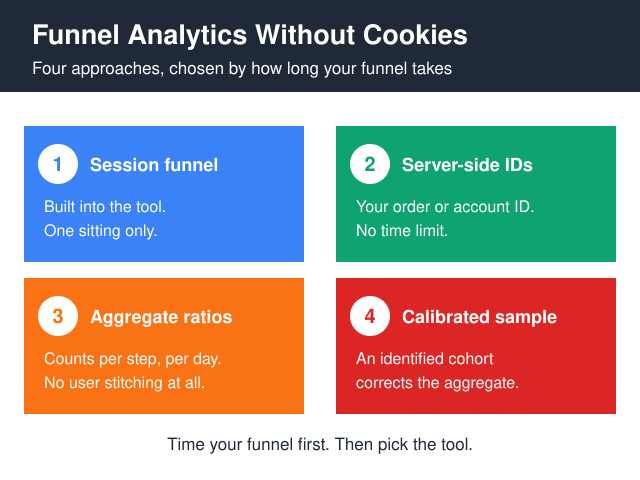
Funnel analytics without cookies works — but only inside whatever identification window your tool gives you, and that window is shorter than most teams assume. A cookieless tool closes a session after a stretch of inactivity, then rebuilds the visitor ID from a hash whose secret salt gets rotated on a schedule the vendor sets. A checkout that finishes in one sitting is fully measurable. A B2B funnel running demo request → sales call → trial → paid contract over three weeks is not, and no configuration setting will change that. So the useful question isn’t “which privacy tool has funnels” — it’s “how long does my funnel actually take”. Four approaches cover the realistic cases: session-scoped funnels inside a cookieless analytics tool, server-side funnels keyed to your own first-party identifiers, aggregate step ratios with no user stitching at all, and a small identified sample used to calibrate the aggregate numbers. Pick by funnel duration first, tool second.
Why funnel analytics without cookies hits a ceiling
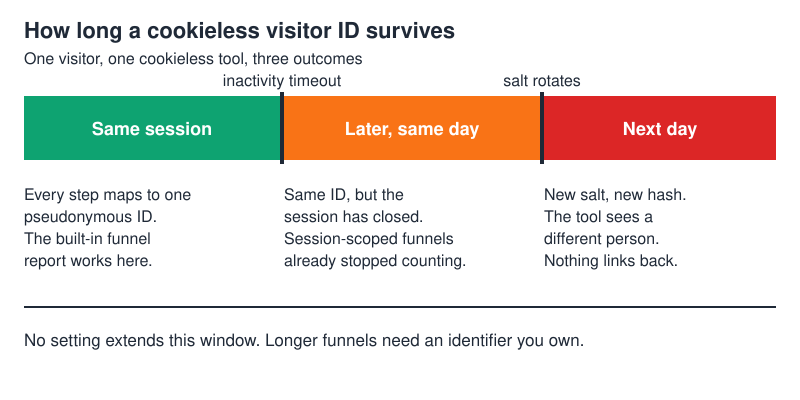
Cookieless analytics tools don’t store anything on the visitor’s device. Instead they derive a pseudonymous ID server-side, typically by hashing the IP address, the user agent, the site domain and a secret salt. Plausible documents this openly and states that the salt is rotated and deleted every 24 hours, which means the same person visiting on Tuesday and Wednesday produces two unrelated IDs (see the Plausible data policy). That rotation is the privacy feature. It is also the reason your funnel has a ceiling.
Two mechanisms decide everything before you configure a single step:
- Session timeout — the stretch of inactivity after which the tool opens a new session. Steps separated by more than that land in different sessions, and most built-in funnel reports are session-scoped.
- Identifier lifetime — how long the salt stays put. Once it rotates, steps on either side of the rotation belong to different “people” as far as the tool is concerned.
Both are vendor decisions rather than laws of nature. However, you don’t get to lengthen them from your side, and vendors keep them deliberately short, because a long-lived identifier is exactly what the cookieless model exists to avoid. Read each tool’s own documentation instead of assuming a shared default — the numbers differ, and some tools don’t publish them at all.
Here’s how the common tools land against that constraint:
| Tool | Funnel report built in? | How a visitor is identified | Ceiling on one person’s funnel |
|---|---|---|---|
| Plausible | Yes — on the paid tier | Hash of IP + user agent + site + secret salt | Salt rotation, documented every 24 hours |
| Matomo (cookieless mode) | Yes — Funnels is a paid add-on | config_id hash, no cookie written |
Rotating hash — check your version’s docs |
| Umami | Yes — funnel report in the UI | Hash-based, cookieless | Rotating hash, short-lived |
| Fathom | No funnel report | Hash-based, cookieless | n/a |
| GoatCounter | No | Hash-based | n/a |
PostHog with persistence: 'memory' |
Yes | In-memory only, lost on reload | One page session |
| Your own database | Whatever you build | Your account ID, order ID or signed first-party token | None |
Notice the last row — the only one without a ceiling, and the one most teams skip because it feels like engineering work.
Approach 1 — session-scoped funnels in a cookieless tool
The cheapest option, and it covers more ground than people expect. You define an ordered list of pages or custom events, the tool counts how many pseudonymous IDs reached each step in the same session, and you get drop-off percentages. Plausible, Matomo and Umami all ship a version of this; Plausible’s is the least fiddly, Matomo’s the deepest but behind a paid add-on.
It fits when the whole journey happens in one sitting: an e-commerce checkout, a multi-step signup, a booking flow, a lead form with a confirmation page. Most consumer conversion work is fine here, and you can have it running this afternoon.
It breaks the moment a step happens outside the window. Email verification is the classic killer — user submits the form, leaves to check their inbox, comes back well after the session expired, and your tool records a fresh visitor arriving directly at the confirmation page. Your funnel then shows a cliff at that step that doesn’t exist in reality, and the fix is not in the tool’s settings.
Two practical notes. If your checkout is a single-page app, page-URL funnels won’t work — you need custom events fired at each step, because the URL never changes. Moreover, filter bots hard before trusting step one; inflated top-of-funnel counts make every downstream percentage look worse than it is, and a single scraper hammering your product pages can move a conversion rate by a visible margin.
Approach 2 — put the funnel server-side and key it to your own IDs
The strongest option, and the one that removes the ceiling. Instead of asking an analytics script to remember who someone is, you use identifiers you already own: an account ID, an order ID, a cart ID, a signed first-party session token. Each funnel step writes a row, and the funnel becomes a SQL query rather than a report.
A table with entity_id, step_name, occurred_at answers every funnel question you’ll ever ask — including ones spanning weeks, which no cookieless client-side tool can touch. The numbers are exact, too, because your order count is your order count. There’s no sampling, no modelling and no vendor between you and the answer.
The trade-offs are real and worth stating plainly:
- It only covers identified journeys. Anonymous browsing before signup stays anonymous, so you still need Approach 1 or 3 for the top of the funnel.
- You’re now storing personal data under your own controller responsibility. Retention limits, access control and deletion routes are your problem, not a vendor’s.
- Someone has to build and maintain it. Budget engineering time honestly — the first version is a day, the version that survives a schema change is not.
One warning if you plan to keep GA4 alongside your own tables and push an order or account identifier into it as a custom dimension. Standard properties are capped at 50 event-scoped custom dimensions and 50 event-scoped custom metrics, both documented in Google’s GA4 configuration limits. Teams burn slots on experiments and hit the wall mid-project, with archiving the only way back under the cap. Your own table has no such ceiling, which is most of the argument for this approach.
The mechanics of moving collection off the browser are covered in more depth in the server-side versus client-side tracking breakdown, and the identifier question specifically in first-party tracking without cookies.
Approach 3 — aggregate step ratios, with no user stitching at all
Sometimes you don’t need to follow individuals. You count events per step per day and divide. No sessions, no IDs, no stitching, nothing that could identify anybody.
Say a week of counts looks like this — these are illustrative figures to show the arithmetic, not measured data from any site:
- Product page views: 4,000
- Add to cart: 1,200 → 30% of step 1
- Checkout started: 300 → 25% of step 2
- Orders: 210 → 70% of step 3
That’s enough to find your worst step and to watch the number move after you fix it. It costs nothing to implement and it survives any privacy review, because there’s no personal data in it at all.
What it hides is composition. If paid traffic doubles this week and paid converts worse, your ratios drop without anything on the site getting worse. Consequently, segment by source and device before drawing conclusions, and compare week-over-week rather than day-over-day — daily ratios on a small site are mostly noise.
Aggregate ratios also can’t answer path questions — did checkout abandoners come back later? For that you need Approach 2 or the calibration trick below.
Step zero for free: Search Console as a cookieless traffic source
Aggregate ratios have an obvious gap at the top: the step before anyone reaches your site. Search Console fills part of that gap without touching identity at all, since it reports clicks, impressions, average position and CTR per query and per landing page from Google’s side of the transaction. Nothing is asked of the visitor’s browser.
Two limits shape how you use it:
- Rows per query — the Search Analytics API caps a single request at 25,000 rows, with a default of 1,000, per Google’s Search Analytics query reference. Long-tail query lists get truncated on big sites, so filter to your funnel’s landing pages rather than pulling everything.
- Retention — historical data is limited to the window stated in Search Console’s own help. Anything older is gone unless you exported it yourself.
Therefore, if you ever want to compare this year’s funnel entry against last year’s, set up a monthly export now rather than discovering the wall later. Two caveats before you divide anything by a Search Console number: a click is not a session, and the data covers organic Google search only, so paid, social, referral and direct traffic never appear. Use it as a step-zero denominator for specific organic landing pages, never as a site-wide traffic figure.
Approach 4 — calibrate the aggregate with a small identified sample
This one is underused. Take a subset of traffic where you legitimately do have persistent identity — logged-in users, or visitors who gave analytics consent — and measure the full multi-session funnel properly for that group. Then compare it against the aggregate ratios from Approach 3 over the same period.
You get a correction factor. If the logged-in cohort shows that a meaningful share of checkout abandoners return and convert within the following week, and your aggregate view only sees same-session conversions, you now know roughly how much the aggregate understates reality. Apply it, document it, re-derive it every quarter, because the factor drifts as your traffic mix changes.
Be honest about the bias: logged-in users convert better than anonymous ones, and consenting users aren’t a random sample either. The factor is a directional correction, not a measurement, and it should be written down as such wherever the number gets reported. Even so, a documented rough adjustment beats an undocumented assumption that the cookieless number is the truth.
Which approach fits which funnel
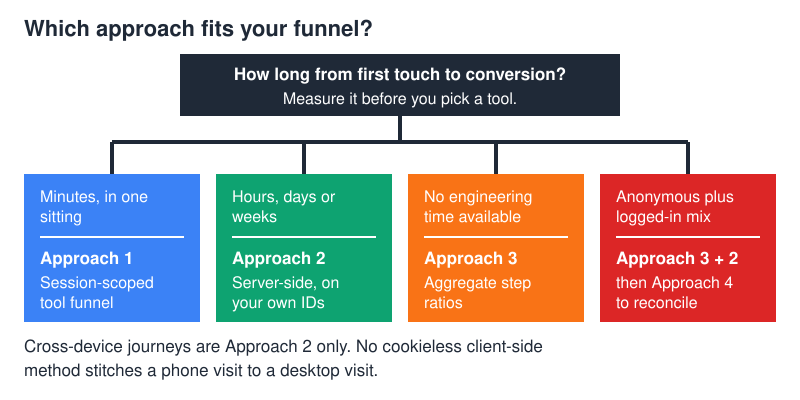
| Your situation | Start with | Add later |
|---|---|---|
| Checkout or signup completed in one sitting | Approach 1 | Approach 3 as a sanity check |
| SaaS trial → paid over days or weeks | Approach 2 | Approach 1 for pre-signup pages |
| Content site, lead form, no engineering time | Approach 3 | Approach 1 once events are wired |
| Mixed anonymous and logged-in traffic | Approach 3 + Approach 2 | Approach 4 to reconcile them |
| Journey crosses phone → desktop | Approach 2 only | — |
The cross-device row deserves emphasis: no cookieless client-side method stitches a phone visit to a desktop visit, and the ones claiming otherwise are doing probabilistic fingerprinting — which creates a bigger compliance problem than it solves. That argument is laid out in cross-device identity resolution without tracking cookies.
Cookieless is not consent-free, and Consent Mode is not a workaround
Two legal points get muddled constantly, so here they are separately.
First, the European consent trigger sits in Article 5(3) of the ePrivacy Directive, and it covers storing information on, or gaining access to information already stored in, a user’s terminal equipment. Cookies are just the famous example. The EDPB’s Guidelines 2/2023 on the technical scope of Article 5(3) ePrivacy, Version 2.0, adopted on 7 October 2024, work through the non-cookie cases — URL and pixel tracking, IP-based identification, local processing whose results are sent back — and place several of them inside the same rule. A tool that writes nothing to the device has a far better argument than one that does. It does not have an automatic exemption. GDPR, meanwhile, applies to whatever personal data you process regardless of any banner. Get your own legal read; this is a blog post, not advice.
Second, Google Consent Mode v2 is a different thing entirely, and it does nothing for your identity window. Since March 2024 it has carried two additional signals, ad_user_data and ad_personalization, alongside the original storage flags; all four parameters and what each denial switches off are listed in Google’s Consent Mode reference. Denying ad_personalization, for instance, cuts off remarketing in Google Ads, Display & Video 360 and Search Ads 360. That’s an advertising problem. It doesn’t lengthen a cookieless funnel by one minute, and it substitutes for none of the four approaches above.
Where teams go wrong
Four failure modes come up again and again.
- Comparing the new number to the old GA4 number and calling the gap “data loss.” Different denominators, different identity windows, different bot filtering. They were never going to match — rebaseline instead of investigating a phantom.
- Assuming cookieless means consent-free. As above: Article 5(3) is about device storage and access in general, and the EDPB’s Guidelines 2/2023 place several non-cookie techniques inside the same article.
- Swapping cookies for
localStorage. Same legal trigger, and Safari deletes all of a site’s script-writable storage after seven days of Safari use without user interaction on that site — announced by WebKit in March 2020 alongside full third-party cookie blocking. You inherit the compliance problem without the durability. - Building a six-step funnel when three would do. Every extra step is another place for tracking to break, and another drop-off you’ll be asked to explain in a meeting.
Frequently asked questions
Can I track a multi-day funnel without cookies?
Not per person, using a client-side cookieless tool — the salt rotation makes it structurally impossible. You have two routes: key the funnel to your own first-party identifiers server-side, or accept aggregate step ratios and calibrate them against an identified sample.
Does funnel analytics without cookies still need a consent banner?
Often no, but it isn’t automatic. The consent trigger under ePrivacy is storing or reading information on the device, which a genuinely cookieless tool avoids. However, the EDPB’s Guidelines 2/2023, Version 2.0 adopted on 7 October 2024, put several non-cookie techniques inside the same article, and GDPR obligations around personal data apply regardless. This is a question for your own counsel, not a blog post.
Will my cookieless funnel numbers match Google Analytics?
No, and chasing a match wastes weeks. Cookieless tools typically report fewer sessions and different conversion rates because of the shorter identity window and stricter bot filtering. Treat the switchover date as a new baseline and measure change from there.
Which cookieless tool has the best funnel report?
For most teams, Plausible — the setup is the least fiddly and the report answers the common question directly. Matomo goes deeper if you need segment-level funnel breakdowns and can live with a paid add-on. Umami is the sensible pick if you’re already self-hosting. None of them escapes the identity window.
What about tracking funnels with URL parameters instead?
Passing a step token through URLs works within a single journey and avoids device storage entirely. It’s fragile though: shared links leak the token, and any external redirect can strip it. Use it as a supplement to server-side logging, not as the primary mechanism.
What I’d do first
Time your funnel before choosing anything. Pull the median gap between first touch and conversion from whatever data you already have — order timestamps work fine, and support tickets will tell you the rest. If that gap fits comfortably inside your tool’s documented session timeout, a session-scoped funnel gets you most of the value this week. If it’s measured in days, stop shopping for analytics tools and start writing funnel steps into your own database, because that’s the only thing that will answer the question you’re actually asking.
For a wider view of what funnel analytics without cookies can and can’t reach, the cookieless analytics category page lists the current options with their identification models side by side.