
The self-hosted analytics tools worth running come down to six: GoatCounter, Umami, Plausible Community Edition, Matomo, Ackee, and Counter.dev. They all run privacy-first web analytics on hardware you control, so the data never leaves your server. I’ve run every one of them on VPSes across portfolio sites for the past four years — GoatCounter on a $5 box, Plausible and Umami in Docker, Matomo on its full stack. This list ranks them not by feature count but by what they actually cost to operate: how small a VPS they fit on, which database they drag along, and how many hours a month they take from you.
If you’re still deciding whether self-hosting is right for you in the first place, that’s a separate question with its own trade-offs. This article assumes you’ve decided to self-host and you want to know which tool. For the wider category, the self-hosted analytics hub lists every option we track.
What “self-hosted” actually means
Self-hosted analytics means you run the software and store the data on infrastructure you control — a VPS, a dedicated box, or your own cloud account — instead of pasting a snippet that ships events to a vendor. That’s the data-ownership argument in one sentence: no third-party processor sits between your visitors and your reports.
But “self-hosted” hides three very different operational realities, and conflating them is the single most expensive mistake I see people make.
- Single-binary self-host. One process, an embedded database (usually SQLite), no separate services. You download a binary or pull one Docker image, run it, and you’re done. GoatCounter is the clean example. Operationally this is closer to running a static site than to running a database.
- Multi-service self-host. A web tier plus a separate database tier — PostgreSQL, MySQL/MariaDB, or ClickHouse — and sometimes a cache or worker tier on top. Umami, Plausible Community Edition, and Matomo all live here. This is closer to running a database in production than to “running an app”.
- Managed-self-host. A third party (Cloudron, Coolify, a managed-Hetzner setup) runs the self-host stack on infrastructure you nominally own. You get data ownership without the on-call pager. It’s a middle path, not a fourth tool.
The gap between single-binary and multi-service is the whole story of this list. A single-binary tool costs roughly 1–2 hours of maintenance a month. A multi-service tool with ClickHouse underneath costs 4–6 hours a month plus the occasional ruined afternoon. Same word, wildly different bill.
How I sized and ran each tool
Every tool below got the same treatment: I deployed it on the smallest VPS its documentation says it’ll tolerate, pointed real low-to-medium traffic at it, and watched what it did to memory, disk, and my weekends. The criteria I’m ranking on:
- Smallest VPS it runs on. The real floor, not the marketing floor. ClickHouse, for instance, wants 2 GB of RAM before it stops worrying about out-of-memory kills, so no Plausible CE box is honestly a “$5 VPS”.
- Which database it drags along. SQLite means zero external dependencies. PostgreSQL or MySQL means one more service to back up and upgrade. ClickHouse means you now operate a columnar database, which is its own skill.
- Maintenance reality. Backups, version upgrades, SSL renewal, disk monitoring, and the upgrade that breaks. Honest hours per month, not “set and forget”.
- Open source and license. Whether you can read, fork, and keep the code — the thing most buyers actually mean by “open source”.
- Who it’s for. Traffic shape and ops bandwidth it suits.
VPS prices move, so I’m citing them as ranges. At the time of writing, Hetzner’s smallest cloud instances sit around €4–5/month and DigitalOcean’s basic droplet starts at $6/month for 1 GB of RAM (DigitalOcean pricing). Check today’s rates before you budget — these are the numbers that make or break the cost case against SaaS.
The best self-hosted analytics tools
GoatCounter — runs on a $5 VPS
GoatCounter is the lightest genuinely-useful option, and the only one on this list I’d call a true single-binary self-host. It ships as one Go binary (around 25 MB) with SQLite as the default database, so you can run a production analytics server with literally no external services — no Docker required, no database to provision (GoatCounter on GitHub). PostgreSQL is supported when SQLite starts to strain on a busy site, but most small projects never need it.
The tracking script is around 1 KB compressed, which is the smallest in the category and won’t dent your Core Web Vitals. On a 1 GB Hetzner or DigitalOcean box it barely registers; I’ve run it comfortably on the cheapest tier each provider offers. The source is under the EUPL-1.2 licence, so you can self-host, modify, and even ship a commercial fork as long as you keep the same licence.
Maintenance: about an hour a month. Back up one SQLite file, drop in the new binary on release, renew your TLS cert. That’s the whole job. Who it’s for: indie sites, blogs, and side projects under a few hundred thousand monthly pageviews where you want data ownership without operating infrastructure. The full scorecard lives on the GoatCounter profile.
Umami — the popular Docker default
Umami is what most people land on when they search “self hosted Google Analytics alternative” and want something prettier than GoatCounter without committing to Matomo’s weight. It’s a Node.js application (requires Node 18.18+) backed by PostgreSQL or MySQL, and the official path is Docker: the project ships a docker-compose file that brings up Umami and its database together, so docker compose up -d is genuinely most of the install (Umami on GitHub). It’s MIT-licensed, which is about as permissive as open source gets.
This is where the operational cost steps up from GoatCounter. You’re now running two services — the app and a real database — so you have a PostgreSQL instance to back up, upgrade, and watch. It’s still modest: a 1–2 GB VPS handles a typical site fine, and the dashboard is clean and fast. The honest budget is 2–3 hours a month once you account for database housekeeping.
Maintenance: 2–3 hours a month — mostly Postgres backups and the occasional Docker image bump. Who it’s for: sites that want a polished dashboard and event tracking, with someone around who’s comfortable running a database in Docker. If you want the step-by-step, our Umami self-hosting walkthrough covers the Docker setup end to end, and the Umami profile tracks features and pricing.
Plausible (Community Edition) — now a full ClickHouse stack
Plausible Community Edition is excellent software with the heaviest small-tool footprint on this list, and the most common misconception attached to it. It is not a single binary. Plausible CE runs as three Docker containers: the Elixir web app, PostgreSQL for user accounts, and ClickHouse for the analytics events themselves (Plausible CE on GitHub). ClickHouse is the cost driver — it wants at least 2 GB of RAM at idle and spikes higher on complex queries, so the realistic floor is a 2 GB VPS, not a $5 one.
What you get for that weight is a beautiful dashboard, fast queries over large datasets, and a tool that scales to millions of pageviews without breaking a sweat — ClickHouse is built exactly for that. The trade-off is that you’re now operating a columnar database, and ClickHouse failure modes (disk filling because partitions weren’t pruned, memory spikes under load) are genuinely different from the Postgres problems you might already know.
Maintenance: 4–6 hours a month, plus an unplanned incident every several months when ClickHouse does something ClickHouse-shaped. Who it’s for: teams with medium-to-high traffic and someone who has run a real database in production. Below ~100k pageviews on a single site, the ops weight is hard to justify against the same tool’s hosted plan. The Plausible profile keeps the feature comparison current.
Matomo — full features, full ops weight
Matomo is the heavyweight, and the only self-hosted tool here that genuinely rivals Google Analytics on feature breadth: funnels, heatmaps, session recordings, e-commerce, goal tracking, multi-site roll-ups, the lot. That breadth is the whole reason to pick it, and the whole reason it’s the most demanding to run. It’s a PHP application — PHP 8.1+ recommended — backed by MySQL or MariaDB (Matomo requirements).
Matomo’s own guidance asks for at least 2 GB of RAM for a modest install and recommends considerably more (8 GB, 4 CPU) for anything serious. In practice a small site on a 2 GB VPS works, but the archiving cron — Matomo pre-computes its reports — is hungry, and on a busy site you’ll feel it. This is a full LAMP-style stack: web server, PHP, a database, and a scheduled archiving job that all need care.
Maintenance: 4–6 hours a month, weighted toward database growth, plugin/core upgrades, and keeping the archiving cron healthy. Who it’s for: organisations that genuinely use the advanced features and have the sysadmin bandwidth to feed a LAMP stack. If you only need pageviews and referrers, Matomo is more tool than the job requires. The Matomo profile has the full breakdown.
Ackee and Counter.dev — the minimalist options
If GoatCounter still feels like too much, two stripped-back tools cover the “just the numbers” end. Ackee is a self-hosted, Node.js-and-MongoDB tracker focused on a clean, deliberately minimal dashboard — it tells you views and referrers and not much else by design, which is exactly the point for some people. The MongoDB dependency makes it a two-service deploy, so it sits a notch above GoatCounter on operational cost despite the simpler feature set.
Counter.dev is the most radical minimalist: a tiny, donation-funded open-source analytics service that you can also self-host, built around the idea that most dashboards show ninety per cent noise. Both are fine choices when your real requirement is “replace the GA snippet with something I own and never think about again”, and neither tries to be a platform.
Maintenance: Ackee, 2–3 hours a month (MongoDB housekeeping); Counter.dev, near GoatCounter levels if self-hosted. Who they’re for: minimalists who want ownership and almost no surface area. See the Ackee and Counter.dev profiles for specifics.
Self-hosted analytics compared (resources + cost)
The short version, ranked by how much it costs to operate. “Maintenance” is honest hours per month for a small-to-medium site, including backups and upgrades — not the zero-effort fantasy.
| Tool | Smallest realistic VPS | Database | Maintenance | Open source (licence) |
|---|---|---|---|---|
| GoatCounter | 1 GB ($5 tier) | SQLite (Postgres optional) | ~1 hr/mo | Yes (EUPL-1.2) |
| Counter.dev | 1 GB | Lightweight store | ~1 hr/mo | Yes (open source) |
| Ackee | 1–2 GB | MongoDB | 2–3 hrs/mo | Yes (MIT) |
| Umami | 1–2 GB | PostgreSQL / MySQL | 2–3 hrs/mo | Yes (MIT) |
| Plausible CE | 2 GB | PostgreSQL + ClickHouse | 4–6 hrs/mo | Yes (AGPL-3.0) |
| Matomo | 2 GB (8 GB recommended) | MySQL / MariaDB | 4–6 hrs/mo | Yes (GPL-3.0) |
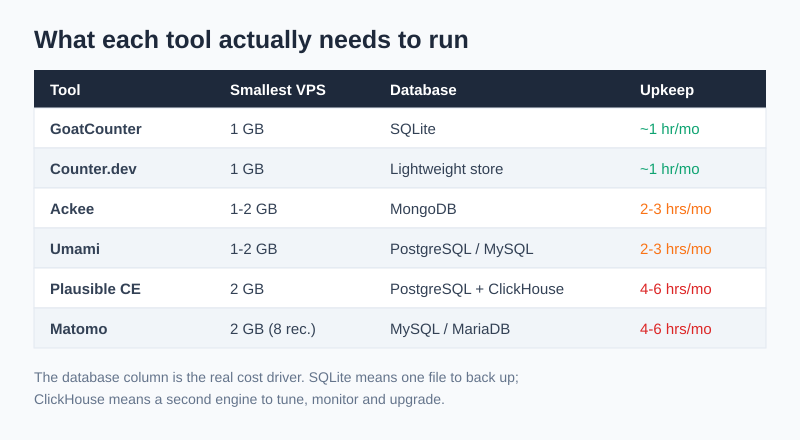
Notice the split runs almost entirely along the single-binary versus multi-service line. The two cheapest-to-run tools carry no separate database; the two most expensive each drag a heavyweight one. That’s the mechanism behind every “self-hosting is/isn’t worth it” argument — it’s not the tool, it’s the database tier underneath it.
Pick by traffic volume and ops bandwidth
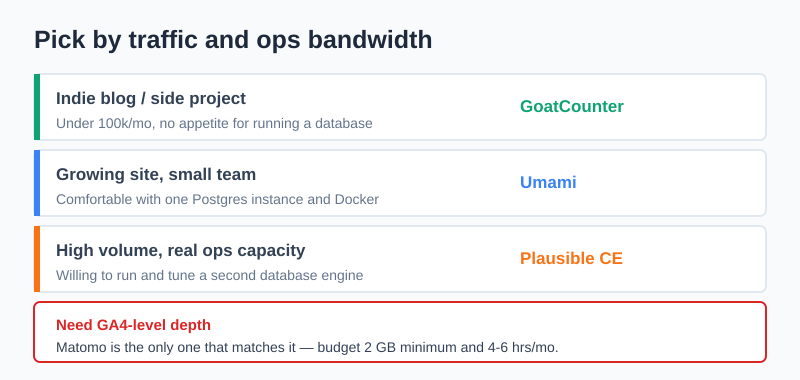
The right tool is the intersection of two axes: how much traffic you push and how much database competence you have on hand. Here’s how I’d match them.
| Your situation | Traffic | Ops bandwidth | Run this |
|---|---|---|---|
| Indie blog / side project | < 100k/mo | None — don’t want a database | GoatCounter (or Counter.dev) |
| Small business site | 100k–500k/mo | Comfortable with Docker | Umami |
| Growing product, clean dashboard wanted | 500k–5M/mo | Has run Postgres in production | Plausible CE |
| Need funnels, heatmaps, e-commerce | Any | Has a sysadmin / DevOps | Matomo |
| Want ownership, zero feature ambition | < 100k/mo | Minimal | Ackee / Counter.dev |
The honest default for most readers of this site — privacy-conscious owners of one or a few sites — is GoatCounter if you want minimum fuss, or Umami if you want a nicer dashboard and don’t mind running Docker. Reach for Plausible CE or Matomo only when traffic or feature needs genuinely demand them, because their database tier is where the real cost lives. If pure openness is the priority, the open-source analytics hub ranks these and others on licence and community health.
The honest cost of self-hosting
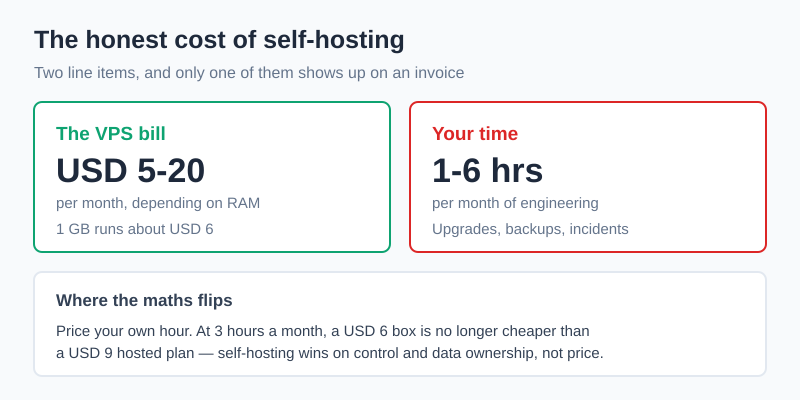
The real bill for self-hosted analytics is roughly $5–20/month for the VPS plus 1–6 hours of your time each month — and the time, not the server, is what catches people out. A single-binary tool like GoatCounter is closer to the floor of that range; a ClickHouse-backed Plausible CE or a full Matomo stack is at the top, before you count the unplanned incident.
That hardware number is genuinely small. Hetzner’s smallest cloud instances run around €4–5/month and DigitalOcean’s basic droplet starts at $6/month, which is less than almost any SaaS analytics plan for a single site. The catch is everything around the snippet: TLS renewal, version upgrades that occasionally break, database backups you have to actually test, disk monitoring so ClickHouse or MySQL doesn’t quietly fill the volume, and being the person who gets paged when the analytics database fills its disk at 2am. None of that work disappears because a tool is “lightweight” — it scales with the database tier, which is exactly why this list ranks by ops cost rather than features.
Done right, self-hosting buys you real data ownership and GDPR posture: the analytics data sits on infrastructure you control, with no third-party processor and EU residency if you pick an EU VPS. Done lazily — untested backups, skipped upgrades — it buys you a liability that’s worse than a reputable SaaS with a clean data-processing agreement. The tool you pick should match the maintenance you’ll actually do, not the maintenance you imagine you’ll do.
FAQ
What is the best self-hosted analytics tool?
There’s no single winner — it depends on traffic and ops bandwidth. For most small sites and indie projects, GoatCounter is the best self-hosted analytics tool because it’s a single Go binary on SQLite that runs on a $5 VPS and takes about an hour a month to maintain. If you want a richer dashboard and can run a database in Docker, Umami is the runner-up. For high traffic with a database-savvy team, Plausible Community Edition; for the full Google Analytics feature set, Matomo.
Is there a free self-hosted Google Analytics alternative?
Yes — several. GoatCounter, Umami, Plausible Community Edition, Matomo, Ackee, and Counter.dev are all open source and free to self-host; you pay only for the VPS that runs them. “Free” here means no licence fee, not no cost: a server runs $5–20/month and your maintenance time is real. All of them give you full data ownership, which the free hosted Google Analytics never does.
How much does it cost to self-host analytics?
Budget $5–20/month for a VPS plus 1–6 hours of engineering time per month, depending on the tool. A single-binary tool like GoatCounter sits near the bottom — a 1 GB box and an hour a month. A multi-service stack like Plausible CE (which needs at least 2 GB for ClickHouse) or Matomo sits at the top, plus an occasional unplanned outage. The server cost is trivial; the time cost is the number that decides whether self-hosting beats SaaS for you.
Is self-hosted analytics GDPR-compliant?
Self-hosting helps GDPR compliance but doesn’t grant it automatically. Because the data sits on infrastructure you control with no third-party processor, you remove the cross-border-transfer and sub-processor concerns that complicate US-based tools, and you can keep everything on an EU VPS for data residency. But you still need a lawful basis for processing, honest configuration (IP anonymisation, no PII in event data), and the same transparency obligations as any analytics. Self-hosting is a strong foundation, not a compliance checkbox on its own.
What are the downsides of self-hosting analytics?
You become the operations team. The real downsides are ongoing: database backups you have to schedule and actually test, version upgrades that sometimes break, SSL certificate renewal, disk monitoring so the database doesn’t fill its volume, and incident response when something fails at an inconvenient hour. A lightweight single-binary tool keeps this to about an hour a month; a ClickHouse- or MySQL-backed stack can cost 4–6 hours plus the occasional ruined afternoon. If your backup discipline is “we’ll figure it out when it breaks”, a reputable SaaS with a clean DPA is genuinely the safer choice.